Anybody knows about SCR_THREAD_SERIES_*** in Intelligent fastener 's Option ?
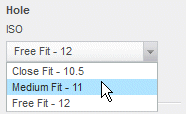
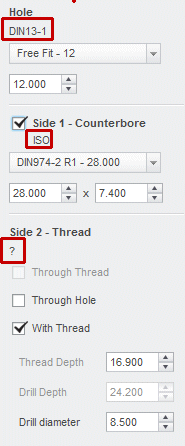
I use intelligent fastener to create holes in the meantime when I assemble the bolts. Recently I found the counterbore hole created by the intelligent fastener is different from the hole created by "hole" function in parametric. For example, when I assemble a M8 socket head bolt ( ISO 4762-8.8), let the "IF" create a counterbore hole on the top part. By default the diameter is 15, which shows as "DIN974-1 R1 -15.000". But if the hole is create by "hole" function in parameter, the default diameter of the counterbore is 14.5. I do understand that the hole created in parametric could be modified manually or modified the relevant hole chart. And I do know the hole create in the "IF" can be modified manually as well.
I am wondering is there a way that I can set the default size of the hole in "IF". I am tired of checking holes all the time. In parametric I could set the hole chart as per my requirement. But what about "IF"?
I have searched around both in google and PTC online help?
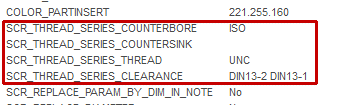
All I can find is
SCR_THREAD_SERIES_COUNTERBORE
Hole chart for counterbores.
SCR_THREAD_SERIES_COUNTERSINK
Hole chart for countersinks.
SCR_THREAD_SERIES_THREAD
Hole chart for threaded holes.
SCR_THREAD_SERIES_CLEARANCE
Hole chart for clearance hole.
I have no ideal what are these settings for and how to modify it.
Really! PTC's help files are terrible. I believe that I am not the only one feel this way.
Anybody knows about this, please give me some advice.
Thanks
This thread is inactive and closed by the PTC Community Management Team. If you would like to provide a reply and re-open this thread, please notify the moderator and reference the thread. You may also use "Start a topic" button to ask a new question. Please be sure to include what version of the PTC product you are using so another community member knowledgeable about your version may be able to assist.