21-Topaz II
May 12, 2016
Solved

Filter Repeat Region by Two Conditions

  • May 12, 2016
  • 6 replies
  • 19651 views

Creo 3, M070

I'd like to use two conditions to filter a repeat region, can I do this?

What I mean is that I want to filter all assemblies out of my region except the ones with the parameter BOM_DISPLAY set to YES.  So, I'd like to display assemblies only if these two conditions are met:

&asm.mbr.type  == ASSEMBLY*

&asm.mbr.bom_display  == yes

But, I believe that if I put those tow things in the repeat region filters the only items I'll get are those assemblies.  I'd like to get all the parts too (except skeletons and parts where BOM_DISPLAY is set to no).

So, what I want is:

&asm.mbr.type  != SKELETON*

&asm.mbr.bom_display  != no


&asm.mbr.type  != ASSEMBLY*

EXCEPT where:

&asm.mbr.type  == ASSEMBLY*

AND:

&asm.mbr.bom_display  == yes

Of course, that's not going to work.   How can I accomplish all of this?

Best answer by MartinHanak

Doug,

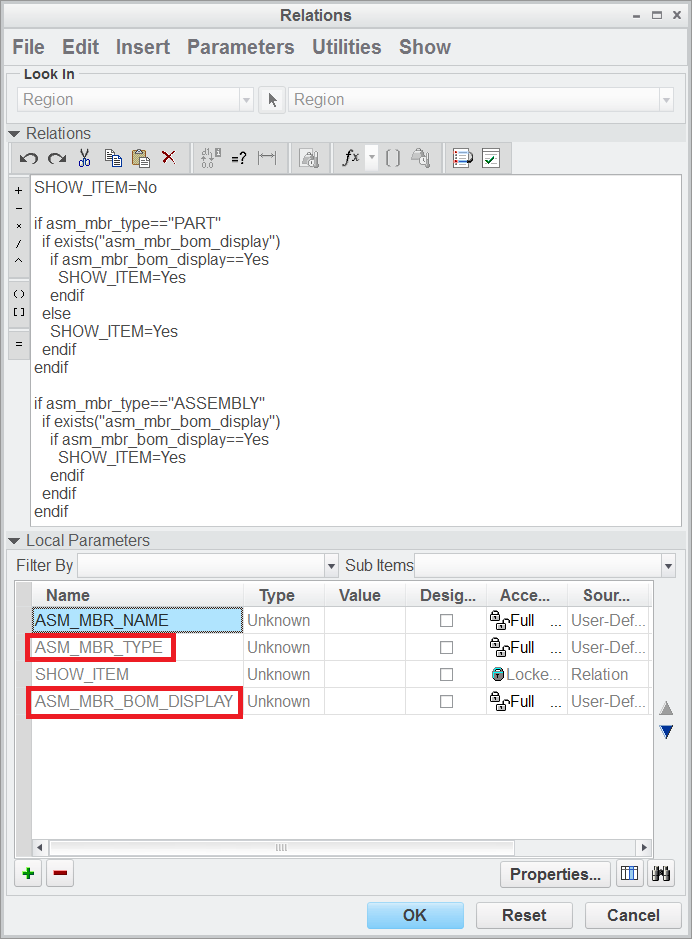
I created test data in CR2 M070 (repeat_region.zip). Unzip it, investigate it and apply it to your real data .

__rel_par.png

In Relations dialog box I had to create two highlighted parameters manually (as String parameters).

MH

6 replies

1-Visitor
May 12, 2016

Try:

&asm.mbr.type == ASSEMBLY, PART

&asm.mbr.bom_display == YES

21-Topaz II
May 12, 2016

A nuance that I failed to mention is that not all parts or assys have the BOM_DISPLAY parameter.  Right now, only the parts that I want to exclude do.

The more I think about this, I'm thinking that rules to exclude skeletons and the parts that I never what to show (parts of a purchased sub assy) plus then manually filtering the rest makes the most sense in this case.

23-Emerald IV
May 12, 2016

Doug Schaefer‌,

I would suggest using repeat region relations to set a parameter that can be used by the filter to determine whether or not to show each row.  Take a look at this discussion:  REPEAT REGION FILTERS

7-Bedrock
May 13, 2016

Maybe you need second BOM

24-Ruby III
May 13, 2016

Doug,

I created test data in CR2 M070 (repeat_region.zip). Unzip it, investigate it and apply it to your real data .

__rel_par.png

In Relations dialog box I had to create two highlighted parameters manually (as String parameters).

MH

1-Visitor
April 4, 2019

This solution is terrible for parameters that are non binary.  Why can't we simply use an "AND" expression for two conditions in a filter?

Allow me to give an example.  If I have a component family that has 5 styles (1,2,3,4,5) and 4 options (A,B,C,D)

Style == (1,2,3,4,5)

Option== (A,B,C,D)

If I want to create a table that filters out a few of them lets say all parts that are style 1 and have option A.   I have to create another parameter "DISPLAY" or whatever and create a complicated conditional relation to set various combinations. 

Display == 1A,    (if style ==1 and option==A) ...

1B 

1C

1D

2A 

2B

etc..

That seems like a ridiculous amount of work just to create a table that filters a table with 2 conditions.

Does anybody know a better way.  This seems like something that would be easy to program with an AND / OR statement in a filter.

18-Opal
November 18, 2019

Another problem I run into using the above method is that I don't know how to adapt it to use multiple parameters on the OR line (for example if I wanted to filter by description OR P/N OR etc).


Also, the other reason I don't want to do filtering in the relations is that wildcards very much complicate the coding.  For example, if I wanted to filter by *BACK*UP* to account for BACKUP and BACK-UP, I think that would have to be done with 2 search functions and a nested if statement...now if I wanted to throw AND functions in there it would turn a one line filter into many lines...unless I am missing something.

7-Bedrock
May 13, 2016

like this?:

11.gif

7-Bedrock
May 14, 2016

Very good~!!!

If the component is not too much

Like this:

Asm create a parameter: bom_display=no

Filter:&asm.mbr.bom_display !=no

This is faster.

1-Visitor
March 4, 2019

Hi Doug,


I have a similar situation, but I need to use an OR condition in my filter. 

I want my BOM to include all assembly members (&rpt.level < 2) OR any sub-component with a custom parameter (&asm.mbr.BOM_DISPLAY == YES)


Do you know how I can accomplish this? Thank you!


Spencer

1-Visitor
March 4, 2019

Please disregard - I was way over-complicating it. I just discovered the Flat/Rec Item button in the repeat region menu. It does exactly what I need.