
1-Visitor
September 10, 2012
Solved

BOM TABLE WITH FLEXIBLE QTY AND UOM

  • September 10, 2012
  • 1 reply
  • 18093 views

First off, I do not have the routed systems packages. I do limited work with components that are "per lenght" as opposed to "per each".


For this reason I have developed a custom BOM Table that uses PARAMETERS and RELATAIONS to populate a custom BOM_QTY.


IF EXISTS ("ASM_MBR_BOM_QTY")

BOM_QTY=asm_mbr_bom_qty

ELSE

BOM_QTY=rpt_qty

ENDIF


For each component that I wish to quantify by lentgth, the BOM_QTY parameter is set by a relation in the model (i.e. BOM_QTY=d0).


I use the FLEXIBILITY (varied items) for such components so that the component legth can be dictated for each assembly.


The BOM_QTY value shown for such components in the BOM TABLE (Repeat Region) will reflect this "flexibility".


This part is working well.


The dilema is that we work in both Metric (mm) and English (in). Our latest designs are Metric.


THE SCENARIO:


Existing model of wire, that was modeled in Eglish (in): WIRE_PART_ENGLISH

New Metric Assembly: METRIC_WIRE_ASSY


WIRE_PART_ENGLISH is placed into METRIC_WIRE_ASSY and made to be flexible. The legth of the tube d0 is made flexible. The value entered is 10 for 10 inches. It appears that the flexibitly window uses the units of the component, in this case inches.


The BOM table in the METRIC_ASSY drawing shows 22 (in) instead of 558.8 (mm). On another note, if the WIRE_PART_ENGLISH dimension d0 (or any other dimention of this component) is shown on METRIC_WIRE_ASSY drawing it will display as 22 (in), not 558.8 (mm). The wire that was modeled in metric displays correctly both BOM information and dimensions.
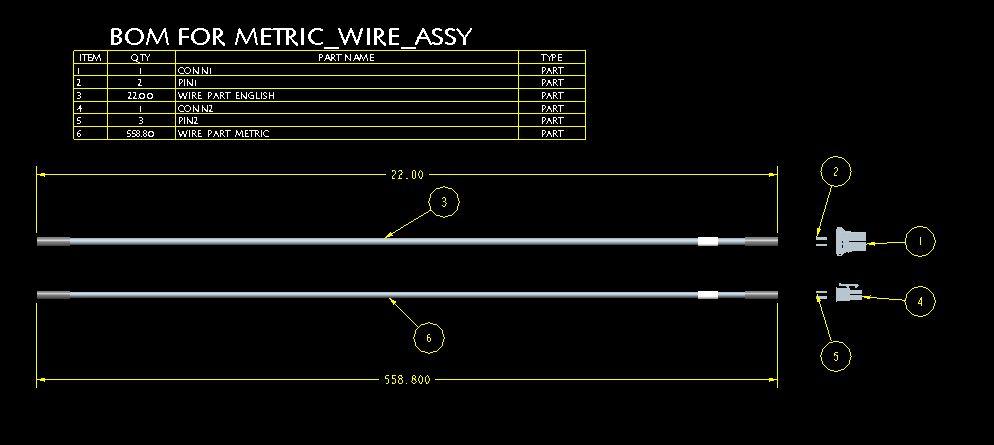
 

drw.JPG


THE CHALLENGE:


Either...


Option 1. Find a way to have the BOM_QTY value of the components in the BOM display in the units of the ASSY, despite the units of the components


Or


Option 2. Find a way to have a USER DEFINED or SYSTEM paramter for the UOM displayed in the BOM TABLE that mathes the units of the BOM_QTY. If the compnent is a "per each" item, then have EA displed as the UOM.


In eiter case I had to set up the model and the repeat region:


First, for the "per length" component, the BOM_QTY parameter was set up with units (Insert Unit). The Unit Sensitive was turned on in the Relation Utilities and a relation was set up to equate BOM_QTY to the length (BOM_QTY=d0).
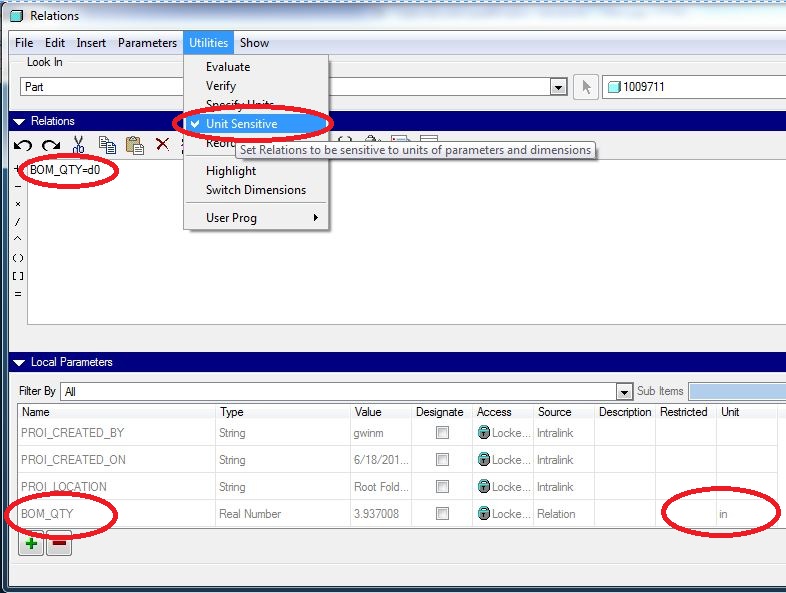
 

BOM_QTY relations.JPG


For the repeat region, the RELEATIONS and PARAMETERS were set up as follows:
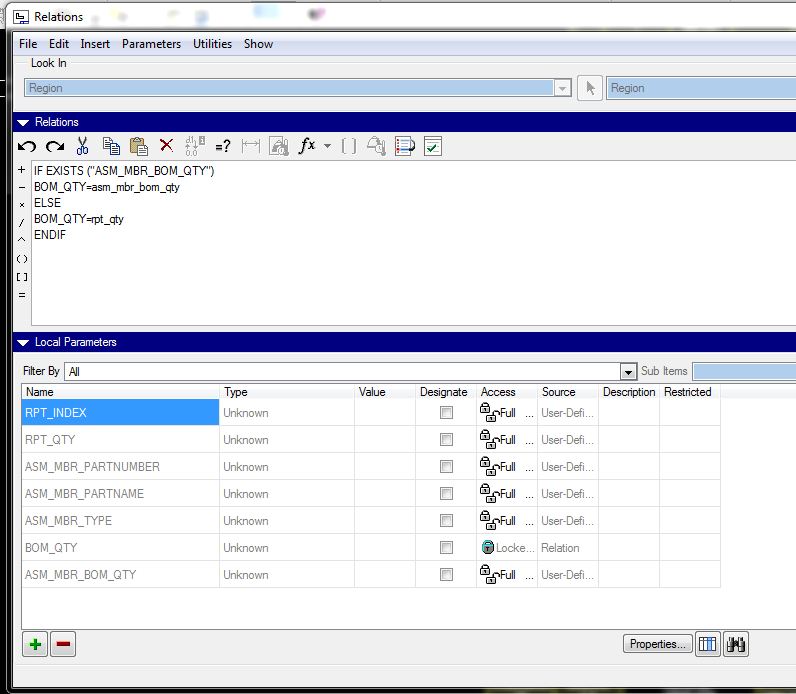
 

BOM_QTY repeat region relations.JPG


Then I tried to implent Option 2.....


Additional PARAMETERS and RELATIONS were set up to look at the UNITS of the BOM_QTY.


I would think the way to pull the UNIT information from the BOM_QTY parameter would be to use &ASM.MBR.PTC_UNIT.BOM_QTY


Note: The syntax in the relation is to replace the "." with "_"
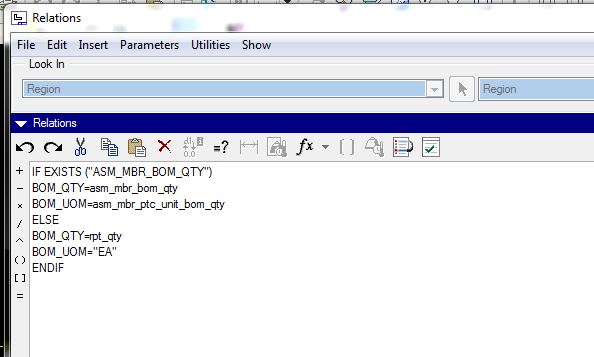
BOM_QTY repeat region relations with UOM.JPG


The issue is that I cannot get the relations to work. I get a hidden error. That is when I Execute\Verify the relations the system says Relations have been successfully verified.


However, when the UPDATE TABLES is run, the system says that "There are errors regenerating repeat region relations".


And for the "per length" items, not only do I get a "blank" value in the UOM column, but the QTY column also now shows a "blank".
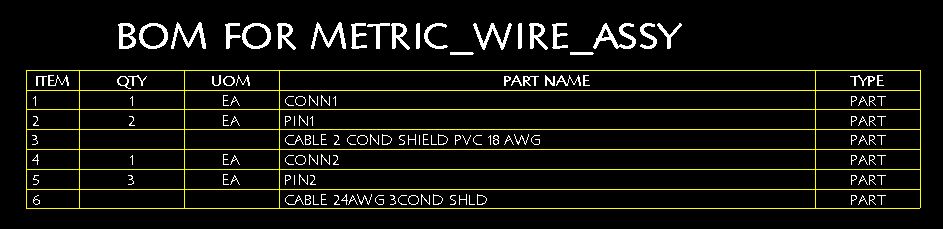
 

drw with UOM.JPG


Could it have something to do with replacement of the "." with a "_" when you use a PARAMETER in a REPEAT REGION RELATION?


When using &ASM.MBR.PTC_UNIT.BOM_QTY in a relation, it is written &ASM_MBR_PTC_UNIT_BOM_QTY.


I wonder if upon regeneration or update the ASM_MBR_PTC_UNIT_BOM_QTY is interpreted as ASM.MBR.PTC.UNIT.BOM.QTY? The "." between PTC and UNIT would not make sense.


This is driving me nuts!!!!!


UPDATE: 3:11pm 10SEP2012...


I tried to remove the "_" in my BOM_QY and BOM_UOM parameters, and change them to BOMQTY and BOMUOM respectively.


This time it resulted in an error when Execute\Veriry was run. So, it points more to the "_" in the PTC_UNITS being an issue???


Still driving me nuts!!!!!


Mike


Message was edited by: Michael Gwin

Best answer by MikeGwin

Brian,

I know how you feel, this has been driving me crazy. You would think after 20+ years that Pro/E (Creo) would have a simple way of generating a BOM that you can easily configure (per component) to drive the qty as you wish, either by EA, LENGTH, AREA, etc. and it would also be able to automatically list the units.

Thanks for your efforts. I did try the ASM_MBR_PARAM_UNIT also and it did seem to work. However, the only hole is that if you have units defined in more than one PARAMETER, in the model then you get multiple listings in the REPEAT REGION.

I added two phony PARAMETERS in the METRIC PART and gave them random UNITS. As you can see the METRIC PART has multiple listings now. NO DUP/LEVEL is applied as an attribute of the REGION.

USING ASM_MBR_PARAM_UNIT.JPG

This alone sent my whole perception of reality back. I had no idea that REPEAT REGIONS are driven by PARAMETERS and not the COMPONENTS.

In other words, I thought the REPEAT REGION simply had one row per COMPONENT (assuming no duplicates or no dup/level) and would then fill in the other cells in the table based on their value for that COMPONENT.

So, I am down to the following two choices.

  • OPTION 1: Go with the above and if by chance we have a model that has UNITS defined for multiple PARAMETERS, then we could always manually filter out those lines. (I could not figure out how to filter out through RULE)
    • Pro: If you ever change the EDIT SETUP UNITS, then the BOMQTY units automatically covert and update
    • Con: You have to manually filter out any other lines that show up in the BOM because of addition PARAMETERS that have UNITS specified. This could be a pain if a component is widely used and is later updated to include a UNIT SPECIFIED PARAMETER, then through associativity, all the BOMS were it is used will show multiple lines and have to be filtered manually or if you could figure out a rule the rules would have to be applied to each table in each assy drawing.
  • OPTION 2: Set up every model to have UOM PARAMETER and simply just list this directly in the BOM TABLE as &ASM.MBR.UOM.
    • Pro: No filtering required, no multiple lines in the REPEAT REGION
    • Con: If you change the MODEL UNITS ( EDIT SETUP UNITS) then you have to remember to change the UOM PARAMETER manually since it is a STRING
    • Con: Not sure if this is a big one, but process of adding UOM PARAMETER to all MODELS could be a pain. But might be easy through Pro?Intralink or even Model Check.

I did open a PTC case and referred them to this discussion on PTC Planet. I will wait to see if they have any other revelations and let you know.

Mike

1 reply

13-Aquamarine
September 10, 2012

Hi Mike...

Welcome to the wonderful world of repeat region relations.

First thing I'd try would be to stop using BOM_QTY as your special quantity parameter. For exactly the reasons you're describing, I limit myself to one word with no underscores. I'd go with bomqty instead of bom_qty.

Second... there is a chance that the underscore in ptc_units is an issue- but there's nothing you can really do about it. I'm very impressed you got as far as you did. Most people get stuck and call for help somewhere in the first few steps. You've made it very far into the problem. You've turned on units sensitivity and you know about the ptc_units tag. You can count the number of people who know this exists on two hands. So congratulations for getting as far as you have!

I really need to go back and carefully digest the material you've posted so far. At first glance, you're on the right track. But there are some nuances with the ptc_units mechanism you need to watch out for. First, I believe you have to have units sensitive turned on and then generate a new relation before the ptc_units tag will work. Simply turning units sensitive on and then trying to query it is not enough. You have to create a relation after that switch it set before ptc_units will work.

Let me take a closer look at your problem and I'll write back with better advice or a solution.

Thanks!

-Brian

MikeGwin1-VisitorAuthor
1-Visitor
September 10, 2012

Brain,

Many thanks for the compliments, this means a lot coming from someone with your expertise.

I specifically sent you a link to this post after reading one of your replies to another community member regarding 1/2 pieces in a BOM. In that post you mentioned that "_" in user defined parameters cause issues.

I have updated my post as well as removed the "_" from my UDPs. They are now BOMQTY and BOMUOM.

I have a bad feeling the system parameter PTC_UNIT is causing the relations to fail (now upon Execute\Verify) because of the "_".

As you said, please take your time to digest.

Look forward to collaboration on this.

Mike

1-Visitor
September 10, 2012

Hello Michael,

Interesting post. Looks like you have done some research on the matter before posting.

Since I don't have any experience with ptc_unit report in particular I can only mention couple of basic steps related to repeat regions in general and those are:

1) To make sure that your repeat region contains all the parameters used in cells of repeat region table and also including parameters used in relations. From my experience user defined parameters don't get defined automatically after the relation is verified. So if you have a &ASM.MBR.PTC_UNIT.BOMQTY in one of cells of your repeat region table then make sure you have ASM_MBR_PTC_UNIT_BOMQTY parameter defined in relations of your repeat region.

2) Sometimes when you choose to just simply type in the repeat region cell for example the &ASM.MBR.PTC_UNIT.BOMQTY then it won't report the parameter after the table is updated. So instead of using RMB and going for properties the sure way is to choose "Report Parameter" instead and go for selection of asm... --> mbr... --> ptc_unit... --> User Defined in an opened tab and then type in the parameter name upper case.

Good luck.