1-Visitor
August 14, 2021
Solved

Controls does not work and can not insert controls

  • August 14, 2021
  • 2 replies
  • 9149 views

Hi Experts,


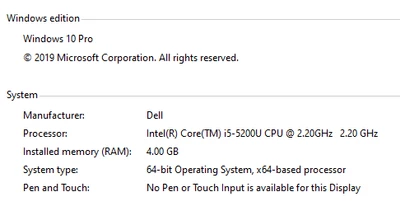
Below are my office Mathcad (with legal license) and OS (with legal license) information.
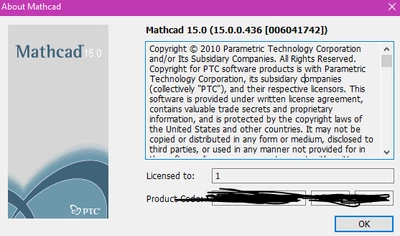
MC_1-1628921923416.png

MC_2-1628921970647.png


I searched "control(s)" in community, but I can not find final solution. Some posts were posted about 10 or even about 20 years ago...


The problems are that:

1. when I open the quicksheet "Controls and Automation" (Ibelieve you can find the quicksheet in mathcad folder, anyway i save as and upload it), the button does not work. see below screenshot
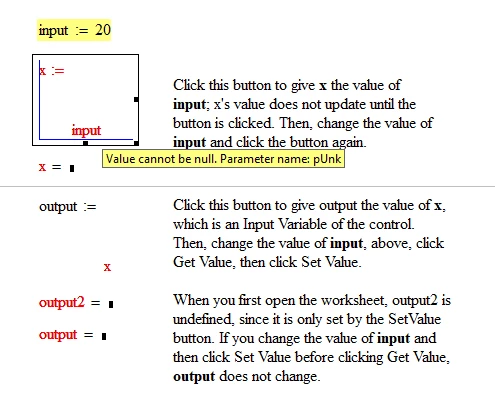
Controls1.PNG


2. Another problem is that when I Insert -> control -> Push button (or other controls or Web control...), nothing apears. Also, Insert -> Data -> Table, nothing apears. 
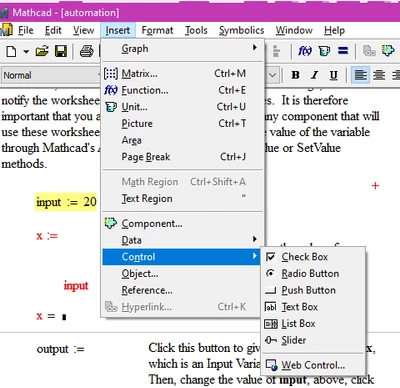
MC_0-1628921776958.png


But my own home computer(Win 10 OS). Mathcad (Mathcad15, need check details) works well without above kind of problems. So for the compatibility, I need avoid to use controls. This is very inconvenience and make sheet to be lower leavel... I try to find solution for years from internet and F1 help. But can not solve the problem.


Because I am not the administrator of office computer, so I can not reinstall Mathcad , but our IT guy helped me reinstall Mathcad several times when I found potential solutions.
All of our R&D office computers that with Win10 system have the same problems. Only one public Win7 computer works well with controls. I am sure that when our office computers were all win7 OS several  years ago, Mathcad controls were all OK. So the problems are related with windows OS?


Strongly hope that comunity experts can give finnal solutions. Thanks



Best answer by Werner_E

Too bad that re-registering the *.mcm files did not work. My guess would have been that that may be  the cause for your problem.


IT and me try to download M020 or M050 Mathcad 15 from PTC official wesite. But we can not find it...

Can you please help to provide the web links of M020 and/or M050?

Is it free that install M020 or M050 revision if we already have legal license of F000 revision?


As you may know, the participants in this forum are primarily volunteers and not representatives of PTC and so I am in no way affiliated with PTC either. So you should be careful with my comments on the legal situation.
As far as I know, the license file for your MC15F001 is also valid for all further editions of the MC15 without changes. You should always keep a backup of this license file (usually "license.dat") anyway.
If you are currently always paying the annual maintenance fee to PTC (and many in this forum are wondering what service actually it is for), you should be able to download the software at

https://support.ptc.com/appserver/auth/it/esd/product.jsp?prodFamily=MCD

(Login required). If you are no longer under maintenance, rumour has it that you can download the current trial-version of Mathcad, install it and then make it the full version with your license file. PTC does a pretty good job of hiding the trial version of MC15. Here are some links under which it was found in the past:

http://download.ptc.com/products/mathcad/trial/mc15/Mathcad15_EN.zip

https://www.ptc.com/-/media/Files/Docs/Mathcad/Mathcad15-EN.zip

https://www.ptc.com/en/products/mathcad/free-trial

Good luck!


BTW, if you are still under maintenance, you may also try to contact official PTC support to help you with your problem. Not sure about a working link, maybe https://support.ptc.com/apps/case_logger_viewer/cs/auth/ssl/log


EDIT: I attach the readme file from MC15 M050 so you can see what changes and bug fixes since F001 were done. I think M050 was the first release which officially supported Win10, but as far as I know older versions also worked well with Win10 appart from some minor glitches (3D plots, as far as I remember).


2 replies

1-Visitor
August 14, 2021

I remembered I posted a same topic when 2014:


https://community.ptc.com/t5/PTC-Mathcad/why-the-controls-are-disable-in-my-sheet-Mathcad-15-F000/m-p/360932#M141178


MC_1-1628924631724.png


But the difference is in that post the problem because our office OS update from winXP to win7. And after IT guys reinstall Mathcad, in Win7 OS, the controls problem were solved. Now this time in this post, the OS is Win10...

MC_0-1628924608785.png


The Mathcad is still Mathcad 15 F000

25-Diamond I
August 14, 2021

Any chance to upgrade from F000  ("F" means the first release of version 15) to a newer maintenance release (current and last is M050)?

I am not sure though if this would cure your problem as I assume that at home you are using F000 as well without problems, right?


Anyway, I just looked up the readme of M050 and found that it mentioned two fixes which have to do with controls:

Fixed in M010:

Werner_E_1-1628930553283.png

Fixed in M020

Werner_E_2-1628930609087.png


Furthermore, just to be on the safe side, I'd like to mention that its mandatory that .NET 3.5 is installed (it has to be that version, a higher version won't do!). Check, if that older version is installed on the company workstations (probably along an in parallel with a newer version).


Also, sometimes its necessary to re-register the *.mcm files responsible  for the components as even a re-installation of Mathcad won't do so. Find mcmreg.exe and start it (run as Admin!) and then navigate to the folder with the *.mcm files, usually C:\Program Files (x86)\Mathcad\Mathcad 15\mcm. Select all of them and click "open" and  follow the dialog.
As an alternative it may also work by opening a command shell as Admin and typing C:\Program Files (x86)\Mathcad\Mathcad 15\mathad.exe /register


Because of missing permissions you probably will need the help of your IT Support to try some of the above.


1-Visitor
August 17, 2021

@Werner_E wrote:

Furthermore, just to be on the safe side, I'd like to mention that its mandatory that .NET 3.5 is installed (it has to be that version, a higher version won't do!). Check, if that older version is installed on the company workstations (probably along an in parallel with a newer version).


Yes. Confirmed with IT that .NET3.5 is installed


@Werner_E wrote:


Also, sometimes its necessary to re-register the *.mcm files responsible  for the components as even a re-installation of Mathcad won't do so. Find mcmreg.exe and start it (run as Admin!) and then navigate to the folder with the *.mcm files, usually C:\Program Files (x86)\Mathcad\Mathcad 15\mcm. Select all of them and click "open" and  follow the dialog.
As an alternative it may also work by opening a command shell as Admin and typing C:\Program Files (x86)\Mathcad\Mathcad 15\mathad.exe /register

Run mcmreg.exe as admin and register all of the mcm files. 

And then I restart the computer, the controls still do not work...


@Werner_E wrote:

Any chance to upgrade from F000  ("F" means the first release of version 15) to a newer maintenance release (current and last is M050)?

I am not sure though if this would cure your problem as I assume that at home you are using F000 as well without problems, right?


Anyway, I just looked up the readme of M050 and found that it mentioned two fixes which have to do with controls:

Fixed in M010:

Werner_E_1-1628930553283.png

Fixed in M020

Werner_E_2-1628930609087.png


IT and me try to download M020 or M050 Mathcad 15 from PTC official wesite. But we can not find it...

Can you please help to provide the web links of M020 and/or M050?

Is it free that install M020 or M050 revision if we already have legal license of F000 revision?


Thanks

Mathcad user


Werner_E25-Diamond IAnswer
25-Diamond I
August 17, 2021

Too bad that re-registering the *.mcm files did not work. My guess would have been that that may be  the cause for your problem.


IT and me try to download M020 or M050 Mathcad 15 from PTC official wesite. But we can not find it...

Can you please help to provide the web links of M020 and/or M050?

Is it free that install M020 or M050 revision if we already have legal license of F000 revision?


As you may know, the participants in this forum are primarily volunteers and not representatives of PTC and so I am in no way affiliated with PTC either. So you should be careful with my comments on the legal situation.
As far as I know, the license file for your MC15F001 is also valid for all further editions of the MC15 without changes. You should always keep a backup of this license file (usually "license.dat") anyway.
If you are currently always paying the annual maintenance fee to PTC (and many in this forum are wondering what service actually it is for), you should be able to download the software at

https://support.ptc.com/appserver/auth/it/esd/product.jsp?prodFamily=MCD

(Login required). If you are no longer under maintenance, rumour has it that you can download the current trial-version of Mathcad, install it and then make it the full version with your license file. PTC does a pretty good job of hiding the trial version of MC15. Here are some links under which it was found in the past:

http://download.ptc.com/products/mathcad/trial/mc15/Mathcad15_EN.zip

https://www.ptc.com/-/media/Files/Docs/Mathcad/Mathcad15-EN.zip

https://www.ptc.com/en/products/mathcad/free-trial

Good luck!


BTW, if you are still under maintenance, you may also try to contact official PTC support to help you with your problem. Not sure about a working link, maybe https://support.ptc.com/apps/case_logger_viewer/cs/auth/ssl/log


EDIT: I attach the readme file from MC15 M050 so you can see what changes and bug fixes since F001 were done. I think M050 was the first release which officially supported Win10, but as far as I know older versions also worked well with Win10 appart from some minor glitches (3D plots, as far as I remember).