14-Alexandrite
October 27, 2024
Solved

Exclude some values

  • October 27, 2024
  • 1 reply
  • 10448 views

Hi there

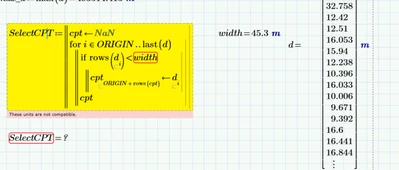
I want to exclude some values from d when it is bigger than the width .... I want the program to just exclude the values that do not fulfil the condition, I used this program ,but it shows strange error ...I'm sure both of them have the same units 
YA_10963798_1-1730037766728.png

How to fix this ?


Best answer by Werner_E

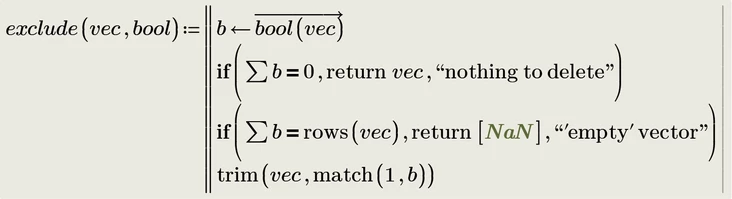
You may also use a generic utility function to do the job:

Werner_E_0-1730044894764.png

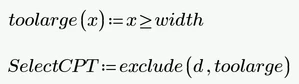
You may then use either

Werner_E_2-1730041443456.png

or in one go

Werner_E_4-1730041480344.png


You have to decide what to return in case all elements have to be deleted. As Prime does not provide an empty array you may chose 0 or NaN or, like I did, a 1x1 array containing NaN (so I can still use the transpose operator even in that case).


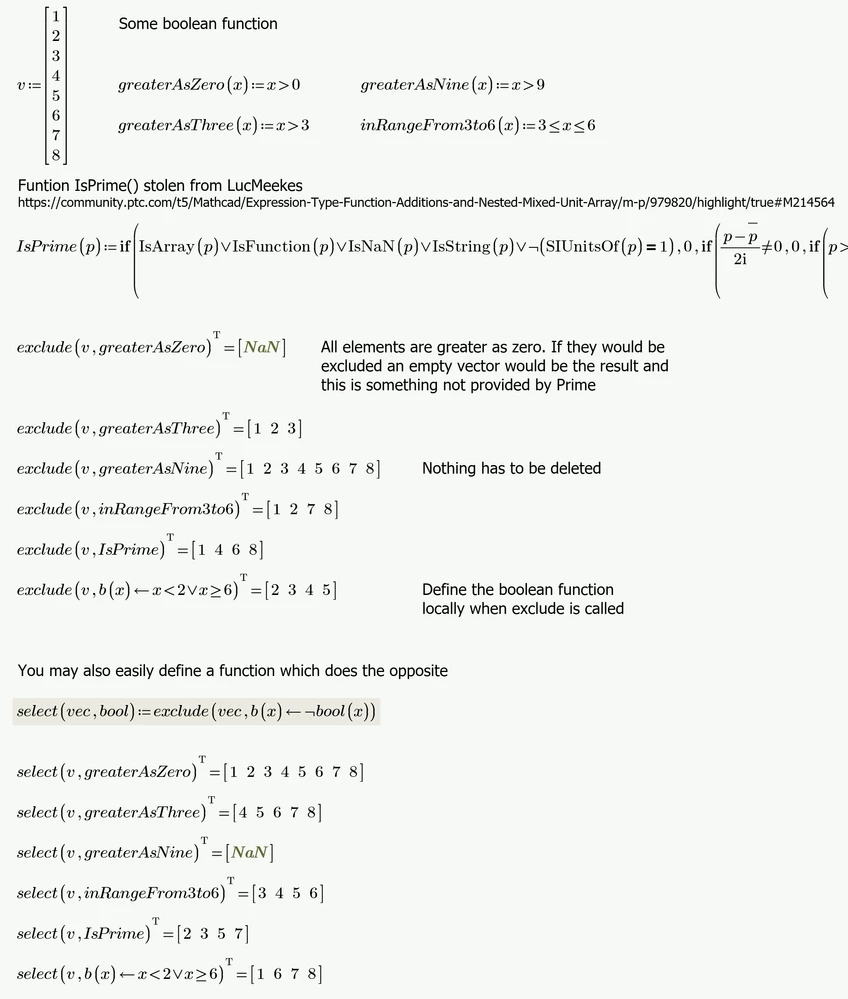
Here some examples of usage

Werner_E_1-1730041177071.png


1 reply

25-Diamond I
October 27, 2024

Delete the word "rows", just use     if d[i < width


A simpler way probably would be to just use

Werner_E_7-1730042081725.png

or

Werner_E_8-1730042183264.png

Caution: This will fail, if ALL values in d are smaller than width or if ALL are larger or equal.

EDIT: See a more generic function which also deals with these special cases in my answer below.


Werner_E25-Diamond IAnswer
25-Diamond I
October 27, 2024

You may also use a generic utility function to do the job:

Werner_E_0-1730044894764.png

You may then use either

Werner_E_2-1730041443456.png

or in one go

Werner_E_4-1730041480344.png


You have to decide what to return in case all elements have to be deleted. As Prime does not provide an empty array you may chose 0 or NaN or, like I did, a 1x1 array containing NaN (so I can still use the transpose operator even in that case).


Here some examples of usage

Werner_E_1-1730041177071.png


DJNewman
19-Tanzanite
October 28, 2024

Nope, nothing to do with Excel. That all works the same.


I mean...


Mathcad Prime 9; turning a range variable into a vectorMathcad Prime 9; turning a range variable into a vector


versus


Mathcad Prime 10.0.1.0, you can't turn a range variable into a vector anymoreMathcad Prime 10.0.1.0, you can't turn a range variable into a vector anymore


If you wanted an easy way to turn a range variable into a vector, you can borrow this suggested small program from CS416474.

PTC Marketer for Creo and Mathcad. I run their YouTube channels, some Creo campaigns, and all Mathcad campaigns and communications.