

Mathcad prime 10.0.0.0 failing to save
Just as i thought the problem was solved it went back. I tried resetting my pc and downloading everything from scratch. I have a lenovo with windows 11 home. Everytime i try saving a document a corrupt saving page pops up. i will attach it here. 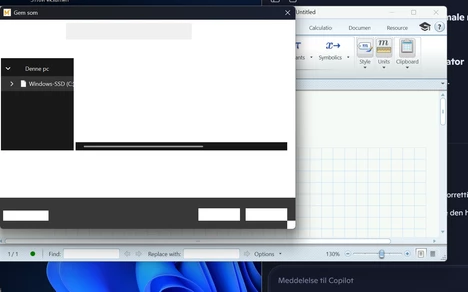
It happens when i use; save as, save or any type of export.
I have tried reinstalling several times, also as administrator, and it has the same outcome.
When running the program as admin it gives 3 more seconds on the save window but inevitably it crashes again. I made sure i unpacked the download zip-file locally and not using onedrive. Also i placed the app locally.
Background info: Im a danish student at Aarhus university. They supply license to mathcad prime 10.0.0.0 and is therefore my only way of downloading the program. I have got a new pc as the old one got destroyed, and now the problem is occuring. I have tried following instructions to solution finding through AI, but it has not lead me to a working solution. I have reset my pc and tried reinstalling the program several times without a payoff. IT-support at uni leads me in the direction of mathcad or PTC as they dont know enough about the program.
William