10-Marble
December 2, 2025
Solved

Matrix Formatting Issue

  • December 2, 2025
  • 1 reply
  • 752 views

To whom this may concern, 


Looking for help on how to setup Matrix headers for the attached. 


I would like to have a Title above each column for each variable, and the corresponding units shown in the matrix. See remarks in red within the attached. 


Many thanks,

Iain 


FYI, I use Mathcad Prime 10.0.0.0 
Best answer by Werner_E

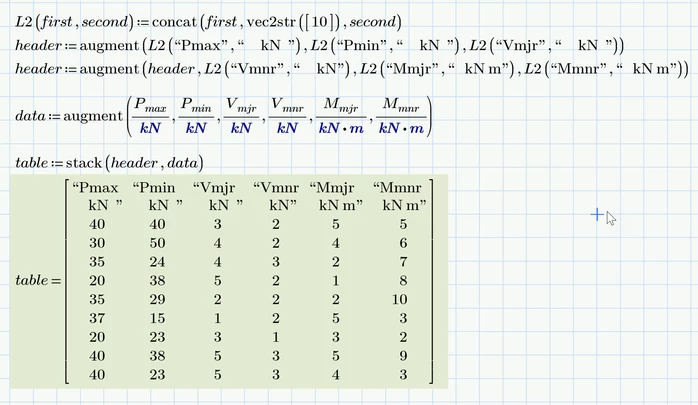
In Prime 10 we could also use the Linefeed character #10 to create a multi-line string.

Werner_E_3-1764687446521.png

But as Stuart noted in a thread not that long ago this was broken in Prime 11 and another character code has to be used instead of 10 (I forgot which one).


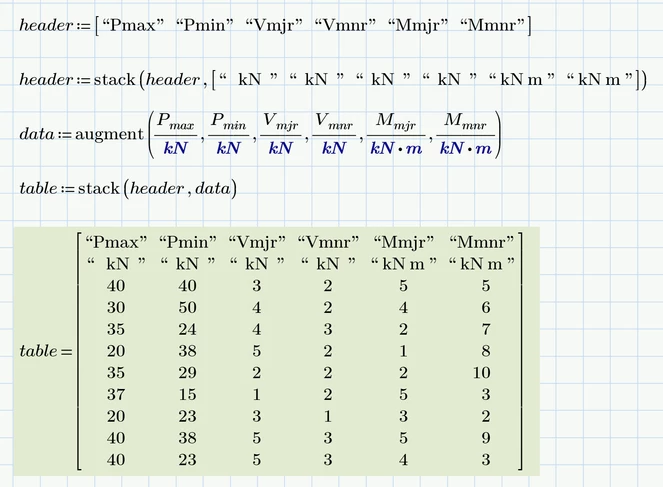
So I guess to be on the safe it might be better to simply use two matrix rows. Which we could get rid of the nasty looking quotation marks:

Werner_E_2-1764687155585.png


Prime 10 sheet attached


1 reply

25-Diamond I
December 2, 2025

Unfortunately Prime still does not allow to choose units inside of a matrix, so we can't show kN or KN'm inside of the matrix.

We can only change the unit after the matrix in the appropriate place holder, which looks a bit strange

Werner_E_0-1764678599193.png

and also does not allow to add a header line.


So the best we can achieve is by stripping the units and adding the unit information in the header:

Werner_E_1-1764678853848.png


Another option would be to use an embedded Excel component. Because Excel does not support units you are again forced to display unit-less numbers and name the units in the header, but you have all of Excel's formatting capabilities (like colors, different typefaces, conditional formatting, etc.) at your disposal. You have to decide if the display of some values would justify the effort.

Werner_E_3-1764679716573.png

Prime 10 sheet attached


23-Emerald V
December 2, 2025

Does the Prime 11 Custom Units options allow the user to set, say, kN as the base unit?


Stuart

25-Diamond I
December 3, 2025

Yes, the desire to be able to generate a structure similar to Prime tables from existing data has been raised here in the forum many times. It would certainly be an improvement.

However, I would be delighted if Prime had an equivalent to the data tables in the real Mathcad. These are ideal for storing large amounts of data, which may come from other sources, permanently in a Mathcad file in a space-saving manner.
To do this, however, PTC would first have to change the idiotic way in which cut and paste is implemented. Currently, it is not even possible to copy the data from a larger matrix, as only the currently visible data can be selected. Not to mention the fact that this data is then stored in a format that is unusable for other applications.


But why am I complaining? We already have superscript and subscript functionality in text areas, and in the next version we'll get a handful of selectable background colors and maybe even a second y-axis in the native plots. Things are really moving forward pretty fast!