

4-Participant
May 14, 2020
Question

Programmatically create variable names and assign values from Excel spreadsheet (MCD15)?

  • May 14, 2020
  • 4 replies
  • 7944 views

Hello,

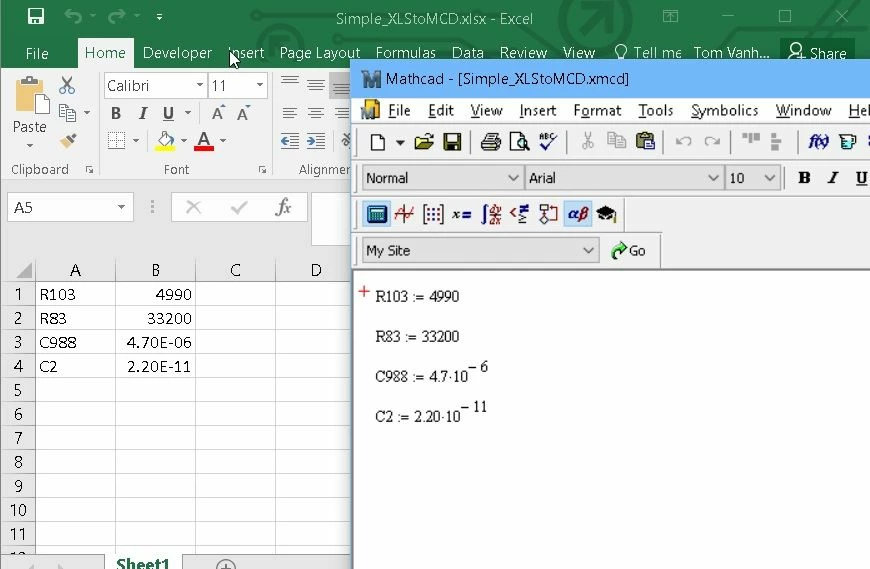
I wonder if anybody can suggest a means to programmatically create variable names and assign values to them, using data from an Excel spreadsheet? I have attached a very simple example to illustrate what I want to do. I have electronic component identifiers (Reference Designators) in column A, and the corresponding values for those components in Column B. I would like the values in column A to become variable names in Mathcad, and the values in column B to become the values of these variables. In the example below, I have manually created the variables in Mathcad, but I would like to automate that.  Seems pretty simple, but I haven't figured out how to do it. Any suggestions would be greatly appreciated! Thank you.Excel_to_Mathcad_Illustration.jpg
4 replies

23-Emerald V
May 15, 2020

As far as I'm aware, Tom, there is no way of programmatically creating names in a straightforward fashion. 


I've asked for such a feature several times over the years, but it's not appeared yet.  There have been other user requests for this feature, eg.


https://community.ptc.com/t5/PTC-Mathcad/Create-variable-names-automatically/m-p/574404


Coincidentally, I recently (Apr 2020) followed up an Alfasoft article on Unicode character creation by asking Alfasoft about this capability.   They said that they had had similar requests from other customers, didn't know whether it was on PTC's development path for Mathcad, but would forward my request to PTC.


https://support.alfasoft.com/hc/en-us/articles/360003722078-How-to-add-things-on-top-of-characters-used-as-variable-names


With a createName type function, it would be straightforward to vectorize it over a list of names imported from Excel.


Stuart


From my letter to Alfasoft:


Thank you for posting the referenced article - it was interesting and solves a particular problem that several have had over the years. However (there’s always a ‘however’, isn’t there?), the process of adding a constructed character or name by copy & paste is somewhat mandraulic, not to mention “copy&paste” errors being a somewhat notorious and common phenomenon. On the face of it, the process would seem to be better suited to automation.


Could a feature request please be raised to add a function to Mathcad Prime 6 that takes a string and creates a new name (variable/function) on the left-hand side of a definition and which is then available for use 'later on' in the worksheet?


Eg, make a name ...


newName:=concat("var",num2str(1))
newName = "var1"

or

newName := stack(97,0x0333)
newName = "a̅0̳"


followed by creating the name, 


createName(newName) := <expression>


This would have the effect of manually typing/pasting a name and be fully equivalent to var1 := <expression>.


Used on the rhs, or as a function parameter, createName would not create a name but would stand in place of the name var1.


Other options might be to prefix 'newName' with an operator (eg, @ or 🄋 (or even🗃or 🗄!) - available via the ribbon) to identify a name indirection, eg


( 3 + 🄋newName == 3 _ var1)


(Suspicions that I might be subtly asking for a macro capability are, I am sure, completely unwarranted. Indeed, the thought has never so much as passed through my head …)


From a subsequent worksheet I was playing around with to create complex names, and a candidate for a function like createName,


2020 05 15 A.png


21-Topaz II
May 15, 2020

Hi,


You can sort of do it like this:

Capture.JPG

Cheers

Terry

4-Participant
May 21, 2020

Thank you Terry. Yes, this approach "sort" of does what I want. Unfortunately, when I then go to use these variables in subsequent calculations, it gets a bit "ugly". Consider a very simple example of a voltage divider using my two resistors, what I want to do would look like this:

Voltage_Divider_Example1.jpg


Whereas your approach would look like this: Voltage_Divider_Example2.jpg


Although not exactly what I was looking for, your suggestion is much appreciated none-the-less.


Thanks again,

Tom


23-Emerald V
May 22, 2020

@LucMeekes wrote:

Apart from the fact that it is desirable to have a function that can define a worksheet variable, in order to drive that variable name from e.g. Excel, you must have a reference. At some point you need to decide which one of the many variable names that are defined in the Excel table will be used at which position in a Mathcad expression. So why not let the row index do that....


I may have grasped the wrong end of the stick here, Luc, but I was under the impression that the absolute row number of a component value might change, or a different component could be selected at a different time.  In which case, a lookup-type solution is possibly a better way to go.


In the example below, I've created a tailored version of one of my lookup functions to make it easier to use.


2020 05 22 A.png


 Also bear in mind that it's almost as difficult to bring units over from Excel to Mathcad

How true.  I'm surprised that no maintenance subscriber has asked for a modified version of str2num that converts quantified numeric strings (eg, "3.14159 mp" or 2.7Fb" (where mp = millipotrzebie and Fb = furschlugginer blintz )), so that we'd have:

str2num("3.14159 mp") = 7.111 μm

str2num("2.71828mp") = 99.014 t


I suppose some enterprising individual could probably write one ... (I think I've may have one hidden deep in my M15 archive)


In the meantime, here's one way of tackling the problem:


2020 05 22 B.png


2020 05 22 C.png


Cheers,


Stuart


21-Topaz II
May 21, 2020

Hi,

But, by chance, you are looking for something like this (it can be developed to make it more automatic):

TVH answer.jpg

4-Participant
June 8, 2020

I think I found a solution to the second half of my problem... that of programmatically CREATING a variable in Mathcad: AutoHotKey (https://www.autohotkey.com/). The simple example below shows a program in AutoHotKey that creates 4 variable in Mathcad when Ctrl-K is pressed. I still have a lot to figure out with regard to opening a file and parsing it in AutoHotKey, but I am confident that it can be done. This might not be the most elegant solution but  I think it will accomplish my objective. Thanks again for the suggestions.

Creating_Mathcad_Variables_with_AutoHotKey.jpg

21-Topaz II
June 8, 2020

Hi,


Good bit of research.

Visual Basic in Excel had a similar SendKeys method.


Cheers

Terry