
9-Granite
May 25, 2023
Solved

This value must be a scalar

  • May 25, 2023
  • 3 replies
  • 2746 views

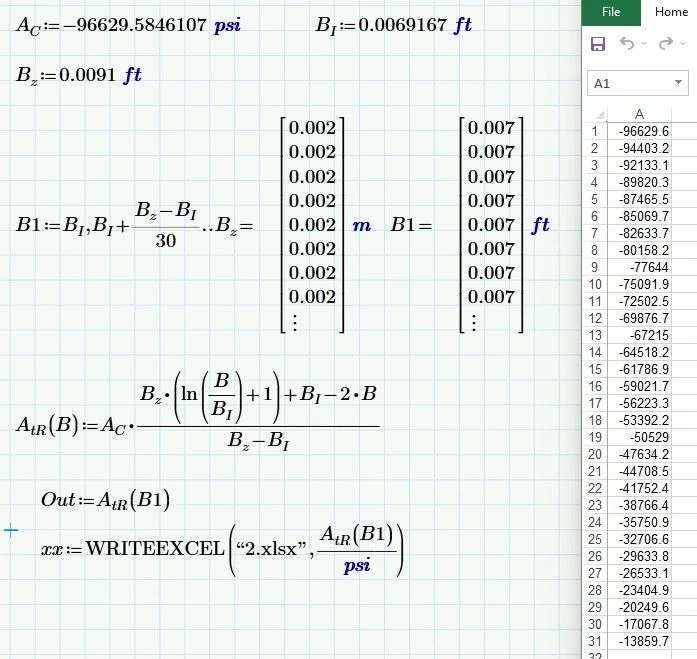
I have used units but when writing the function to excel I am getting error. Please help 

Best answer by terryhendicott

Hi

Here is the file working.

The problem is B1 is defined in your sheet as a range variable. 

Looks in PTC Prime exactly like a vector.

To change it to a vector just use the hack of putting an equal sign after it to show it.
Capture.JPG

3 replies

17-Peridot
May 25, 2023

hi,


WRITEEXCEL can't do units. See excerpt from mathcad help.

I suggest to divide the matrix you'd like to export with "UnitsOf(variable)" before writing to Excel.


Regards


Raiko


25-Diamond I
May 25, 2023

The problem is not WRITEEXCEL as you correctly strip the units when you use it.

The problem is that B1 is a range, not a vector, and so it can't be used as the argument for function A,tR.

Find attached two ways to deal with that situation.

Werner_E_0-1685018948295.png


17-Peridot
May 26, 2023

You're right. I didn't notice it.

25-Diamond I
May 26, 2023

It doesn't matter anyway. If you look at all the questions this user already had posted it seems, that he isn't really interested in the answers - at least he seems to think that it isn't necessary to come back, close the threads and maybe comment the answers given.

21-Topaz II
May 25, 2023

Hi

Here is the file working.

The problem is B1 is defined in your sheet as a range variable. 

Looks in PTC Prime exactly like a vector.

To change it to a vector just use the hack of putting an equal sign after it to show it.

Capture.JPG