1-Visitor
August 25, 2017
Solved

Use vlookup over a vector?

  • August 25, 2017
  • 1 reply
  • 2772 views

In the attached image (from Mathcad Prime 3.1) I'm able to use vlookup with a single value. Is it possible to use it with a vector of input values and return a vector of values?

Best answer by Werner_E

I guess thats only possible if you define an auxiliary user function.

Here are two examples. The first hast the data matrix and the return column hardcoded in the function, the second is more generic.
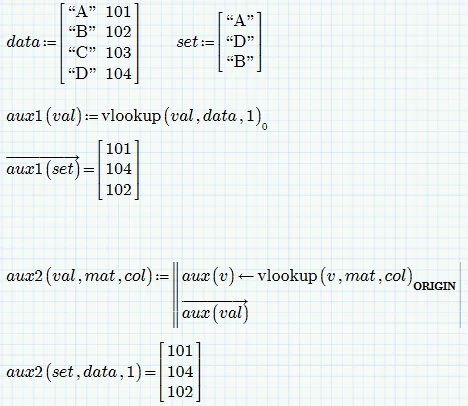
Bild.png

Both function can be called with a single, scalar argument as well. So you may give them a more meaningful name and use them as vlookup replacement (if you only are interested in the fist find),
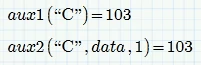
Bild.png

1 reply

Werner_E25-Diamond IAnswer
25-Diamond I
August 25, 2017

I guess thats only possible if you define an auxiliary user function.

Here are two examples. The first hast the data matrix and the return column hardcoded in the function, the second is more generic.

Bild.png

Both function can be called with a single, scalar argument as well. So you may give them a more meaningful name and use them as vlookup replacement (if you only are interested in the fist find),

Bild.png

dsochor1-VisitorAuthor
1-Visitor
August 29, 2017

Thanks Werner, as long as the order of shapes matches the look up matrix, your second solution works perfectly. Smiley Happy


Why can't a vector be placed directly into the vlookup?


 Thanks Werner.jpg

25-Diamond I
August 29, 2017

@dsochor wrote:

Thanks Werner, as long as the order of shapes matches the look up matrix, your second solution works perfectly. Smiley Happy


No sure what you mean by that matching order??


Why can't a vector be placed directly into the vlookup?

Because vlookup already has a matrix argument. If the first argument is a matrix/vector, too, you would only be able to vectorize the call if both arguments are of the very same dimension.

But even if that would be the case and you vectorize, Mathcad would cycle through BOTH matrices and so would feed vlookup with a scalar as second argument and this would make vlookaup fail, because the second argument must be a matrix.


So just this (rather useless) example works:

Bild.png
