14-Alexandrite
December 8, 2024
Solved

average value

  • December 8, 2024
  • 3 replies
  • 2224 views

Good evening everyone,


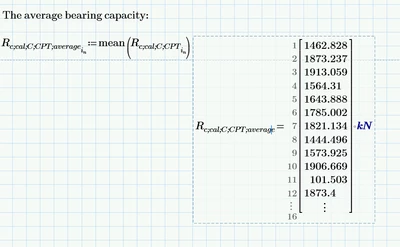
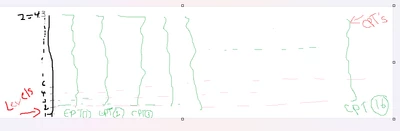
I have 43 level and in each level I have 16 elements ... I want mathcad to calculate the average value in each level >> summing the 16 elements in each level and dividing them by their number (16). 

but what I get is the opposite ... it sums all the  levels (43) and divides them by 43... 
YA_10963798_0-1733675801926.png


YA_10963798_0-1733669487511.png

I expect the answer to contains 43 value not 16 

I tried to use programing ..I get worse result 
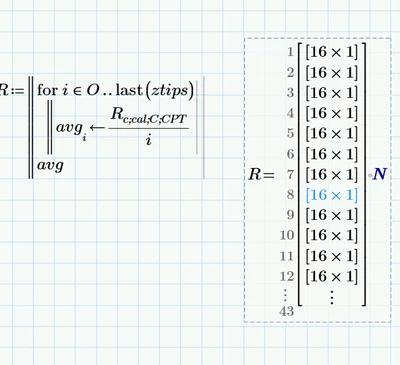
YA_10963798_1-1733669594798.png

I also, tried to use a simple mathcad sheet to post .. it works there , but not at my original sheet ;(
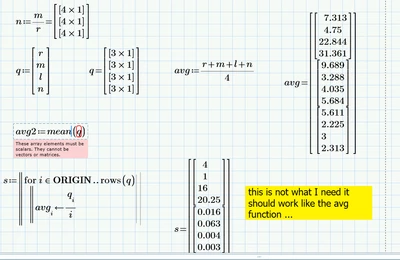
YA_10963798_2-1733669988440.png


I posted both the original and the simplified version for your assessment

Thanks in advance 


Best answer by StuartBruff

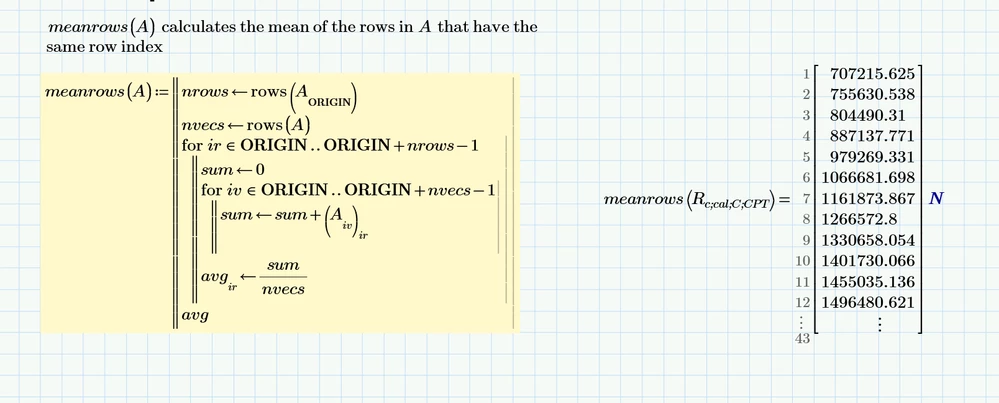
I think this does what you want for the average.


2024 12 08 A.png


However, I'm wondering whether your calculated value Rc;cal;C;CPT;min is what you want, as that only has 16 values (ie, is the minimum of the 43 layers for each of the 16 "element" vectors)?


Stuart 

3 replies

14-Alexandrite
December 8, 2024

I tried also this >> 

YA_10963798_0-1733681157941.png

so to clarify more ... The R is a nested  which are the results of 16 elements (CPT) 

YA_10963798_1-1733681374470.png

the number 43 represents the level of each R 

I want to calculate the average value of R in each level .... the function has to calculate average of  the Rs of the 16 elements in each level 

YA_10963798_2-1733681754974.png


So the answer should be 43 vector 

23-Emerald V
December 8, 2024

I think this does what you want for the average.


2024 12 08 A.png


However, I'm wondering whether your calculated value Rc;cal;C;CPT;min is what you want, as that only has 16 values (ie, is the minimum of the 43 layers for each of the 16 "element" vectors)?


Stuart 

14-Alexandrite
December 8, 2024

for the minimum value I tried to use same concept ...it says it must be a vector

YA_10963798_0-1733683633995.png


14-Alexandrite
December 9, 2024

Thank you so much Stuart that so thoroughly explained and solved

I appreciate your help 

ttokoro
21-Topaz I
21-Topaz I
December 8, 2024

image.pngimage.pngimage.png

t.t.
25-Diamond I
December 9, 2024

@ttokoro 

It looks to me that @YA_10963798  is maybe(?) rather looking for something like this:


Werner_E_0-1733705867758.png


Not sure if the result should be a nested vector as shown in the picture above or rather a simple 12x1 vector.

But in any case I would prefer a functional solution like @StuartBruff  had provided which is more generic and does not need to define any worksheet range variables.


@YA_10963798 

Guess that Stuart has already solved your problem. Next time you create a simplified sheet it would be a good idea to manually type in the complete result vector you would like to create. That way it would be much clearer what you are looking for and also it would be clear which data structure you would like to see the results to be arranged in (nested vector vs. simple vector).

BTW, I couldn't make a try with your original sheet because of the missing Excel data file (I finally cleaned up my workspace). I know you posted it in other threads earlier, but I was far too lazy to look around for it.
Like Stuart I fond it irritating that you defined "rows" and "cols" as variables. We often need to use the built-in functions of the same names when working in your sheet and its tedious to experience an error message every time we do because Prime assumes that we mean your variable and we have to manually re-label the name as being a "function" and not a "variable".
I strongly second Stuarts suggestion that you should rename those variables as he already has shown in the sheet he posted.

23-Emerald V
December 9, 2024

Curses! Foiled again!


StuartBruff_0-1733705189340.jpeg


I was about to reply to Tetsuro's post, but I see you've beaten me to it.


Still, here's a range variable version ...


2024 12 09 A.png


And an implied version of TransposeNested that uses a matrix intermediary to do the transposition.     


2024 12 09 B.png


It's often a lot easier to work on a matrix than nested vectors.  And vice versa.  😇


Stuart