10-Marble
June 14, 2024
Solved

how to do element product in two column vectors?

  • June 14, 2024
  • 2 replies
  • 2179 views

In mathCAD prime 10,


how to do element product in two column vectors?


For example,


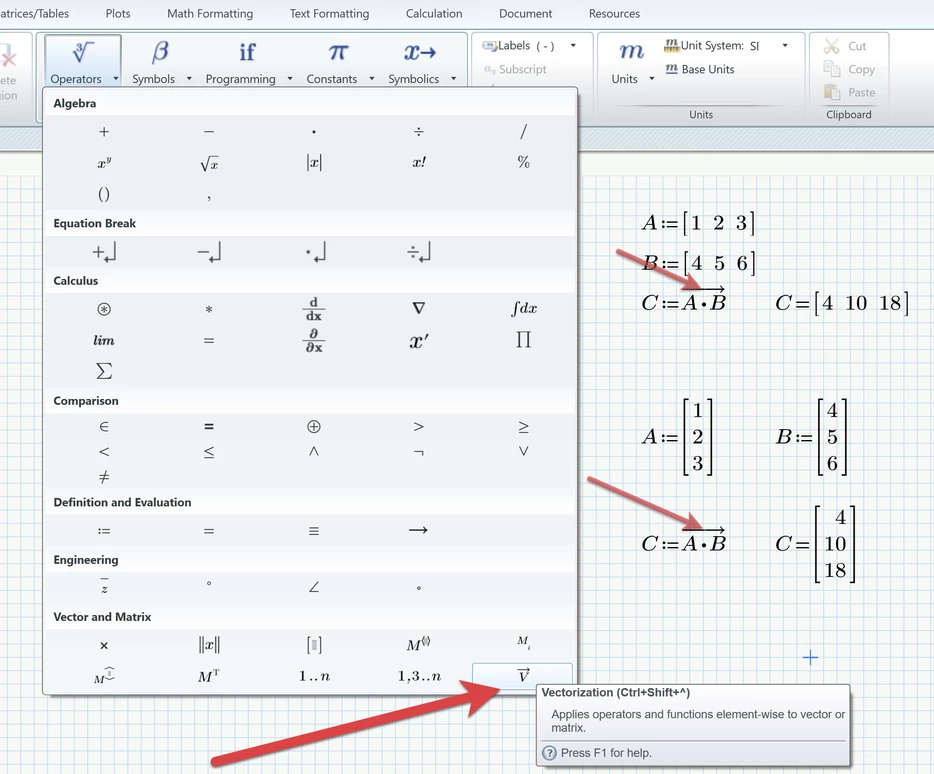
A := [1 2 3]

B :=[4 5 6]


I want to have C=[4 10 18]. In this case, how can I express it in mathCAD?

Please help me!

Best answer by Werner_E

You have to use "vectorization"!

Werner_E_1-1718344070332.png

Prime 10 file attached

2 replies

Werner_E25-Diamond IAnswer
25-Diamond I
June 14, 2024

You have to use "vectorization"!

Werner_E_1-1718344070332.png

Prime 10 file attached

10-Marble
June 14, 2024

Thanks a lot!


but I have another issue.


Here is my worksheet.


N:= 50     n := 0..N-1


w(s) := cos(2*pi*n)


f0(s) :=sin(10*n)


I need to do element product here.


Vectorizing f0(s)*w(s) doesn't work. 

25-Diamond I
June 14, 2024

Not sure if the problem is already solve for you. Just to be on the safe side:

To create a vector you have to use the matrix index. You will notice a small rectangle when you are editing the expression.

Werner_E_0-1718374029100.png

You can't use the literal index to do so

Werner_E_1-1718374170444.png

The syntax v(..) can only be used to access vector elements, not to create a vector


Werner_E_3-1718374335476.png

I for myself dislike this way to access vector elements an prefer the second way shown in the picture using the matrix index.

The reason I dislike it is because the syntax with the parentheses is used for functions.

When you defined something like

Werner_E_4-1718374449244.png

you defined a function with the formal argument "n". This n at this moment has nothing to do with the range "n" you defined before. You could have used any name.

You also can evaluate the function for any argument you like

Werner_E_5-1718374536113.png


And now the trap you felt in. When you write

Werner_E_6-1718374585050.png

you are actually dealing with an invalid object. Unfortunately Prime allows it to be displayed and it looks like a vector. Bit its neither a vector nor a range - its invalid.
You can see that if you try to assign it a variable:

Werner_E_7-1718374705786.png

You get an error and this also is the case when you try to use this expression in other calculations.


To create a true vector you can use the method described above, but you also could use that function w very similar to the failing expression:

Werner_E_8-1718374847372.png

You may think of a range as an implicit loop. Here n is uses as matrix index on the left hand side and so it loops through its values an that way creates a true vector. Behind the scenes a loop is calculated similar to the explicit loop here:

Werner_E_9-1718375021610.png


But you are not alone - many users find it difficult to distinguish between ranges and vectors and to use ranges correctly 😉

24-Ruby III
June 14, 2024

MartinHanak_0-1718343775282.png

MartinHanak_1-1718343788998.png