

1-Visitor
January 14, 2015
Question

License File does not support this version

  • January 14, 2015
  • 3 replies
  • 9425 views

Today I installed Creo 3.0 on my PC. I followed the instructions as seen on http://apps.ptc.com/schools/references/install_creo2_student_uni.pdf

When opening Creo, I get a License error:
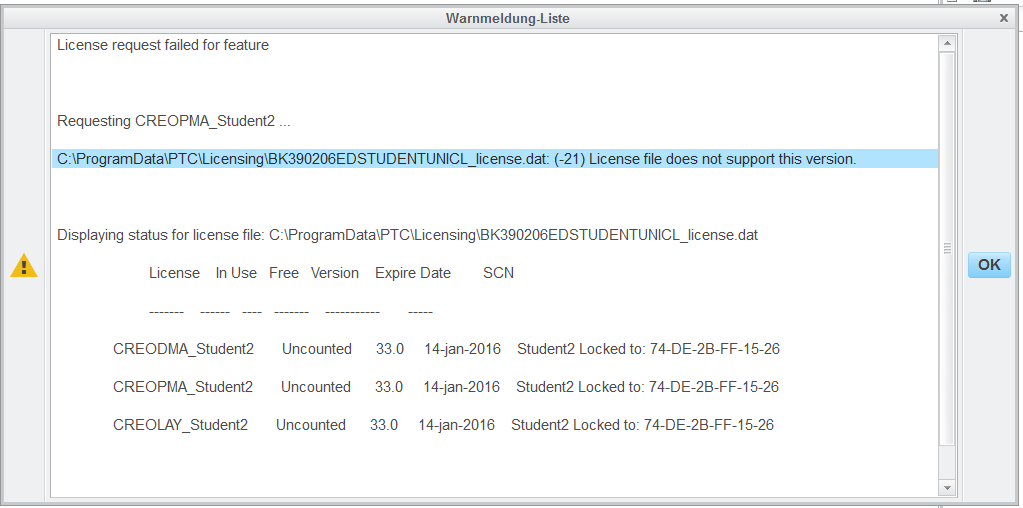
Unbenannt.PNG

I opened the license file on C:\ProgramData\PTC\Licensing and saw, that this license was for Creo 2.0 ?!?!
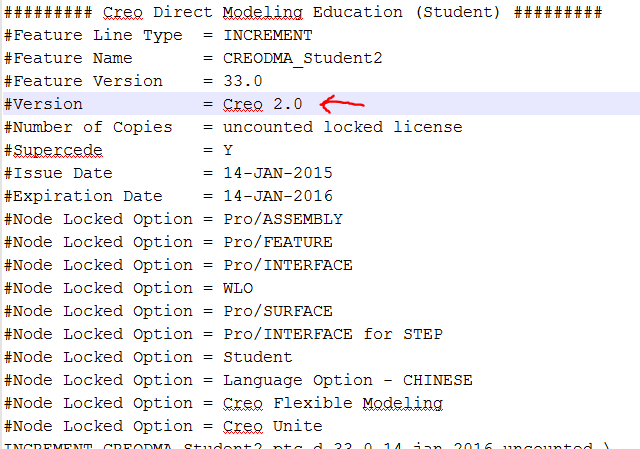
Unbenannt1.PNG

The license file was created automatically during the installation process, and there was a success message.

    3 replies

    1-Visitor
    July 15, 2017

    Same issue here !

    1-Visitor
    July 28, 2017

    Same issue here !

    內置圖片 1

    1-Visitor
    January 9, 2018

    I have the same issue

    Installed creo 4 and got a license file for Creo 3 !!! 🙂

    24-Ruby III
    January 9, 2018

    Hi,


    1. remove all license files from C:\ProgramData\PTC\Licensing directory
    2. uninstall all pieces of Creo 4.0
    3. launch setup.exe and install Creo 4.0 once again
    4. use one of following Product codes

    K-12       students can use Product code BE410708EDSTUDENTEDK12
    University students can use Product code BK410705EDSTUDENTUNICL

    1-Visitor
    July 7, 2018

    Hi MartinHanak,


    I'm having the same issue. trying to install Creo 5.0 Academic getting the below error using the Product code BK410705EDSTUDENTUNICL and BE410708EDSTUDENTEDK12 both. The file shows Creo 4.0 as version. screenshots below. Please help I'm trying this for last 2 days and getting very frustrated


    CreoError.PNG


    CreoLicense.png