1-Visitor
December 3, 2020
Solved

Please Help me with this bug - Integral functions and plotting

  • December 3, 2020
  • 1 reply
  • 5484 views

Hi all, I am new to MathCAD and i can just not figure out this bug. 

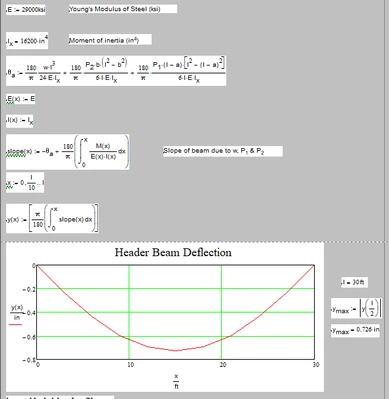
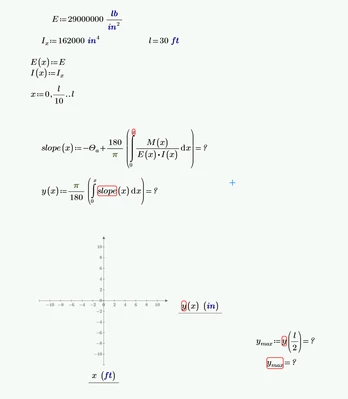
I am trying to plot a chart for beam deflection on prime4. I am using an old mathcad15 sheet as a reference and the cad 15 sheet calculates it fin so this should work but I cannot figure out why it's giving me an error. 
 

PH_9740325_0-1607014677259.png

PH_9740325_1-1607014724267.png


Best answer by Fred_Kohlhepp

I need to point out that both of you have run afoul of the "English Units" tribulation.


"lb" is a unit of mass.  We're dealing with forces (lbf)


Attached is Werner's sheet modified (sorry Werner) to correct unit issues (including degrees.)


I only have Express, if opened in full Mathcad it should calculate properly.

1 reply

25-Diamond I
December 4, 2020

Even though Prime would accept its its bad math to use the same variable as limit and variable of integration like in

Werner_E_1-1607042984565.png

But as Prime is unit aware, you must even add the unit to a value of zero. This is different to real Mathcad which uses static unit checking. So a correct approach would be something like

Werner_E_2-1607043053204.png

Doing this consequently gives you

Werner_E_3-1607043416113.png

BTW, you should Prime let do the conversion from radian to degree and vice versa for you. There is a predefined constant/unit factor "deg" which is pi/180.


1-Visitor
December 4, 2020

Ok, so it is still telling me that the variables are undefined. 

I don't see how this could be the case. 

PH_9740325_0-1607044547088.png


25-Diamond I
December 4, 2020

This is probably because you still have defined E:=E(x) and so you overwrite the variable E (which is used in the integral) with the function of the same name.

Either delete the definition of E(x) as I did or use E(xi) in the integral.

If thats not the problem, you'll have to attach your modified worksheet


I just saw your question in the other thread and that you had attached your modified worksheet.

The problem was an error in Primes auto-labelling. Some x and xi were labelled differently (and so were seen as different variables) and also the name "slope" in the integral for y(x) had a different label and the y errenously was labelled as "function" and not as "variable". Wrong autolabelling often occurs in Prime and is very nasty and annoying - most often it occurs when expressions are edited and simply retyping them from scratch often is quicker then looking for which name is labelled wrong.

Another error was that you forgot to add the length unit to the lower limit of the integral for M(x).

Next error was that you typed numeric evaluations (=) after the definition of the functions "slope" and "y". You can't do that - what kind of result do you expect from f(x):=x^2=...? So those equal signs must be deleted.

I also modified the function V(x) (replaced x=l by x>=l in the last if-statement) - reason is that the function should return a value for every possible input x even though you later avoid to call it with valued higher than l.


I attach the working sheet (Prime 6 format).