
1-Visitor
December 14, 2015
Solved

Placement disappeared

  • December 14, 2015
  • 4 replies
  • 35125 views

Hello!


Im from germany, so please don't mind my bad english 🙂

I've got a problem with Creo Parametric 3.0 on Windows 10 (64bit)

The last weeks Creo works fine, but today I grabed accidentally my "Platzierung/Placement" button and now all the parameters disappeared.
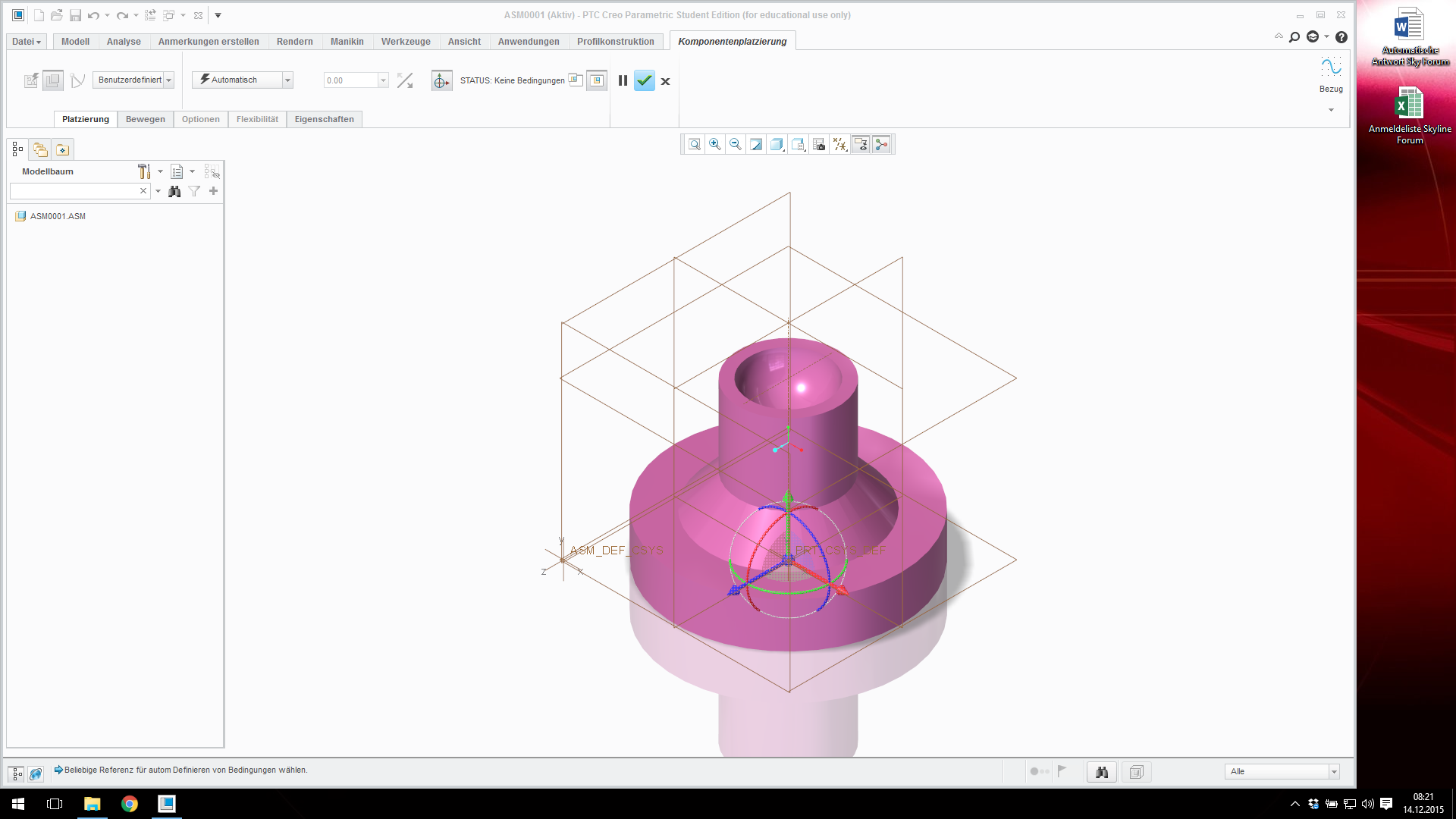
Screenshot 2015-12-14 08.21.20.png

I can't do any new placements now.

I already restart the system 2 times and completly reinstalled my Creo Software. The other buttons (Bewegung/move) working fine!

The only thing I can do is "Alt +Tab" to make the Placement window visible, but I can't change anythink because when I click on it, it disappears again.


Thanks a lot for your help, and have a nice day!

Best answer by Mahesh_Sharma

Thorsten,

I have seen this problem in the past and those were due to corrption in cache folder, rename .wf folder (default location for that is in C:\Users\%username%\AppData\Roaming\PTC\ProENGINEER\Wildfire) and restart Creo. I hope this will help you.

4 replies

22-Sapphire I
December 14, 2015

Thorsten,

I have seen this problem in the past and those were due to corrption in cache folder, rename .wf folder (default location for that is in C:\Users\%username%\AppData\Roaming\PTC\ProENGINEER\Wildfire) and restart Creo. I hope this will help you.

24-Ruby III
December 15, 2015

Hi,

I guess that you disconnected Placement dialog from its tab. This is new functionality available in Creo Parametric 3.0.

How to disconnect tab:

  1. place mouse cursor on Placement tab
  2. press and hold left mouse button
  3. move dialog box into requested location
  4. release left mouse button

How to connect tab:

  1. click Placement tab, Placement dialog appears
  2. place mouse cursor on Placement dialog title
  3. press and hold left mouse button
  4. move dialog box into Placement tab
  5. release left mouse button

You can also delete PTC subdirectory located in %APPDATA% directory.

MH

1-Visitor
June 18, 2018

Hello Martin,

i have tthe same problem, but i lost the properties and placement tab off screen, so i can't left-click on them to reconnect the to their main position. what can i do?

Thanks

23-Emerald III
July 13, 2020

@CTool 

Did you try the "Reset Panels Position" is available under File > Options > Window Settings "Reset Panels Position" mentioned below.


1-Visitor
December 15, 2015

Hey there!

Thanks for your answers!

I've found my fault. Shure I disconnected it, but I never found the new window, that was the big Problem MartinHanak. The window was lost.

Now I've found the window on my disabled second screen. Im using 2 screens and the last days I didn't need it. Today I turned it on and there I found my lost placement window.

But thanks for the information with the AppData Folder! Maybe it will be helpfull in the future 😉

22-Sapphire I
December 16, 2015

In such cases other option can be used to rest the position of panels. Option "Rest Panels Position" is available under File > Options > Window Settings "Rest Panels Position".

1-Visitor
October 23, 2018

 Thank you MaheshSh.  To add to your answer, I did find that the File -> Options -> Windows settings is inactive while you are in the feature and notice the window panel missing but cancel the feature and you can make the reset while in the main part/assembly. 

1-Visitor
March 7, 2022
  1. file 
  2. options 
  3. window settings 
  4. Resume display of dialog box 
  5. Reset panel's position
  6. Restore defaults 
  7. OK