
18-Opal
March 10, 2016
Question

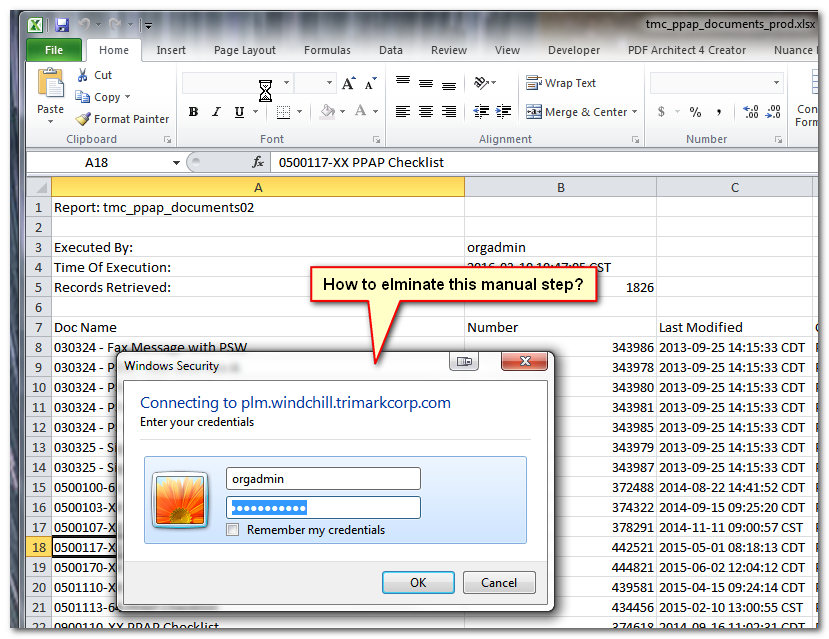
How to automatically pass log on credentials in an Excel report?

  • March 10, 2016
  • 1 reply
  • 8703 views

Hi Y'all,


I have an Excel spreadsheet that calls a Windchill report and I want to have it automatically refresh everytime it is opened with no user interaction.   Anyone do this before?


-marc


20160310-160504.png

1 reply

mdebower18-OpalAuthor
18-Opal
March 16, 2016

I guess I get to answer my own question.  More points for me!! 

After much searching and trial and error I ran across the solution here: http://stackoverflow.com/questions/22149169/how-to-pass-authentication-credentials-in-vba

20160316-135529.png

Place the following code in the ThisWorkbook section in the VBAProject in Excel.  Change to point to your server and also use a valid username and password.

Private Sub Workbook_Open()

With CreateObject("Microsoft.XMLHTTP")

  .Open "GET", "https://your.windchill.server.com/Windchill/app", False, "username", "password"

  .Send

End With

ActiveWorkbook.RefreshAll

End Sub

Note that the username and password will be stored in cleartext in the VBS project.  To mitigate this  create or use an account with read only privileges.

21-Topaz I
March 16, 2016

Nice Marc.

Will users be given a copy of the excel file for their own use?  Or is this just for your use.  And what about login/password credential security?  Couldn't someone get that information?  The problem with the read-only rights is typically you have to have admin rights to make that change.

21-Topaz I
March 17, 2016

You put some thought into it.  I'm no security export expert and I don't know of any better way.  I just wanted to bring up some thoughts.

Edit: I just can't type and proofread lately.