
18-Opal
March 10, 2016
Question

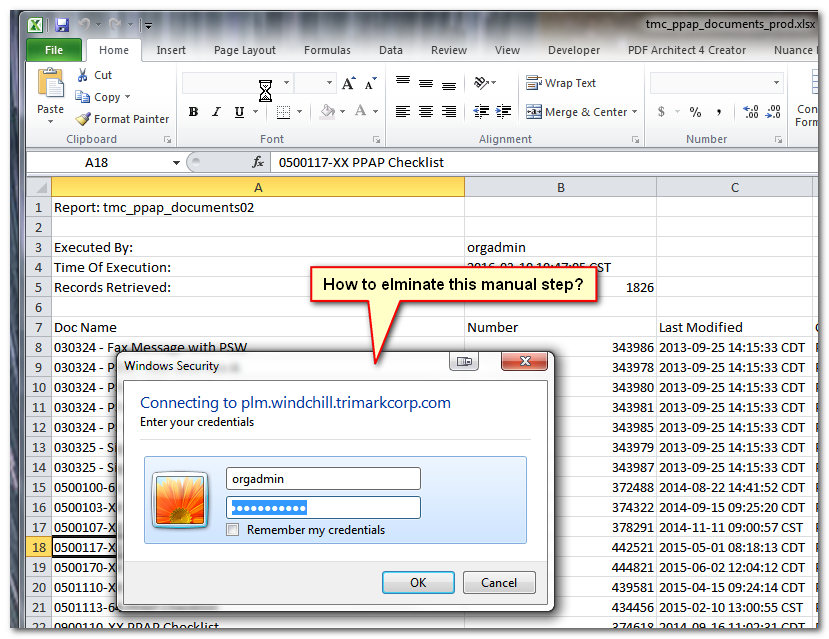
How to automatically pass log on credentials in an Excel report?

  • March 10, 2016
  • 1 reply
  • 8696 views

Hi Y'all,


I have an Excel spreadsheet that calls a Windchill report and I want to have it automatically refresh everytime it is opened with no user interaction.   Anyone do this before?


-marc


20160310-160504.png

1 reply

mdebower18-OpalAuthor
18-Opal
March 16, 2016

I guess I get to answer my own question.  More points for me!! 

After much searching and trial and error I ran across the solution here: http://stackoverflow.com/questions/22149169/how-to-pass-authentication-credentials-in-vba

20160316-135529.png

Place the following code in the ThisWorkbook section in the VBAProject in Excel.  Change to point to your server and also use a valid username and password.

Private Sub Workbook_Open()

With CreateObject("Microsoft.XMLHTTP")

  .Open "GET", "https://your.windchill.server.com/Windchill/app", False, "username", "password"

  .Send

End With

ActiveWorkbook.RefreshAll

End Sub

Note that the username and password will be stored in cleartext in the VBS project.  To mitigate this  create or use an account with read only privileges.

21-Topaz I
March 16, 2016

Nice Marc.

Will users be given a copy of the excel file for their own use?  Or is this just for your use.  And what about login/password credential security?  Couldn't someone get that information?  The problem with the read-only rights is typically you have to have admin rights to make that change.

mdebower18-OpalAuthor
18-Opal
March 16, 2016

Thanks Steve.

The spreadsheets will actually be used as input into our SQL database that drives an internal webpage.  Not the best way to connect data silos, but you cant beat the price!  So this will limit the exposure to the credential information, because the files will be stored on our web server with very limited user access.

The other thing I did to mitigate the exposure is I created a special user account just to use for these reports,  we already have 6 or 7 and I can see it growing in the future so it made sense to create an account.  This report maker account is limited to view only or Guest privileges.  If someone was to gain access, they could still look around and in some contexts download files, but couldn't make any changes.  Again, not the best solution, but workable.

If there are better ways to implement this, I would love to hear them...   Always open to better ways of doing things.