
16-Pearl
October 6, 2017
Question

Toggling a toggle button with another toggle button

  • October 6, 2017
  • 1 reply
  • 4473 views

Hi All,

I'm having a bit of fun with toggle buttons and was wondering if anyone can wee what I'm doing wrong.

I have two toggle buttons - Toggle A which is pressed and Toggle B which is unpressed.  I want to set the experience so that when Toggle B is pressed, Toggle A is unpressed and visa versa.

So I created a binding by dragging pressed for Toggle B onto Toggle A and selecting not pressed as shown:
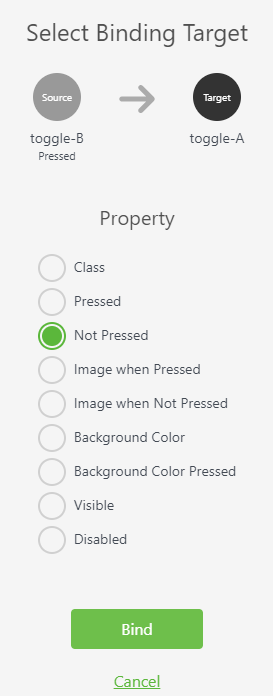
Clipboard01.png

But when I press Toggle B, nothing happens to Toggle A.  My ultimate goal is to have a number of buttons where pressing one will unpress all the others.  I could achieve the result I"m after with some Java, but I'd rather do it without having to code.  Am I missing something here?

Many thanks,

Allan

1 reply

1-Visitor
October 10, 2017

Try by using disable function or else write script for particular button like,

view.wdg['ButtonID']['pressed']=false;

16-Pearl
October 10, 2017

Thanks Rohit.

This disable function actually stops the button from functioning, but I want it to function, but get set to disabled.

I know that I can use Java to do it, as you've indicated, but I"m trying to do it without using Java, and from looking at the binding option that I've shown in my screenshot, it looks like it should be possible.

To me, it looks like a bug, but maybe I'm missing something.

Allan

15-Moonstone
October 30, 2017

Rohit,

you have missing $scope before view.wdg['ButtonID']['pressed']=false;


the string correct is

$scope.view.wdg['ButtonID']['pressed']=false;


Bye

Giuseppe