1-Visitor
May 15, 2018
Solved

change the color gauge 3D twx studio

  • May 15, 2018
  • 1 reply
  • 3458 views

hello, i have a question, is possible change the color of the gauge 3D with respect to value, for example if the value is 30 the color is green but if the value is 90 the color is red, is that possible? 


with the gauge 2d is possible using value min and max but in gauge 3D is possible?
Best answer by tmccombie

For more information on creating state definitions in ThingWorx, see the ThingWorx help center section: http://support.ptc.com/help/thingworx_hc/thingworx_8_hc/index.html#page/ThingWorx/Help/Composer/Visualization/StyleandStateDefinitions.html


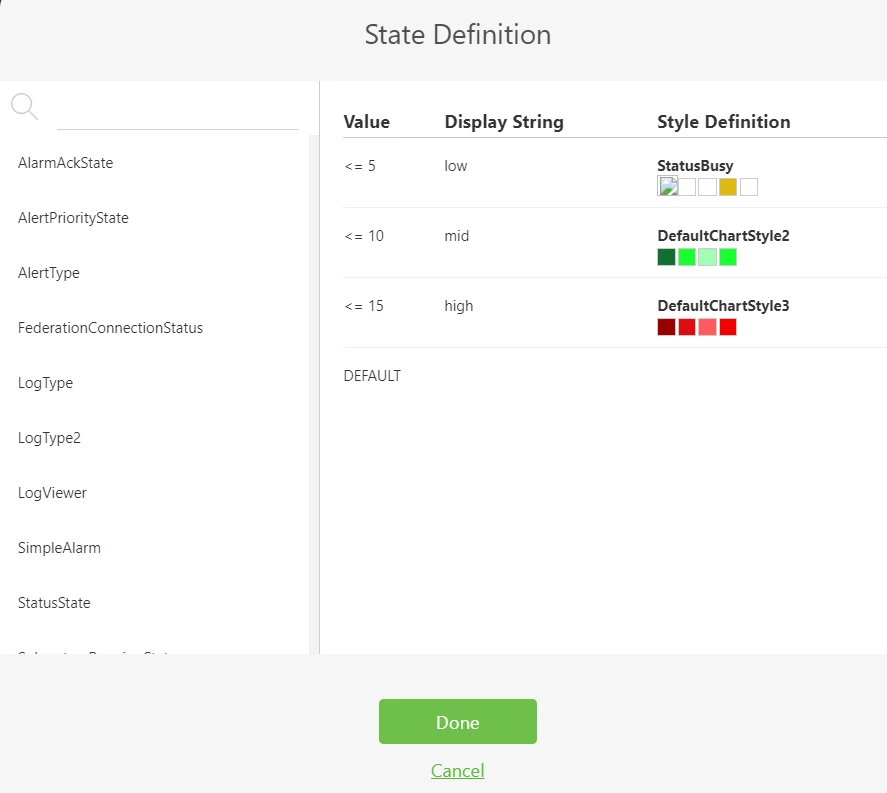
Once you have the state definition defined, you can select it within Studio. I created a state definition called 'TaraTest': StateDef.png


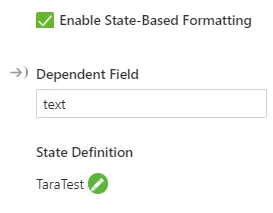
I chose the dependent field of the state definition to be the text field:

Definition.png


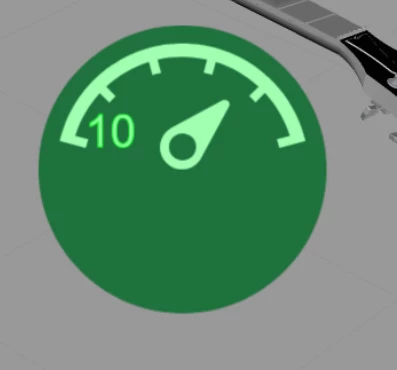
Now when I preview, the gauge shows green for a value of 10 based on my state definition:

Gauge.png

1 reply

21-Topaz I
May 15, 2018

You can use state based formatting for the 3d gauge. Check the "allow state based formatting" box within the gauge properties. You can then select the state definition you created within the connected ThingWorx instance. 

1-Visitor
May 16, 2018

do you have a example? thanks for the answer

tmccombie21-Topaz IAnswer
21-Topaz I
May 16, 2018

For more information on creating state definitions in ThingWorx, see the ThingWorx help center section: http://support.ptc.com/help/thingworx_hc/thingworx_8_hc/index.html#page/ThingWorx/Help/Composer/Visualization/StyleandStateDefinitions.html


Once you have the state definition defined, you can select it within Studio. I created a state definition called 'TaraTest': StateDef.png


I chose the dependent field of the state definition to be the text field:

Definition.png


Now when I preview, the gauge shows green for a value of 10 based on my state definition:

Gauge.png