
19-Tanzanite
August 4, 2023
Solved

Eclipse debug issue : Failed to connect to remote VM. Connection refused. Connection refused

  • August 4, 2023
  • 1 reply
  • 13023 views

Hi 


I'm following this guide to develop a custom extension - ThingWorx Extension Development Guide (ptc.com)


When I try to debug an extension from Eclipse I'm getting the below error
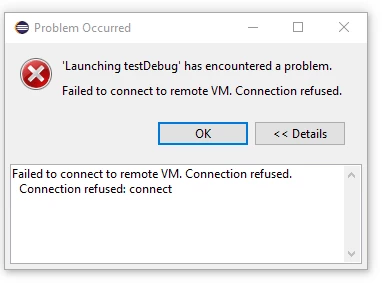
 

Velkumar_0-1691154400377.png


I have added the below Java options in tomcat

-agentlib:jdwp=transport=dt_socket,address=*:8000,server=y,suspend=n


Tomcat Service :

[Unit]
Description=Tomcat 9 servlet container
After=network.target

[Service]
Type=forking

User=tomcat
Group=tomcat

Environment="JAVA_HOME=/usr/lib/jvm/jdk-11.0.11"
Environment="JAVA_OPTS=-agentlib:jdwp=transport=dt_socket,address=*:8000,server=y,suspend=n -Djava.security.egd=file:///dev/urandom -Djava.awt.headless=true"

Environment="CATALINA_BASE=/opt/tomcat/latest"
Environment="CATALINA_HOME=/opt/tomcat/latest"
Environment="CATALINA_PID=/opt/tomcat/latest/temp/tomcat.pid"
Environment="CATALINA_OPTS=-Dserver -Dd64 -XX:+UseG1GC -Dfile.encoding=UTF-8 -Djava.library.path=/opt/tomcat/latest/webapps/Thingworx/WEB-INF/extensions"

ExecStart=/opt/tomcat/latest/bin/startup.sh
ExecStop=/opt/tomcat/latest/bin/shutdown.sh

[Install]
WantedBy=multi-user.target


Could some one help me with this


Thanks in advance


/VR
Best answer by Velkumar

Hi @VladimirRosu_116627 


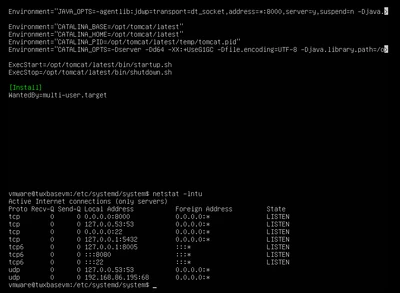
Thanks for your support. Port 8000 is open in Linux

Velkumar_0-1691470436533.png


It started to work after restarting the machine. I think we need to restart the machine once we make changes to the tomcat service.


/VR

1 reply

24-Ruby III
August 5, 2023

Article - ""Failed to connect to remote VM. Connection refused." error": https://www.ptc.com/fr/support/article/cs349804

Velkumar19-TanzaniteAuthor
19-Tanzanite
August 6, 2023

Hi @VladimirN 


Thanks for sharing. Is this also applicable to Thingworx?


/VR

19-Tanzanite
August 7, 2023

That article is not applicable for ThingWorx - @VladimirN fyi


@Velkumar the main reason you might encounter this is because that socket is not accessible from where you installed Eclipse.

To diagnose this, you should send a couple more details:

1. Is the ThingWorx server you're trying to connect to hosted on your local machine, or on a cloud server? If you're hosted on your local machine, make sure the firewall accepts incoming requests on 8000 (I don't know for sure if firewall applies or not to requests originating from your local machine, that's why this suggestion). If you're hosted on cloud, verify with your provider if it can accept TCP requests on that port (there are appliances that for example only forward HTTP requests, and can't do pure TCP; also, maybe because of security reasons, they might only allow as incoming ports the HTTP ones, at which stage you're really blocked.)


2. If you're localhost, can you check if the port is in waiting mode after you started ThingWorx? Meaning: are you really sure that those settings resulted in that port being opened? And check the port also before you start tomcat - maybe there's another program listening on it?