
1-Visitor
December 19, 2016
Solved

FAIL - Application at context path /Thingworx could not be started

  • December 19, 2016
  • 2 replies
  • 18957 views

I've been trying to install Thingworx 7.2.4

Java - 1.8.0_112

Apache tomact - 8.033

postgres 9.4.10.1

After deploying Thingworx.war in webapps, when I start the server, Thinworx is not starting.

I get error message FAIL - Application at context path /Thingworx could not be started


I've attached apache logs along with post.
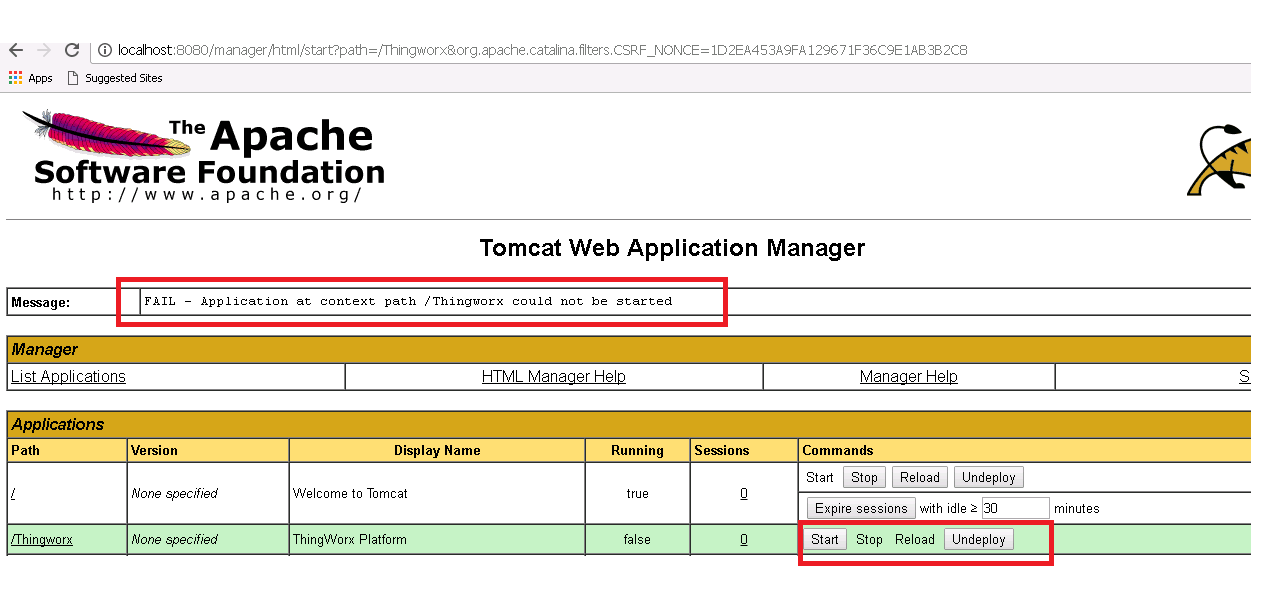
thingworx_start_error.png

Message was edited by: Siddharth Patel Attached tomcat and thingworx logs

Best answer by posipova

I see

2016-12-20 19:24:28.303+0530 [L: ERROR] [O: c.t.p.p.PostgresDocumentModelDriver$SystemDocumentModelInformation] [I: ] [U: SuperUser] [S: ] [T: localhost-startStop-1] Platform being shut down because System Ownership can not be acquired.

Please refer to the following document Frequently Seen Errors upon launching the Thingworx application:, "this type of error points at the security/permission issue. As all of the installation operations should be performed by a root/Administrator role, the following points should be verified.."

Try to:

  • Ensure both Tomcat and ThingworxPlatform folders have relevant read/write permissions
  • The title and contents of the configuration file in the ThingworxPlatform folder has changed from 6.x to 7.x
    • Check if the right configuration file is in the folder
  • Verify if the name and password provided in this configuration file matches the ones set in the Postgres DB
  • Run the Database cleanup script, and then set up the database again.
  • Assigning read/write permissions to everyone user group to fix the script execution and then execute the batch file:
    • Right-click on ‘ThingworxPostgresStorage’ directory -> Share with -> specific people.
    • Select drop-down, add everyone group and update the permission level to Read/Write.
    • Click Share.
    • Executing the batch file as admin.

2 replies

20-Turquoise
December 19, 2016

Instead of deploying through the Tomcat manager browser page, turn the tomcat off, go to the folder where your tomcat is installed and drop (copy and paste) the Thingworx.war file in the "webapps" directory.  Make sure there is no Thingworx already installed/deployed in that folder. IF there is - delete it beforehand. Once you copy the .war file into that directory, start the Tomcat and it will unpack the .war accordingly.

spatel-211-VisitorAuthor
1-Visitor
December 20, 2016

Hi Polina,

Thanks for your reply.

I've already tried that. Infact I tried uninstalling the complete thing and reinstalling it, just to see if I get some different result.

- Siddharth

posipova20-TurquoiseAnswer
20-Turquoise
December 20, 2016

I see

2016-12-20 19:24:28.303+0530 [L: ERROR] [O: c.t.p.p.PostgresDocumentModelDriver$SystemDocumentModelInformation] [I: ] [U: SuperUser] [S: ] [T: localhost-startStop-1] Platform being shut down because System Ownership can not be acquired.

Please refer to the following document Frequently Seen Errors upon launching the Thingworx application:, "this type of error points at the security/permission issue. As all of the installation operations should be performed by a root/Administrator role, the following points should be verified.."

Try to:

  • Ensure both Tomcat and ThingworxPlatform folders have relevant read/write permissions
  • The title and contents of the configuration file in the ThingworxPlatform folder has changed from 6.x to 7.x
    • Check if the right configuration file is in the folder
  • Verify if the name and password provided in this configuration file matches the ones set in the Postgres DB
  • Run the Database cleanup script, and then set up the database again.
  • Assigning read/write permissions to everyone user group to fix the script execution and then execute the batch file:
    • Right-click on ‘ThingworxPostgresStorage’ directory -> Share with -> specific people.
    • Select drop-down, add everyone group and update the permission level to Read/Write.
    • Click Share.
    • Executing the batch file as admin.
20-Turquoise
December 20, 2016

Great! I saw the logs were attached 20 minutes ago, didn't realize it's already been resolved in between.

5-Regular Member
December 20, 2016

Yeah actually he have a case opened with me and while sorting some settings we noticed that his Apache Tomcat won't come up let alone ThingWorx - but he now confirmed over email that at least that is starting up - checking up with him on the ThingWorx now. But indeed he do have issues with the access being denied while editing or copying files around on the drive where ThingWorx is being installed.

spatel-211-VisitorAuthor
1-Visitor
December 21, 2016

Hi Sushant,

With the updated platform-settings file, I'm able to start Tomcat server. However the Thingworx application is still not getting started.

- Siddharth