1-Visitor
April 27, 2020
Solved

Grid view with merge headers

  • April 27, 2020
  • 2 replies
  • 2800 views

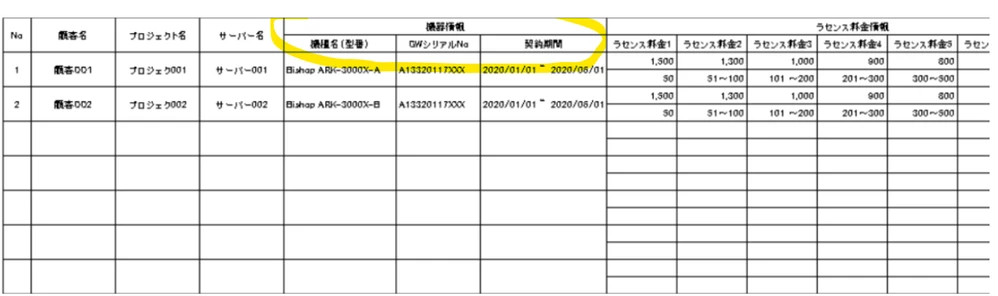
I've currently have a task to create a grid view with sub headers like a picture bellow. I've struggled with this for few days but haven't got any clue to custom girdview header like this. Can anyone give me any ideas to handle that. Thanks alot!Annotation 2020-04-27 102319.png

Best answer by Constantine

Hello @quangnguyenduc4,


I can suggest four alternatives, all of which are bad, but in different ways:

  1. Wait for PTC to implement this merging;
  2. Customize Advanced Grid widget or implement your own grid from scratch;
  3. Collection widget in "Table" mode might be able to help;
  4. Create a service returning a table as HTML and render it using HtmlTextArea widget;
  5. Export data to Excel and group cells on POI level (you'll need to write a custom Java extension for that too);

All of those options (except for (1)) are either just ugly or complex and ugly. Option (4) will probably bring you the highest value in the long-term perspective, but it requires some development. At least, that's what I usually do when the users need some advanced grid operations (grouping, merging, filtering, formatting, etc.) -- then I just say "You will use web interface to preview the data, and you'll be able to click "Export to Excel" to get the actual grid".


Regards,
Constantine

2 replies

1-Visitor
April 27, 2020

I don't think you will be able to do nothing like this with the standard neither with the advanced (https://marketplace.ptc.com/apps/247648/grid-advanced---version-421#!overview) grid widget.

18-Opal
April 27, 2020

Hello @quangnguyenduc4,


I can suggest four alternatives, all of which are bad, but in different ways:

  1. Wait for PTC to implement this merging;
  2. Customize Advanced Grid widget or implement your own grid from scratch;
  3. Collection widget in "Table" mode might be able to help;
  4. Create a service returning a table as HTML and render it using HtmlTextArea widget;
  5. Export data to Excel and group cells on POI level (you'll need to write a custom Java extension for that too);

All of those options (except for (1)) are either just ugly or complex and ugly. Option (4) will probably bring you the highest value in the long-term perspective, but it requires some development. At least, that's what I usually do when the users need some advanced grid operations (grouping, merging, filtering, formatting, etc.) -- then I just say "You will use web interface to preview the data, and you'll be able to click "Export to Excel" to get the actual grid".


Regards,
Constantine

18-Opal
April 27, 2020

I forgot to mention another option, which also works well for some of my customers -- embed some BI solution like Tableau or QlikView in a mashup and move all grids (and data visualization) there.

1-Visitor
April 27, 2020

Hi Constantine,


I'm curious in this option (embed BI), how easy to query TW services and alike from thouse BI tools it's? or you have to build especial connectivity services and alike?