
1-Visitor
March 30, 2020
Solved

How to customize progress gauge

  • March 30, 2020
  • 1 reply
  • 2485 views

Hi everyone!


I am starting with ThingWorx and I would like to know how can I customize the progress gauge widget like the example below? For example: What is settings options I have to change to do it work well?
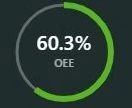
 

progress gauge eg.jpg


Regards

Best answer by cmorfin

Hi @einsfeldleins 


You can also use a image as a background with the circle and make the gauge background transparent.

I have attached some entities that shows this...it is a bit rough but that should give you the idea.


Christophe

1 reply

19-Tanzanite
March 30, 2020

Hi @einsfeldleins 


You can have the background same colour inside and outside the gauge by configuring the backgorund colour of GaugeStyle and GaugeFaceStyle to the same colour.


However I don't think you can have the grey circle that complete the 100% in the middle of the value progress. You can use the outer line for that but it will be on the outside of the progress value bar, not in the middle.


Regards

Christophe


1-Visitor
March 30, 2020

Hi @cmorfin 


Thanks for your answer.


So, maybe to that example above:


Do you think that widget was created and no customize?

cmorfin19-TanzaniteAnswer
19-Tanzanite
March 31, 2020

Hi @einsfeldleins 


You can also use a image as a background with the circle and make the gauge background transparent.

I have attached some entities that shows this...it is a bit rough but that should give you the idea.


Christophe