
Solved
How to display the SQL query into LED and Gauge Widget
I am trying to get one SQL query into the LED widget and another SQL query into the Gauge Widget. I am unable to do the bindings from the MSSQL connection thing to the Mashup.

I am trying to get one SQL query into the LED widget and another SQL query into the Gauge Widget. I am unable to do the bindings from the MSSQL connection thing to the Mashup.
Hello,
What you have in your screenshot is just that the loaded event of your mashup is triggering the "GetProperties" service of your DB connection thing.
You want something similar to this:

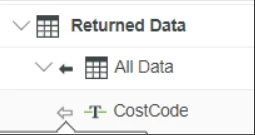
Although as previously described, if you only want to use one row, and show it in a LED or Gauge widget, then you can not use an infotable binding and should instead use the row value of the infotable as shown before:
I'm not sure if this "GetProperties" is the out of the box service that many things have. If that is the case, it might not work for what you are trying to do.
Instead you want to make your own service.
Here are some resources you can use to get you on your way to create your own services:
PTC Help center - Creating, Implementing, and Testing Services
PTC IoT Tips - Implement Services, Events, and Subscriptions
PTC IoT Tips - Working with External Databases
Hope this helps.
Regards,
Jens
Enter your E-mail address. We'll send you an e-mail with instructions to reset your password.