
1-Visitor
September 27, 2018
Solved

How to make a proportional chart

  • September 27, 2018
  • 1 reply
  • 2091 views

Hello everyone,


In this time I have a question about Proportional Chart widget.
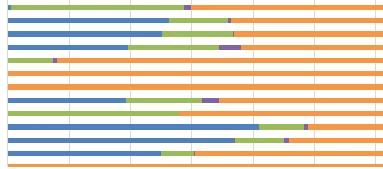
 

screen2.PNG

I'm trying to do something like the picture, but I have no idea how to do it. I think I have to use a Proportional Chart Widget, but no matter how much I change the properties, I can't make a chart like that.


I take data from a Infotable.


ID, Number1, Number2, SumTotal

1,5,5,10

2,7,3,10

3,6,4,10


What is the correct way to do it?


Thanks,

Luis

This topic has been closed for replies.
Best answer by mnarang

Not sure about the attached screen shot of the chart but If you want to take this data to proportional chart .You can simply bind this data which will be coming out of a service as an infotable . So there are option for binding the data in proportional chart as a data source .So if you need to display 4 different variable values in the chart you need to bind that much data sources to the chart .So for first time if you bind it will be data for second time it will be data source 1 and so on .First of all uncheck the single data source property and in the number of series mention the number of data sources you want to bind like for example if i want 4 data sources then it will be 4 .After binding all the data sources you will see those number of data sources coming in the property section .Select data field from the drop down for each data source in the property section and save the mashup and view it .


Thanks ,

Mukul Narang

1 reply

mnarang5-Regular MemberAnswer
5-Regular Member
September 27, 2018

Not sure about the attached screen shot of the chart but If you want to take this data to proportional chart .You can simply bind this data which will be coming out of a service as an infotable . So there are option for binding the data in proportional chart as a data source .So if you need to display 4 different variable values in the chart you need to bind that much data sources to the chart .So for first time if you bind it will be data for second time it will be data source 1 and so on .First of all uncheck the single data source property and in the number of series mention the number of data sources you want to bind like for example if i want 4 data sources then it will be 4 .After binding all the data sources you will see those number of data sources coming in the property section .Select data field from the drop down for each data source in the property section and save the mashup and view it .


Thanks ,

Mukul Narang