
1-Visitor
September 22, 2016
Question

Issue with PostgreDBSetup

  • September 22, 2016
  • 4 replies
  • 4709 views

Hi,

I'm trying to install Thingoworx 7.1 and I have installed postgreSQL 9.4.8.1 that i got along with the installer and the Database user login was also created as twadmin.

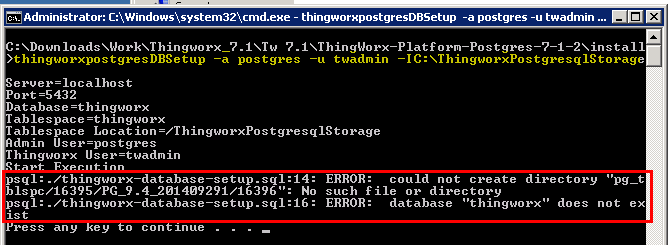
When i configure and execute the thingworxPostgresDBSetup.bat script, i end up with the below error

I had highlighted the way i execute the scrip in yellow colour. I had also attached the batch file that I'm executing in this post. Can someone help me out?

Thanks in advance!

Amarkarthi.
4 replies

5-Regular Member
September 23, 2016

Hi Arasan,

Here are below some basic troubelshooting tips when installing Postgresql DB for ThingWrox. I hope this helps:

  • Ensure 'ThingworxStorage', 'ThingworxPlatform' and 'ThingworxPostgresqlStorage' folders are created
  • The folders have to be present in the root directory unless specifically changed in any configurations
  • Recommended to grant sufficient privileges (if not all) to the database user (twadmin)
  • Note: While running the script in order to create a database, if a schema name other than 'public' is used, the "search_path" in "postgresql.conf" must be changed to reflect 'NewSchemaName, public'
  • Grant permission to user for access to root folders containing 'ThingworxPostgresqlStorage' and 'ThingworxPlatform'
  • The password set for the default 'twadmin' in the pgAdmin III tool must match the password set in the configuration file under the ThingworxPlatform folder

Best Regards,

Amine

aarasan-21-VisitorAuthor
1-Visitor
September 27, 2016

Hi Mohamed,

Thanks for your reply.

Can you please elaborate what do you mean by the below line?

  • Ensure 'ThingworxStorage', 'ThingworxPlatform' and 'ThingworxPostgresqlStorage' folders are created

I have installed just the Postgresql in the default location which got installed into C:\Prgoramfiles\postrgresql\ and I created a directory in the name 'ThingworxPostrgresqlStorage' in the root of C drive and given all permissions.

Should i create the other 2 directories as well?

Thanks in advace!!

20-Turquoise
February 23, 2017

Hi,

Please see this document for some possible solutions: Frequently Seen Errors upon launching the Thingworx application:

1-Visitor
February 23, 2017

hi,

please  open your thingworxPostgresDBSetup.bat file and replace tablespace_location to your real location。

such as:

SET tablespace_location=E:/ThingworxPostgresqlStorage

then clean your old operation and double click thingworxPostgresDBSetup.bat。

Best Regards,

zero

1-Visitor
June 9, 2017

1. Give all permission to the folder (C:\ThingworxPostgresqlStorage)

permission.png

2. Use the following command below:

  thingworxpostgresDBSetup.bat -a postgres -u twadmin -l C:\ThingworxPostgresqlStorage

command.png

3. Result:

result.png

1-Visitor
June 16, 2017

Do you make a directory (ThingworxPostgresqlStorage)?