

pshashipreetham
18-Opal
18-Opal
December 25, 2021
Solved

Line Chart Padding Issue

  • December 25, 2021
  • 3 replies
  • 3463 views

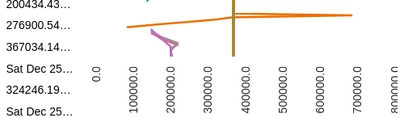
Placed a Line Chart on the Mashup, as soon as Chart Plotted, the chart is not getting placed properly on the dashboard.
May be this is due to the Padding issue. The Line chart on the dashboard is something like this:
psp316r_0-1640471355328.png


 How Can Padding properly set for the Line Chart.
 
@paic @slangley @c_lowy @VladimirN 

Thanks,
Shashi

Best answer by pshashipreetham

The issue is solved by the CSS provided by @c_lowy .

ptcs-chart-line::part(chart-layout) {
padding: 0;
}
If there are 2 or more DataSources given to the Line chart,
1. Enable the Multiple Data source Visualization option in widget properties, and
2. Connect to the 2 or more Data Sources to chart widget again.
3. Select the X Axis as TimeStamp(in my case)

Thanks,
Shashi

3 replies

5-Regular Member
December 27, 2021

Hi @pshashipreetham , 


Kindly check the below attached article:

https://www.ptc.com/en/support/article/CS343992?posno=1&q=line%20chart%20padding&source=search


Revert back in case of further challenges. 


Regards

Bhawna

pshashipreetham
18-Opal
18-Opal
December 27, 2021

Hi @bchaudhary_448008 ,

tried the article, didn't help. The Picture in the issue posted is after trying out the article you have shared.

Thanks,
Shashi.

17-Peridot
December 29, 2021

@pshashipreetham


Have you provided values for the properties "XAxisMaxmumValues", "XAxisMinimumValues", "YAxisMaximumValues" and "YAxisMinimumValues". These properties can be bound to services if the X Axis values change based on other issues.


Hope this helps.


12-Amethyst
December 29, 2021

make the container fixed height


pshashipreetham
18-Opal
18-Opal
December 30, 2021

Hey Hi @GuruPrasad1 ,

Didn't get you, can you show a example ?

Thanks,
Shashi.

12-Amethyst
December 30, 2021

Hi Shashi,

Usually this happens when the container in which your are placing the chart is responsive, if you instead choose a fixed length and give a value say 500px this would appear better. This settings you can find in the layout tab am attching


GuruPrasad1_2-1640867377075.png


GuruPrasad1_0-1640867292113.png


Regards

Guruprasad S


pshashipreetham
18-Opal
pshashipreetham18-OpalAuthorAnswer
18-Opal
January 8, 2022

The issue is solved by the CSS provided by @c_lowy .

ptcs-chart-line::part(chart-layout) {
padding: 0;
}
If there are 2 or more DataSources given to the Line chart,
1. Enable the Multiple Data source Visualization option in widget properties, and
2. Connect to the 2 or more Data Sources to chart widget again.
3. Select the X Axis as TimeStamp(in my case)

Thanks,
Shashi