1-Visitor
June 1, 2020
Solved

display only 2 pages for pagination widget

  • June 1, 2020
  • 1 reply
  • 5098 views

Hi ,

I have 16 pages and it displays 1 to 5 and then the 16th page no. on my screen.But I want to display only two nos and the next and previous button .I can do that for two pages,how do I do it when I have 16 pages?

for eg: I want " previous 5, 6,next "

instead of   "previous 1,2,3,4,5 ...16,next .

please check images for better understanding.

@pagination.JPG   This is what i want when i have 16 pages

 

16pagination.JPG but this is how it displays

Best answer by TravisPickett

You will have to write some custom CSS to modify what is displayed for the paging widget.  Since there is not a custom CSS property for the paging widget you will have to specify the custom class on a parent container.  For the following code I put the custom class on the parent container

  1. Create a Custom Class ( hideExtraPages )
  2. Custom CSS
    /* Hide the | from the paging controls */
    .hideExtraPages .widget-paging .page-controls{
     visibility: hidden;
    }
    
    /* Make the other page controls visible*/
    .hideExtraPages .widget-paging .page-controls a, span{
     visibility: visible;
    }
    
    /* Hide the extra page displays */
    .hideExtraPages .widget-paging span.items-label, a.pagingcontroller, span.previous-ellipsis, span.next-ellipsis {
     display: none;
    }
    
    /* Show the Previous Page Button, Next Page Button, Next page number */
    .hideExtraPages .widget-paging a.previous-page, a.next-page, span.current-page + a {
     display: inline;
    }​
     

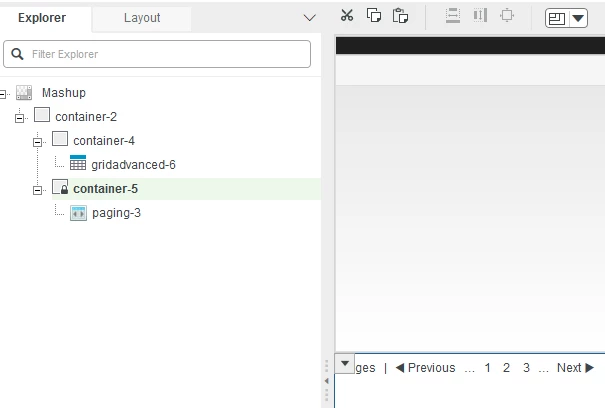
Sample Composer View: ( hideExtraPages is set on Container-5)

composer_view.png


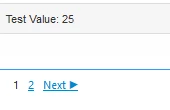
Sample Mashup View:

mashup_view.png

1 reply

12-Amethyst
June 2, 2020

Are you using the OOTB widget that is part of Manufacturing apps or Service Apps?  If so can you please let me know what version you are using.

alenaromi1-VisitorAuthor
1-Visitor
June 4, 2020

No,its is an existing widget .I am using the latest version of thingworx,8.5.x.

12-Amethyst
June 12, 2020

You will have to write some custom CSS to modify what is displayed for the paging widget.  Since there is not a custom CSS property for the paging widget you will have to specify the custom class on a parent container.  For the following code I put the custom class on the parent container

  1. Create a Custom Class ( hideExtraPages )
  2. Custom CSS
    /* Hide the | from the paging controls */
    .hideExtraPages .widget-paging .page-controls{
     visibility: hidden;
    }
    
    /* Make the other page controls visible*/
    .hideExtraPages .widget-paging .page-controls a, span{
     visibility: visible;
    }
    
    /* Hide the extra page displays */
    .hideExtraPages .widget-paging span.items-label, a.pagingcontroller, span.previous-ellipsis, span.next-ellipsis {
     display: none;
    }
    
    /* Show the Previous Page Button, Next Page Button, Next page number */
    .hideExtraPages .widget-paging a.previous-page, a.next-page, span.current-page + a {
     display: inline;
    }​
     

Sample Composer View: ( hideExtraPages is set on Container-5)

composer_view.png


Sample Mashup View:

mashup_view.png