
10-Marble
September 5, 2023
Solved

get time service return wrong time

  • September 5, 2023
  • 1 reply
  • 1117 views

Hi,


I want to get my current time using this code:

var currentdate = new Date();
var datetime = "Last Sync: " + currentdate.getDate() + "/" + (currentdate.getMonth()+1) + "/" + currentdate.getFullYear() + " @ " + currentdate.getHours() + ":" + currentdate.getMinutes() + ":" + currentdate.getSeconds();
var result = datetime;


but the result I got is not correct, The date is suitable but the hour, minute and second are wrong.
 

Best answer by Velkumar

Hi @A_10333884 


You can use the below snippet to convert DATETIME to STRING


var timeValue = new Date();
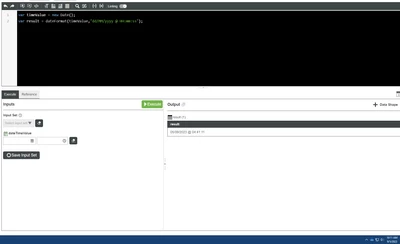
var result = "Last Sync :" + dateFormat(timeValue,"dd/MM/yyyy @ HH:mm:ss");


In the below image, the output time value will be different from the local PC time. It is due to different timezone in Thingworx server. So when you convert DATETIME to STRING, Thingworx will return a string in the server timezone. 

Velkumar_0-1693888893935.png


Please check the below article for more information - 

https://www.ptc.com/en/support/article/CS331340

https://www.ptc.com/en/support/article/CS362537

Solved: Timezone Problem - PTC Community


/VR

1 reply

Velkumar19-TanzaniteAnswer
19-Tanzanite
September 5, 2023

Hi @A_10333884 


You can use the below snippet to convert DATETIME to STRING


var timeValue = new Date();
var result = "Last Sync :" + dateFormat(timeValue,"dd/MM/yyyy @ HH:mm:ss");


In the below image, the output time value will be different from the local PC time. It is due to different timezone in Thingworx server. So when you convert DATETIME to STRING, Thingworx will return a string in the server timezone. 

Velkumar_0-1693888893935.png


Please check the below article for more information - 

https://www.ptc.com/en/support/article/CS331340

https://www.ptc.com/en/support/article/CS362537

Solved: Timezone Problem - PTC Community


/VR