
1-Visitor
June 9, 2021
Solved

3D Panel distance (currently too far)

  • June 9, 2021
  • 1 reply
  • 3912 views

Hello, there's actually a topic about the same thing but it still have no answers...


Basically, my 3D panel is clean and working, but is always at a distance of 2 meters from me while it's not placed...


So when i want to pin it at the place i want to, i have to step back for about 2 meters in order to putthe panel in front of my model. That's pretty annoying for me, so that'll be way more for the buddies who are gonna work with my app...

I tried to work arround it by moving the panel further or closer in the designer but it doesnt change anything.


So what i want to know :

How to chose the distance between user and 3D Panel ?

Can it be setted up within the code ? 
Best answer by sdidier

Hello Mathis,


I have received more details from R&D.

It is already scheduled as a new behavior in a future release of Vuforia Studio.


Today, we cannot change them in Vuforia Studio in the User Interface.

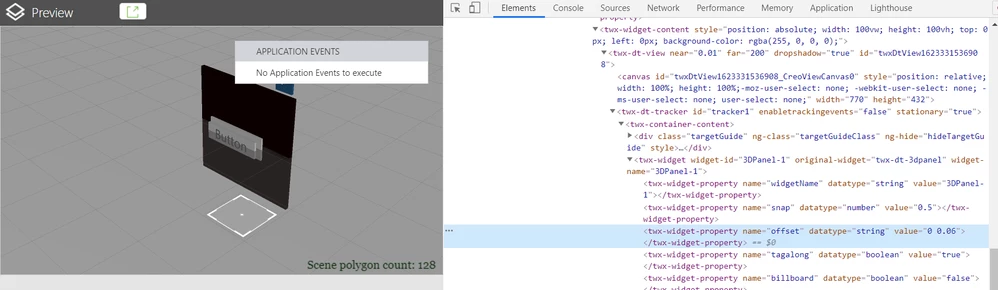
But these Properties seems to be already available from Javascript :

sdidier_0-1623331718052.png


It is the Offset Properties.

It is a string who as this format: x z where x is axis to control heigh where is located the 3D Panel and where Z is the depth where is located the 3D Panel.

X and Z are float values.


I updated the previous Project to test that.

Sadly, it doesn't work.


I believe that the Properties are exposed but without effect on the code behind for the moment.


Best regards,

Samuel

1 reply

17-Peridot
June 10, 2021

Hello Qwtil,


I am sure to understand the issue.


My understand is :

  1. In Vuforia  View, Experience is opened
  2. 3D Canvas Widget is very far in AR world
  3. Using Target as ThingMark, Model or Image Target, place AR World to overlap real physical world
  4. 3D Canvas Widget is located as expected
  • Does my understanning is correct ?


Best regards,

Samuel

Qwtll1-VisitorAuthor
1-Visitor
June 10, 2021

Hi, 


I am using spatial target to place my 3D Canvas and everything goes where i'm expecting to.
The only thing going wrong is my 3D Panel widget (with all my buttons) which is 2 meters far from me until it's pinned, regardless it's position to the spatial target in the studio. (it is not pinned by default, and when i pin it in the viewer, and then unpin, it goes 2 meters away again)


So i think you are right if your 2. is about 3D Panel 🙂

17-Peridot
June 10, 2021

Hello,


I made a test Project to check the behavior.


  • Is it the same behavior for you in your environment with this Project and your Project ?
  • Do we have difference between Projects ?


Best regards,

Samuel