

CAD Import and Optimization Parameters in Vuforia
Hello fellow Vuforians!
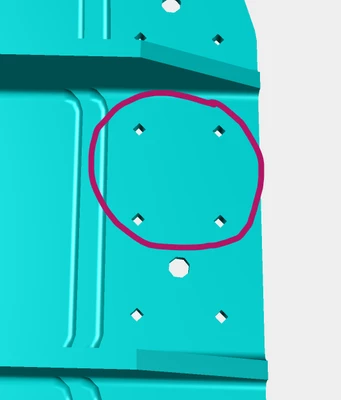
We have been having a few issues when importing CATIA V5 models into Vuforia. It seems the models are 'too light' and we have received feedback to make them more 'realistic'. You can see this issue mostly in a circle or hole. While I believe that making the model as light as possible is super important, we also don't believe that a circle should be represented as a 4-sided polygon!
I don't control the CAD Import process in Vuforia, you just pick your model and click on a box for 'Run CAD Optimization'. However, I find myself needing to control this (polygonal tolerance and scale, specifically).
Does anyone know how/where to control this? If not, is there a separate procedure for converting the CATIA file with the settings of my choice?
See example:
Thanks everybody!