

1-Visitor
March 12, 2018
Solved

Controlling Model Item Opacity Using Toggle Button

  • March 12, 2018
  • 1 reply
  • 8377 views


Controlling Model Item Opacity Using Toggle Button


I want to decrease the opacity of a model item by half on clicking a toggle button. I am attaching screenshots of my approach to doing it. 

I am unable to do it.

Kindly tell me where I am going wrong. 

Best answer by Giuseppe_Fiore


you can use this script to change the opacity of your model.


$scope.opp=function(val) {
switch(val) {
case 1:
$scope.view.wdg['model-1'].opacity= 0;
break;
case 2:
$scope.view.wdg['model-1'].opacity= 1;
break;
}

};


you can call

opp(1); into key pressend of toggle button     

and

opp(0); into key unpressed of toggle button.
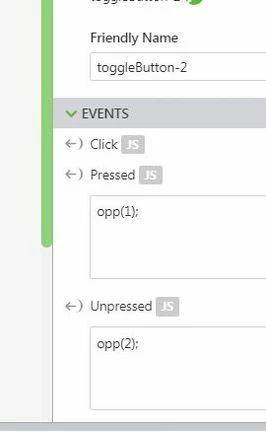
 

opacity.JPG


bye

Giuseppe

1 reply

15-Moonstone
March 12, 2018


you can use this script to change the opacity of your model.


$scope.opp=function(val) {
switch(val) {
case 1:
$scope.view.wdg['model-1'].opacity= 0;
break;
case 2:
$scope.view.wdg['model-1'].opacity= 1;
break;
}

};


you can call

opp(1); into key pressend of toggle button     

and

opp(0); into key unpressed of toggle button.


opacity.JPG


bye

Giuseppe

akanoo1-VisitorAuthor
1-Visitor
March 13, 2018

Worked like a charm!!

Thankxx Giuseppe