Hi @mziemniewicz ,
I did have now the same problem and it took for a while until I did manage it to work in preview mode and on HoloLens. May be, it could be a helpful feedback.
So, following situation:
I wanted to generate a svg format dynamically and used it as source to add there a picture. So the picture should be displayed in the 3dImage widget and also I want to write some graphics there – for example some markups.
Also adds some multiline text:
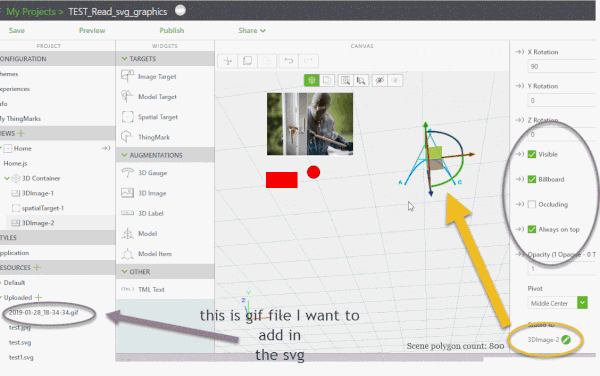
The widget 3DImage-2 has a value pointing to a particular svg file but I will replace it by script. The script should generate the graphic and should read also a gif file (here app/resources/Uploaded/2019-01-28_18-34-34.gif) form the upload project folder. Then it will create SVG file format string adding also the gif file as string and will set it to the src property of the 3DImage widget.
The following script:
//load the image/picture file from folder as base64
const toDataURL = url => fetch(url)
.then(response => response.blob())
.then(blob => new Promise((resolve, reject) => {
const reader = new FileReader()
reader.onloadend = () => resolve(reader.result)
reader.onerror = reject
reader.readAsDataURL(blob)
}))
///////////////
//Creates a dynamic svg file add to it the "txtL" image base64 string
// and set it to the src property of the imgWidget
$scope.svg_ret = function(txtL,imgWidget) {
var xmlsrc='<?xml version="1.0" encoding="UTF-8" standalone="no"?>\n'
xmlsrc=xmlsrc+'<svg xmlns="http://www.w3.org/2000/svg" height="1000" width="600">\n'
xmlsrc=xmlsrc+'<rect x="50" y="300" width="200" height="100" style="fill:red"/>\n'
xmlsrc=xmlsrc+'<image width="700" height="400" href="'+txtL+'"/>'
xmlsrc=xmlsrc+'<circle cx="350" cy="300" r="40" stroke="black" stroke-width="3" fill="red" margin-top="300px" />\n'
xmlsrc=xmlsrc+'<text x="10" y="20" style="fill:red;">Several lines:\n'
xmlsrc=xmlsrc+'<tspan x="10" y="45">First line.</tspan>\n'
xmlsrc=xmlsrc+'<tspan x="10" y="70">Second line.</tspan>\n'
xmlsrc=xmlsrc+'</text>\n'
xmlsrc=xmlsrc+'</svg>'
//some warning to check the string
console.warn('data:image/svg+xml;base64,'+xmlsrc)
$scope.view.wdg[imgWidget].src='data:image/svg+xml;base64,'+btoa(xmlsrc);
}
// will start after View enter
$scope.$on('$ionicView.afterEnter', function() {
//read 2019-01-28_18-34-34.gif
toDataURL('app/resources/Uploaded/2019-01-28_18-34-34.gif')
.then(dataUrl => {
//set the src of 3DImage-2
$scope.svg_ret(dataUrl,'3DImage-2')
})
})
So In preview it looks like:
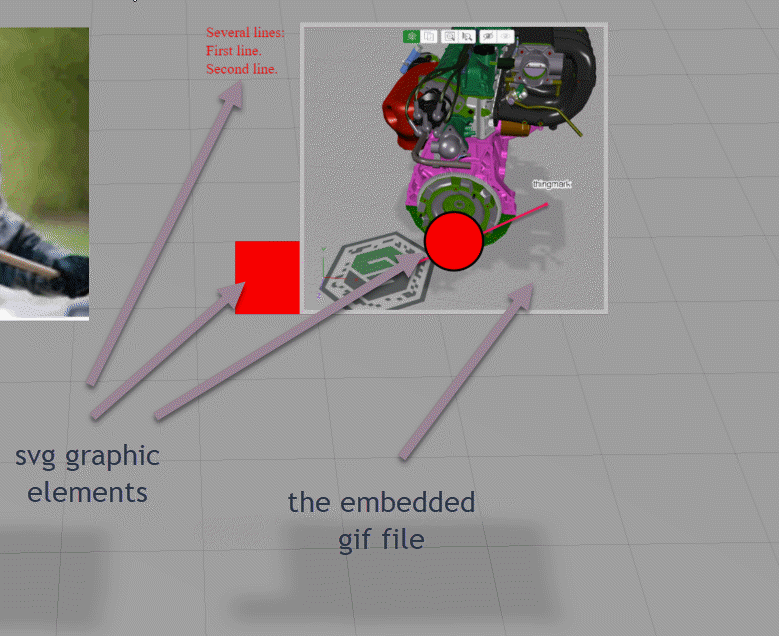 Tested on HoloLens1 and it was also working ok.

