1-Visitor
February 1, 2020
Solved

Finding distance from the model

  • February 1, 2020
  • 1 reply
  • 7153 views

Is there a way to know how far the model is placed from us?

For eg. when I scan a object using model target and my model is superimposed over that object. Now I want to know how far am i standing from that object. And when I move around the distance shown should also change.


Any support or suggestion how it can be achieved will be very helpful.

Best answer by RolandRaytchev

Hi @vivekse ,


yes, this this is correct.  I checked it in a mobile project but it was not working stable. 

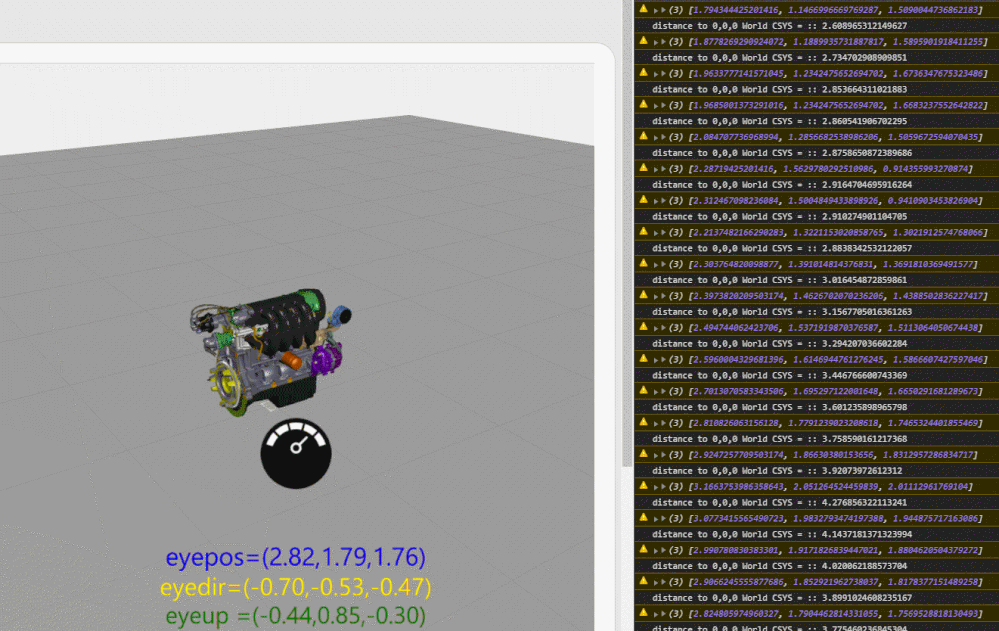
So,I tested somethings furter and have now a mobile project where it seems to work now - means you will received the coordinates of the eye positon , gaze vector and the up vector.

I tested in preview (this is only simulation for mobile device- so that the results/values are not relevant) but I tested it also on IOS Ipad6 and was working with the current Vuforia Viewver version:
 

2020-02-05_12-17-49.gif

the code :


function magnitute(a1,a2,a3)
{

return Math.sqrt( Math.pow(a1, 2) + Math.pow(a2, 2)+ Math.pow(a3, 2));
}

function cross(a1,a2,a3, b1,b2,b3) 
{
 return [ a2 * b3 - a3 * b2, a3 * b1 - a1 * b3, a1 * b2 - a2 * b1 ];
}
function normalizeVector(a1,a2,a3) {
 var mag = magnitute(a1,a2,a3)
 return new Vector(a1/mag, a2/mag, a3/mag);
};

/////////////////////////////////////
$rootScope.$on('modelLoaded', function() { 
 
 
 $scope.setWidgetProp('3DContainer-1','enabletrackingevents',true);
 console.log("now check again the setting of the envronment")
 console.warn($scope.app.view.Home.wdg['3DContainer-1'].enabletrackingevents)
 
 //// end of modelLoaded
});
//=============================================================
 $rootScope.$on('tracking', function( tracker,fargs ) {
 
 console.warn(fargs.position);
 
 $scope.app.params['eyepos'] ="eyepos=("+fargs.position[0].toFixed(2)+","+fargs.position[1].toFixed(2)+","+fargs.position[2].toFixed(2)+")";
 $scope.app.params['eyedir'] ="eyedir=("+fargs.gaze[0].toFixed(2)+","+fargs.gaze[1].toFixed(2)+","+fargs.gaze[2].toFixed(2)+")";
 $scope.app.params['eyeup' ] ="eyeup =("+fargs.up[0].toFixed(2)+","+ fargs.up[1].toFixed(2)+","+fargs.up[2].toFixed(2)+")";
 var scale=1.3;
 $scope.setWidgetProp('3DImage-1', 'x', ( fargs.position[0]+fargs.gaze[0]*scale));
 $scope.setWidgetProp('3DImage-1', 'y', ( fargs.position[1]+fargs.gaze[1]*scale));
 $scope.setWidgetProp('3DImage-1', 'z', ( fargs.position[2]+fargs.gaze[2]*scale));
 //3DLabel-1 no y
 $scope.setWidgetProp('label-distance-x', 'x', ( fargs.position[0]+fargs.gaze[0]*scale)+0.0);
 $scope.setWidgetProp('label-distance-x', 'y', ( fargs.position[1]+fargs.gaze[1]*scale) -0.08*5);
 $scope.setWidgetProp('label-distance-x', 'z', ( fargs.position[2]+fargs.gaze[2]*scale));
 $scope.setWidgetProp('label-distance-y', 'x', ( fargs.position[0]+fargs.gaze[0]*scale)+0.0);
 $scope.setWidgetProp('label-distance-y', 'y', ( fargs.position[1]+fargs.gaze[1]*scale)-0.08*4);
 $scope.setWidgetProp('label-distance-y', 'z', ( fargs.position[2]+fargs.gaze[2]*scale));
 $scope.setWidgetProp('label-distance-z', 'x', ( fargs.position[0]+fargs.gaze[0]*scale)+0.0);
 $scope.setWidgetProp('label-distance-z', 'y', ( fargs.position[1]+fargs.gaze[1]*scale)-0.08*3);
 $scope.setWidgetProp('label-distance-z', 'z', ( fargs.position[2]+fargs.gaze[2]*scale));

 
 console.info("distance to 0,0,0 World CSYS = :: "+magnitute(fargs.position[0].toFixed(2),fargs.position[1].toFixed(2),fargs.position[2].toFixed(2)) )
 
 $scope.$applyAsync();
});


In the parameter eyepos, eyedir and eyeup I created binding to the text property of the lables label-dinstance-x/y/z and are displayed there.

I attached the test project

1 reply

21-Topaz I
February 3, 2020

Hi @vivekse ,

I think after some preparation yes. 

The question what do you mean with model. Is this the 3d geometry which is loaded as model data or you means some geometry on the real word. For example, a surface where you have set the space target....

I believe you mean here the model( model widget) in this case you need to check you model and need to know  e.g. what is the distance of some part what you need to check to the model widget   or modelItem coordinate  system.

Because what you can measure is the current position of your device in regards of  the world 0,0,0 coordinate system. From there you can calculated the distance to e.g. modelItem or model references but you cannot find  the distance to specific  a point e.g. on a surface . I think you can check also the following post

"https://community.ptc.com/t5/Vuforia-Studio/Get-surface-coordinates-of-a-model/m-p/646408#M7459"

vivekse1-VisitorAuthor
1-Visitor
February 4, 2020

Thankyou @RolandRaytchev for your reply.


Actually by model, I meant the model widget. Can you send me an example so that I could understand it in a better way? 

21-Topaz I
February 5, 2020

Hi @vivekse ,


yes, this this is correct.  I checked it in a mobile project but it was not working stable. 

So,I tested somethings furter and have now a mobile project where it seems to work now - means you will received the coordinates of the eye positon , gaze vector and the up vector.

I tested in preview (this is only simulation for mobile device- so that the results/values are not relevant) but I tested it also on IOS Ipad6 and was working with the current Vuforia Viewver version:


2020-02-05_12-17-49.gif

the code :


function magnitute(a1,a2,a3)
{

return Math.sqrt( Math.pow(a1, 2) + Math.pow(a2, 2)+ Math.pow(a3, 2));
}

function cross(a1,a2,a3, b1,b2,b3) 
{
 return [ a2 * b3 - a3 * b2, a3 * b1 - a1 * b3, a1 * b2 - a2 * b1 ];
}
function normalizeVector(a1,a2,a3) {
 var mag = magnitute(a1,a2,a3)
 return new Vector(a1/mag, a2/mag, a3/mag);
};

/////////////////////////////////////
$rootScope.$on('modelLoaded', function() { 
 
 
 $scope.setWidgetProp('3DContainer-1','enabletrackingevents',true);
 console.log("now check again the setting of the envronment")
 console.warn($scope.app.view.Home.wdg['3DContainer-1'].enabletrackingevents)
 
 //// end of modelLoaded
});
//=============================================================
 $rootScope.$on('tracking', function( tracker,fargs ) {
 
 console.warn(fargs.position);
 
 $scope.app.params['eyepos'] ="eyepos=("+fargs.position[0].toFixed(2)+","+fargs.position[1].toFixed(2)+","+fargs.position[2].toFixed(2)+")";
 $scope.app.params['eyedir'] ="eyedir=("+fargs.gaze[0].toFixed(2)+","+fargs.gaze[1].toFixed(2)+","+fargs.gaze[2].toFixed(2)+")";
 $scope.app.params['eyeup' ] ="eyeup =("+fargs.up[0].toFixed(2)+","+ fargs.up[1].toFixed(2)+","+fargs.up[2].toFixed(2)+")";
 var scale=1.3;
 $scope.setWidgetProp('3DImage-1', 'x', ( fargs.position[0]+fargs.gaze[0]*scale));
 $scope.setWidgetProp('3DImage-1', 'y', ( fargs.position[1]+fargs.gaze[1]*scale));
 $scope.setWidgetProp('3DImage-1', 'z', ( fargs.position[2]+fargs.gaze[2]*scale));
 //3DLabel-1 no y
 $scope.setWidgetProp('label-distance-x', 'x', ( fargs.position[0]+fargs.gaze[0]*scale)+0.0);
 $scope.setWidgetProp('label-distance-x', 'y', ( fargs.position[1]+fargs.gaze[1]*scale) -0.08*5);
 $scope.setWidgetProp('label-distance-x', 'z', ( fargs.position[2]+fargs.gaze[2]*scale));
 $scope.setWidgetProp('label-distance-y', 'x', ( fargs.position[0]+fargs.gaze[0]*scale)+0.0);
 $scope.setWidgetProp('label-distance-y', 'y', ( fargs.position[1]+fargs.gaze[1]*scale)-0.08*4);
 $scope.setWidgetProp('label-distance-y', 'z', ( fargs.position[2]+fargs.gaze[2]*scale));
 $scope.setWidgetProp('label-distance-z', 'x', ( fargs.position[0]+fargs.gaze[0]*scale)+0.0);
 $scope.setWidgetProp('label-distance-z', 'y', ( fargs.position[1]+fargs.gaze[1]*scale)-0.08*3);
 $scope.setWidgetProp('label-distance-z', 'z', ( fargs.position[2]+fargs.gaze[2]*scale));

 
 console.info("distance to 0,0,0 World CSYS = :: "+magnitute(fargs.position[0].toFixed(2),fargs.position[1].toFixed(2),fargs.position[2].toFixed(2)) )
 
 $scope.$applyAsync();
});


In the parameter eyepos, eyedir and eyeup I created binding to the text property of the lables label-dinstance-x/y/z and are displayed there.

I attached the test project
