6-Contributor
February 15, 2024
Solved

How to show/hide a waypoint and play specific sequences right after arriving/finding to the waypoint

  • February 15, 2024
  • 2 replies
  • 3002 views

 Dear Sir or Madam,
We are currently working on our diploma thesis together with the school and a company. For our diploma thesis, we are creating assembly instructions in Creo Illustarte to train a worker. These instructions are displayed to the worker with a HoloLens. Therefor we are using Vuforia Studio to display Buttons etc.

We need the Wayfinder widget so we can set waypoints, to let the worker know where he needs to look. Our problem is that we want to show or hide a specific waypoint using a virtual button (in the future, this virtual button will be replaced by a Thingworx parameter - real button).

In addition, we want to know how to play a certain sequence right after the employee has found the waypoint. Could you tell us how to get acces to a specific Waypoint? So we can show or hide a specific waypoint after receiving a true or false from ThingWorx and play a specific Sequence right after finding/arriving to the Waypoint.

We need a Java Script code or other solutions for both cases.

I hope you can help us with this! Thanks in advance!

Best answer by ptc-1155647

Hi Roland,
I would like to briefly describe what my students are dealing with and where we still have problems.
My students have designed and built an assembly workstation where various battery housings are to be assembled.
In order to train employees at this assembly workplace, an AR experience was created for the HoloLens.
The playback of the individual work steps (one after the other) is controlled via Thingworx parameters.
These parameters in Thingworx (Industrial Thing - Industrial Connection) are controlled via Kepware by a PLC Siemens C1215C.
Sensors check which battery housings are being delivered or need to be assembled and whether the work steps have been carried out correctly.
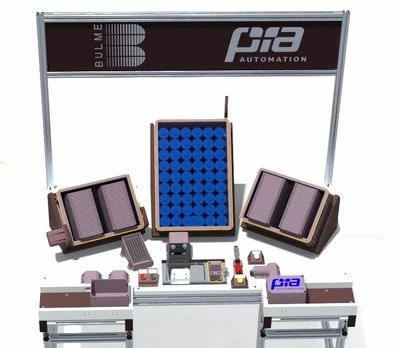
 

Assembly_workplace.jpg

We also want to show waypoints for specific work steps.
The housings are delivered to the lefthand side of the worker - here we want to display a waypoint.
The worker then places the finished housing on the right side of the conveyor belt - we also want to display a waypoint there.
No waypoint should be displayed during the other work steps.

I tried the following code on a simple example:


Language selection: By clicking on the button, the language is set to German or English (with the variable lang2)

var lang2 = 'deu';
$scope.onSprachauswahl_Pressed = function() {
lang2 = 'deu';
$scope.app.view['Home'].wdg['3DLabel-lang2']['text'] = lang2;
};
$scope.onSprachauswahl_Unpressed = function() {
lang2 = 'eng';
$scope.app.view['Home'].wdg['3DLabel-lang2']['text'] = lang2;
};


At the beginning, the Wayfinder widget is deactivated via the application parameter "enable_wayfinder" which controls the property "Enabled".

$scope.app.params.enable_wayfinder = false;

If the parameter "Gehaeuse_VS" is "true" controlled via Thingworx, waypoint 2 (Waypointndex = 1) should be displayed and when reached
(Waypoint_arrived) a text is displayed depending on the language selection and a sound file and then a sequence (not entered here) is played.

$scope.$watch("app.params['Gehaeuse_VS']", function() {
if ($scope.app.params.Gehaeuse_VS == 'true') {
$scope.setWidgetProp('wayfinder-1','selectedWaypointIndex',1)
$scope.app.params.enable_wayfinder = true;
$scope.Waypoint_arrived = function() {
if (lang2 == 'deu') {
$scope.app.view['Home'].wdg['3DLabel-Textanzeige']['text'] = "Gehäuse von links einbauen!";
} else {
$scope.app.view['Home'].wdg['3DLabel-Textanzeige']['text'] = "Assembly the Battery housing from the left side!";
}
$scope.app.params.enable_wayfinder = false;
var soundFilePath = "app/resources/Uploaded/Gehaeuse_" + lang2 + ".mp3";
var audio = new Audio(soundFilePath);
$timeout(function() {
audio.play();
}, 500);
}

}
});

In the Preview this works so far, but at the end the Wayfinder widget is not deactivated again but rather remains displayed and active.
However, it works on HoloLens2.

The following step is one without a waypoint, controlled via the parameter “Deckel_VS”, again via Thingworx.

$scope.$watch("app.params['Deckel_VS']", function() {
if ($scope.app.params.Deckel_VS == 'true') {
if (lang2 == 'deu') {
$scope.app.view['Home'].wdg['3DLabel-Textanzeige']['text'] = "Deckelmontage, Aufschrift PIA Automation muß sichtbar sein!";
} else {
$scope.app.view['Home'].wdg['3DLabel-Textanzeige']['text'] = "Install the cover, PIA Automation label must be visible.";
}
var soundFilePath = "app/resources/Uploaded/Deckel_" + lang2 + ".mp3";
var audio = new Audio(soundFilePath);
$timeout(function() {
audio.play();
}, 500);

}
});


In this step, waypoint 1 should be displayed with Waypointindex = 0 and should be deactivated again after arriving waypoint 1
$scope.$watch("app.params['Akkuzelle_VS']", function() {
if ($scope.app.params.Akkuzelle_VS == 'true') {
$scope.setWidgetProp('wayfinder-1','selectedWaypointIndex',0)
$scope.app.params.enable_wayfinder = true;
$scope.Waypoint_arrived = function() {
if (lang2 == 'deu') {
$scope.app.view['Home'].wdg['3DLabel-Textanzeige']['text'] = "Akkuzelle an der richtigen Position platzieren!";
} else {
$scope.app.view['Home'].wdg['3DLabel-Textanzeige']['text'] = "Place the battery cell in the correct position.";
}
$scope.app.params.enable_wayfinder = false;
var soundFilePath = "app/resources/Uploaded/Akkuzelle_" + lang2 + ".mp3";
var audio = new Audio(soundFilePath);
$timeout(function() {
audio.play();
}, 500);
}

}
});
Here again, the wayfinder widget is not deactivated in the preview and rather remains active and the waypoint is displayed, however it works on HoloLens2.
The Preview:


On HoloLens2:


 I hope the code above fits our needs.
Thanks for the quick answers.

2 replies

21-Topaz I
February 15, 2024

Hi @armink,

to the one question in your topic - here about the automatic play of steps when you arrive a waypoint  here an example

So this example has a model with a sequence TestFig which have   12 steps. So there are also a wayfinder widget with 12 waypoints for each step there is  a point (in this is an example  the postions of the waypoints are not really  relevant here ... acctually they  do not make sense - it is only as example) so when you go to a point then it will paly the step with the same number . Also you could rewind or forward both - waypoints or steps. Here the example

I hope helps. BR


2024-02-15_19-07-00.jpg

21-Topaz I
February 19, 2024

@armink  to your second question in your post /topic:

  • "We need the Wayfinder widget so we can set waypoints, to let the worker know where he needs to look. "

 ###############

Similar to the the example what I already uploaded in the previous post  - showing the automatic play of steps when you arrive a waypoint  .

I removed all waypoints , where I saved the  waypointsData property of the wayfinder widget example:

2024-02-19_12-06-08.jpg

the data contained by waypointsData is a json array and could be modifed or created by javscript functions.

I removed all way points from the wayfinder widgets so that when starting the widget -  there are no acctually any  waypoints. Then set the property waypointsData with the json array and all waypoints are defined. So this means that you dynamicaly define the waypoints.

Example:


//##########################################
//// here the waitpoint data for 16 Waypoints
/// this could be prepared as template 
/// depending on this hwo many points you want to use
//######################################
$scope.app.waypointsdata=[{"position":{"x":-0.5,"y":0.5,"z":0},"gaze":{"x":0,"y":0,"z":-1},"up":{"x":0,"y":1,"z":0},"eventRadius":"0.2","wayfinderDisplayBoundary":"0.2","label":"Waypoint 1"},{"position":{"x":0.0608,"y":0.4892,"z":0},"gaze":{"x":0,"y":0,"z":-1},"up":{"x":0,"y":1,"z":0},"eventRadius":"0.2","wayfinderDisplayBoundary":"0.2","label":"Waypoint 2"},{"position":{"x":0.5117,"y":0.6721,"z":-0.3123},"gaze":{"x":0,"y":0,"z":-1},"up":{"x":0,"y":1,"z":0},"eventRadius":"0.2","wayfinderDisplayBoundary":"0.2","label":"Waypoint 3"},{"position":{"x":-0.1058,"y":0.6174,"z":0.1117},"gaze":{"x":0,"y":0,"z":-1},"up":{"x":0,"y":1,"z":0},"eventRadius":"0.2","wayfinderDisplayBoundary":"0.2","label":"Waypoint 4"},{"position":{"x":-0.1467,"y":0.1608,"z":0.1022},"gaze":{"x":-5.781425897883269e-17,"y":0.47208925070547064,"z":0.8815507582484104},"up":{"x":0,"y":1,"z":0},"eventRadius":"0.2","wayfinderDisplayBoundary":"0.2","label":"Waypoint 5"},{"position":{"x":0,"y":0,"z":0},"gaze":{"x":0,"y":0,"z":-1},"up":{"x":0,"y":1,"z":0},"eventRadius":0.25,"wayfinderDisplayBoundary":"1","label":"Waypoint 6"},{"position":{"x":1.0684,"y":0,"z":0.2729},"gaze":{"x":0,"y":-0.9999999847691291,"z":-0.00017453292431324208},"up":{"x":0,"y":1,"z":0},"eventRadius":0.25,"wayfinderDisplayBoundary":"1","label":"Waypoint 7"},{"position":{"x":0,"y":0,"z":0},"gaze":{"x":0,"y":0,"z":-1},"up":{"x":0,"y":1,"z":0},"eventRadius":0.25,"wayfinderDisplayBoundary":"1","label":"Waypoint 8"},{"position":{"x":0,"y":0,"z":0},"gaze":{"x":0,"y":0,"z":-1},"up":{"x":0,"y":1,"z":0},"eventRadius":0.25,"wayfinderDisplayBoundary":"1","label":"Waypoint 9"},{"position":{"x":0,"y":0,"z":0},"gaze":{"x":0,"y":0,"z":-1},"up":{"x":0,"y":1,"z":0},"eventRadius":0.25,"wayfinderDisplayBoundary":"1","label":"Waypoint 10"},{"position":{"x":0.5752,"y":0,"z":0.6409},"gaze":{"x":0,"y":-0.9999999847691291,"z":-0.00017453292431324208},"up":{"x":0,"y":1,"z":0},"eventRadius":0.25,"wayfinderDisplayBoundary":"1","label":"Waypoint 11"},{"position":{"x":0,"y":0,"z":0},"gaze":{"x":0,"y":0,"z":-1},"up":{"x":0,"y":1,"z":0},"eventRadius":0.25,"wayfinderDisplayBoundary":"1","label":"Waypoint 12"},{"position":{"x":0.4452,"y":0,"z":0.3125},"gaze":{"x":0,"y":-0.9999999847691291,"z":-0.00017453292431324208},"up":{"x":0,"y":1,"z":0},"eventRadius":0.25,"wayfinderDisplayBoundary":"1","label":"Waypoint 13"},{"position":{"x":-0.071,"y":0,"z":0.9664},"gaze":{"x":0,"y":-0.9999999847691291,"z":-0.00017453292431324208},"up":{"x":0,"y":1,"z":0},"eventRadius":0.25,"wayfinderDisplayBoundary":"1","label":"Waypoint 14"},{"position":{"x":-0.1722,"y":0,"z":1.1677},"gaze":{"x":0,"y":-0.9999999847691291,"z":-0.00017453292431324208},"up":{"x":0,"y":1,"z":0},"eventRadius":0.25,"wayfinderDisplayBoundary":"1","label":"Waypoint 15"},{"position":{"x":0,"y":0,"z":0},"gaze":{"x":0,"y":0,"z":-1},"up":{"x":0,"y":1,"z":0},"eventRadius":0.25,"wayfinderDisplayBoundary":"1","label":"Waypoint 16"}];
//######################################
//######the function below is called e.g. by button
// or at the moment when you want to change the 
//way point configuration
//######################################
$scope.app.setWayFinderData=()=>{
//set the wayfinder-1 data of the points
for(let count=0; count < $scope.app.waypointsdata.length;count++)
 $scope.app.waypointsdata[count].position.z -=0.5 ; //increments all z with -0.5
 
 $timeout(()=>{
 $scope.setWidgetProp('wayfinder-1' ,'waypointsData',$scope.app.waypointsdata);
 $scope.$applyAsync(); 
 },300)//called with some delay 0.3 sec

 }
//######################################


So saved the waypoint data as array - this array could be used as template and retrieved e.g. as JSON object from a Thingworx service

Change there something - here in example increment all z values of the waypoints with -0.5

set the data - so far my test this worked fine.

Attached also the test example // see button "activate_waitPoints" which calls onClick "app.setWayFinderData();"


armink6-ContributorAuthor
6-Contributor
February 20, 2024

First of all, thank you for the extensive answers, I really appreciate that!

The codes you sent me are helpful but are way too complex for my needs... .I attached You photos of my codes and the current situation of my Vuforia Studio project.

The label ("There are not enough lids...") you see above the language button would be replaced by a waypoint (with the corresponding text) which is placed on the left-hand euro crate later on... . My question now is how to solve it, so that the sequence is played when I get into the radius of the waypoint and how to show and hide them in a specific sequence.

Thanks in advance!01_Screenshot_Code.png02_Screenshot_Preview.png

21-Topaz I
February 21, 2024

Hi @armink ,

following points:  when you try to check in a $watch construct  a different variables - so the question is - what is the mean intent there? 

I see that you added external services there - so if I understand this  correctly you are checking different services and depending on that you want to decide what of modelWidget /sequence/ step should be played. 

This could be difficult to by syncronized. Let say TWX will change the values all at the same time etc. So when you have implemented already all the program logic  in thingworx then you  can simple provide  only one service which will return  one object /INFOTABLE with pvi, step modelwidget so that on service on Vuforia Side could  play this.

So the second point is there how to integrate  the waypoint widget in the context of the existing widgets and js code. 

So setting a waypoint widget you have to define the points and then depending to point what you arrive or departed you have to check what to do there so that example is nearly to the minimal implimentation