
1-Visitor
February 10, 2020
Solved

Re: Finding distance from the model

  • February 10, 2020
  • 1 reply
  • 1919 views

Thank you @RolandRaytchev . Now its working fine.

But now I have another issue with my experience. What is want is that when the distance between our phone and and our model is less than 0.5 a popup should come to alert the user that it is not safe to come any closer.


For that purpose I used following code:


$scope.trigger = function() {

if (+magnitute(fargs.position[0].toFixed(2),fargs.position[1].toFixed(2),fargs.position[2].toFixed(2)) < 0.5) {

$scope.setWidgetProp('popup-2', 'visible', true)}
};


But it does not work..

Can you help me recifying this error.
    Best answer by RolandRaytchev

    I will suggest to use some code like this:


    $scope.trigger = function() {
    
    if (+magnitute(fargs.position[0].toFixed(2),fargs.position[1].toFixed(2),fargs.position[2].toFixed(2)) < 0.5) {
    
    //$scope.setWidgetProp('popup-2', 'visible', true)
     $scope.app.fn.triggerWidgetService("popup-2","showpopup");
    //show popup
    else
    $scope.app.fn.triggerWidgetService("popup-2","hidepopup");
    //if distance large then hide
    }
    };


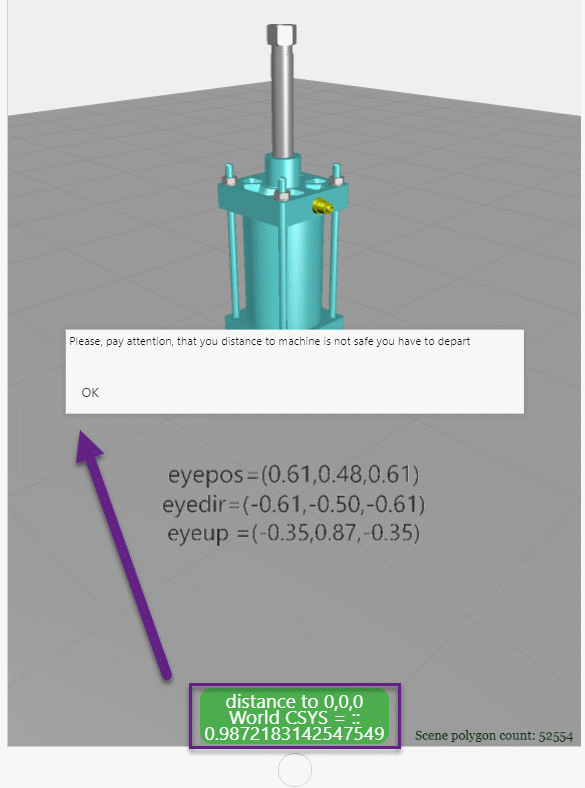
    So I tested and it worked in preview.


    2020-02-10_11-52-19.gif

    1 reply

    21-Topaz I
    February 10, 2020

    I will suggest to use some code like this:


    $scope.trigger = function() {
    
    if (+magnitute(fargs.position[0].toFixed(2),fargs.position[1].toFixed(2),fargs.position[2].toFixed(2)) < 0.5) {
    
    //$scope.setWidgetProp('popup-2', 'visible', true)
     $scope.app.fn.triggerWidgetService("popup-2","showpopup");
    //show popup
    else
    $scope.app.fn.triggerWidgetService("popup-2","hidepopup");
    //if distance large then hide
    }
    };


    So I tested and it worked in preview.


    2020-02-10_11-52-19.gif

    vivekse1-VisitorAuthor
    1-Visitor
    March 12, 2020

    Hi @RolandRaytchev 

    Can you please tag the project since the code didn't worked in my system?

    21-Topaz I
    March 13, 2020

    Hi @vivekse ,

    I uploaded 2 test projects.

    One for mobile device (testEye-Custom ) and other for HoloLens device (testEye-HoloL)

    Please, pay attention that it should only display how this could work. It measure only the distance to the global 0.0.0) If you consider object with another positon you need to calculate the

    delta = Math.abs(magnitute(PointObjectMidle - eyepos))

    The pictures in in my previous post to this topic  was made  in testEye-Custom project - for the mobile device

    On the HoloLens there is no popups possible - here we can use 3dLabels where we set some specific css style or we can use a 3dImag with dynamicaly generated svg file. see also the topic Display SVG as 3D Image on Hololens