
5-Regular Member
November 12, 2017
Solved

Resource Widget. How to change size of the Image

  • November 12, 2017
  • 1 reply
  • 3723 views

Hi, I am trying to place an image in 2D Panel using a Resource Image Widget. But while placing that, I find that image looks over sized and not fitting the screen. Need help on how I can Re-Size the Resource Image.

Thanks,

Avinash
Best answer by tmccombie

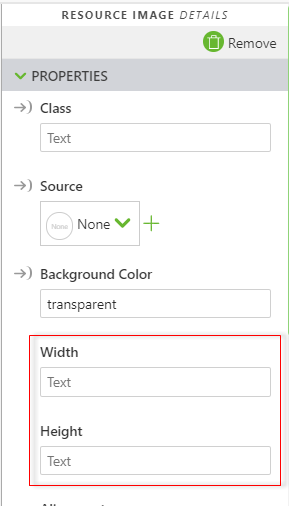
Hi Avinash. You can define the width and height of the image using the width and height properties listed within the resource image details. This will allow you to resize the image to fit appropriately within your experience.

1 reply

tmccombie21-Topaz IAnswer
21-Topaz I
November 13, 2017

Hi Avinash. You can define the width and height of the image using the width and height properties listed within the resource image details. This will allow you to resize the image to fit appropriately within your experience.

agangaiah5-Regular MemberAuthor
5-Regular Member
November 14, 2017

Thank so much. Some how I missed it. Also we need while mentioned th height and width we have to mentioned them either in px or in %.

Thanks,

Avinash