
1-Visitor
July 2, 2014
Solved

Cannot Connect to Server From Creo. need workspace?

  • July 2, 2014
  • 1 reply
  • 8626 views

Someone else logged into their windchill account in Creo on my computer and then when I tried to log back in the server seemed to be down. I went to server managment and sure enough the server is Offline. I right clicked to uncheck "Work offline" button and the window the pops up doesnt let me click OK!
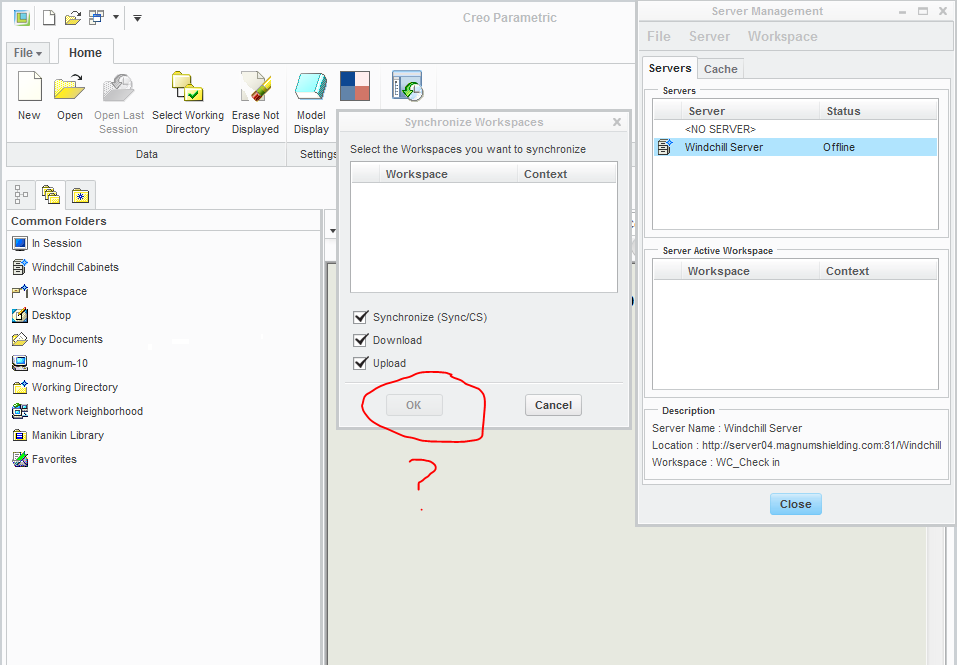
help.PNG

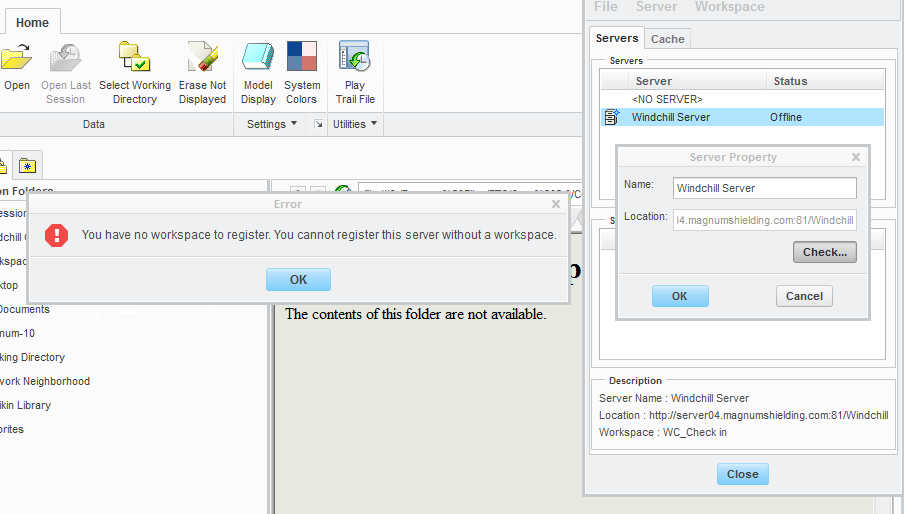
I right clicked the server and did a "check" but it gives me this error:
Help2.PNG

Does anyone know what this means: You have no workspace to register. You cannot register this server without a workspace.

Anyone think they know whats going on?

Best answer by MSC12

If anyone ever gets this problem again. I deleted the server I was using an re-added it. That seems to have resolved the issue

1 reply

MSC121-VisitorAuthorAnswer
1-Visitor
July 2, 2014

If anyone ever gets this problem again. I deleted the server I was using an re-added it. That seems to have resolved the issue

13-Aquamarine
September 30, 2015

Can you please tell me how did you manage to delete the server?

The delete option seems to be disabled on my system

And this is the only server I have, Creo is not allowing me to add another server

1-Visitor
September 30, 2015

Right click on <NO SERVER> and make it primary server. That would allow you to delete Windchill Server

Thank you

Binesh kumar

Barry Wehmiller