
12-Amethyst
August 8, 2023
Solved

Creo Drawing changes not saving after check-in

  • August 8, 2023
  • 3 replies
  • 3494 views

As per the original post


Has anyone ever found a solution to this problem? It will happen at random times to me as well.  There are no other users involved, just me checking out, making changes, checking back in.  Then when I go to check out the drawing again (typically it has stayed in the workspace), the changes have reverted back.  Often just some of the changes disappear, sometimes all of them.  Maybe I am not using Save, Save and Upload, Upload, etc in the correct way? Or, do I need to empty the workspace every time after I do a check-in? 
Best answer by jbailey

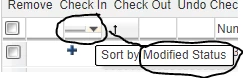
I wouldn't think so, as long as everything is properly saved. Was the note parametric to the model in any way? If the change in no way affects the model (dimension change, change of a note in the drawing that is tied to a model annotation, etc) then you shouldn't have to check out, check in the model. If the change modified the model, you will get the little blue plus next to it in the modified status column.  If your workspace view doesn't have that column, you will need to add it.

jbailey_0-1691512499454.png


3 replies

18-Opal
August 8, 2023

Are the changes you are making changing the model?

Matt_C12-AmethystAuthor
12-Amethyst
August 8, 2023

I don't think so. It seems to be (at least the last few times once I started paying closer attention) primarily text on the drawing.  The drawing today that had this issue was removing a note and filling in revision history.  Weld symbols were changed also but these changes did not revert back. 


Thanks!

18-Opal
August 8, 2023

I have seen this happen before where you make the change in the drawing and the model is modified... then you check in the drawing but never check in the model. I have also seen oddities when the workspace becomes "inactive"

16-Pearl
August 8, 2023

Changes that don't get uploaded/checked in even when the picks are made could also be caused by a corrupted local cache.  Might be worth uploading/checking in the changes from all current workspaces, deleted or renaming the .cache2008 folder, and restarting Creo.

Matt_C12-AmethystAuthor
12-Amethyst
August 10, 2023

Thanks for the tip. Could you explain or point me to info on how to delete or rename that folder?

23-Emerald III
August 10, 2023

I have seen certain changes not get checked in when you think they should. One example is to change the value of a parameter and it will not check-in as the system does NOT see that as a modification to the file. Maybe this example needs to be reported as a bug!

Be sure to watch the messages at the bottom of the screen to be sure that the check-in was successful.

We also set Windchill so it always does a save and upload when a save is performed. This puts the file in the server side workspace as well as local workspace.