
10-Marble
January 21, 2026
Solved

Ghost entries not removable from workspace

  • January 21, 2026
  • 1 reply
  • 254 views
I am using Windchill PDMLink Release 11.0 and Datecode with CPS M020-CPS02

deleting the ghost entries from the database

Here are the errors that I faced
Conflict Description:
A referential integrity violation occurred for this operation:

Cannot delete CAD Part - xxxx11111.prt because it is referenced by Assembly - 70000678726.asm, -.4


A referential integrity violation occurred for this operation:
Object "CAD Document Reference Link - wt.epm.structure.EPMReferenceLink:843001095" references the object "wt.epm.EPMDocumentMaster:843001052" that was removed from the system.


Cannot check in place holder document CAD Part - xxxx11111.prt, -.1.


A referential integrity violation occurred for this operation:
Object "CAD Document Reference Link - wt.epm.structure.EPMReferenceLink:843001095" references the object "wt.epm.EPMDocumentMaster:843001052" that was removed from the system.
    Best answer by avillanueva

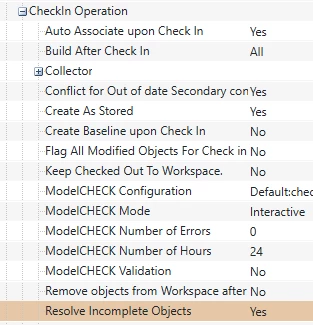
    Removal should be possible but might require purging iterations history. Its not impossible but is a bit of work. It should not involve SQL edits. Sounds like this is not a workspace issue but rather its persisted in your Windchill server right? Was it uploaded or fully checked in? The preference below is what I believe controls allowing incomplete objects to be checked in. Yes should force you to supply something before check in.

    avillanueva_0-1768999918958.png

    See this also;

    https://www.ptc.com/en/support/article/CS289918?source=search 

    1 reply

    avillanueva
    23-Emerald I
    23-Emerald I
    January 21, 2026

    Just verifying that this only exists in your workspace and has not been persisted into Windchill. There are preferences that can block ghosts from being created and its a good thing to enable. So, something in your workspace has a reference to an object no longer present in system (verify) or in the workspace. If you go to the ghost object in the workspace and look at its details page, you should see what its tied to. If its a drawing, I have steps to get rid of it. If its a part or assembly, you need to edit that to remove the external reference. Save and then it should allow the check in.

    If the ghost was already checked in, that is something else. Screen shots?

    10-Marble
    January 21, 2026

    hello, a colleague of mine will provide screenshots, to be uploaded soon.

    It seems to be referenced to an ASM, but looking into it I was not able to find this "incomplete CAD Part", Also remove is not possible, as shown in error details. Most PTC articles refer to "SQL" to solve the issue, where we as normal users have no access.

    In fact the part was created probaly as a simulation and saved accidentaly, generating the issue.

    Thank you very much

    Miguel

    avillanueva
    23-Emerald I
    23-Emerald I
    January 21, 2026

    Removal should be possible but might require purging iterations history. Its not impossible but is a bit of work. It should not involve SQL edits. Sounds like this is not a workspace issue but rather its persisted in your Windchill server right? Was it uploaded or fully checked in? The preference below is what I believe controls allowing incomplete objects to be checked in. Yes should force you to supply something before check in.

    avillanueva_0-1768999918958.png

    See this also;

    https://www.ptc.com/en/support/article/CS289918?source=search