

avillanueva
23-Emerald I
23-Emerald I
July 2, 2021
Solved

Issue with Business Rule and ERPConnector

  • July 2, 2021
  • 1 reply
  • 3357 views

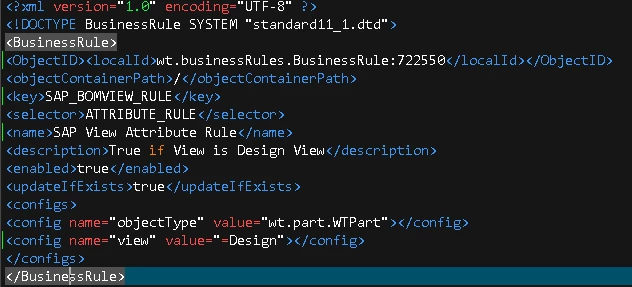
First time using this. Short summary, looking to block "Design" view BOMs from being sent to ERP Connector (SAP). I am using preference "Business Rule set to inhibit production BOM publishing" and I have loaded a custom Attribute business rule. I have also set my DT value for "Always publish Production BOM..." to no. Sry I cannot post text of Business Rule but here it is:
avillanueva_0-1625259824410.png

Simple rule that should be true if view=Design. Except that I am still getting Design View BOM Headers in my export when the Change Notice is released. Do I have the right attribute for "view"? I often wonder where the source of the exact names is so I can look them up? I've seen it in the ESIResponseMetaInfo.xml as "view.identity" so I could be wrong there. Is the value right? I know that Design in DB is actually 1445. How can you test a business rule to know if its working? I did not see that in the documentation. Any logs that can be turned on to show it being evaluated? Thanks in advance for any replies.


As an aside, what's up with the business rules and specifying an object id? Seems odd. Must I keep track of these numbers now so I do not duplicate them? hmmm...
 

Best answer by avillanueva

To paraphrase Rodney D - "I feed like I've given birth ... to a developer!"

Solved, it should not have been this hard.

Rule for Views is like this:

   <config name=view.identity" value="=Design"></config>

Had to use Logical Attribute Report (netmarkets/jsp/lwcType/logicalAttributeReport.jsp). Note that even though "viewName" is listed, would not import since Attribute Condition could not find what data type it was. 

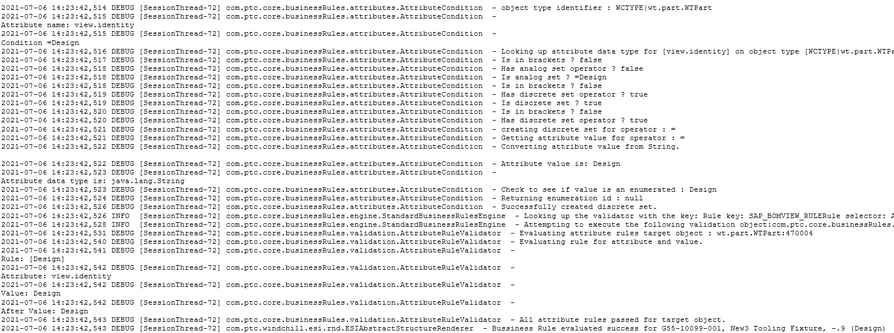
And... it works: Here is the log:

avillanueva_0-1625596272201.png

So, to recap:

  • Distribution Target as "Always publish Production BOM" options set to "YES"
  • Preferences call out Business Rule to prohibit BOM publishing set to my business rule set
  • Now I can post both Design and Manufacturing views to CN Resulting Items and ONLY the Manufacturing BOM is published.

1 reply

18-Opal
July 2, 2021

Tony,


Where you have

<config name="view" value="=Design"></config>

is your value correct

should it be

value="Design"

rather than

value="=Design"

avillanueva
23-Emerald I
23-Emerald I
July 3, 2021

I saw that and changed it to what you have. It complained in load about that. You can see in help why I choose that:

<config name="weight" value="<=100"></config>

Perhaps since its a String, I need to use this:

EQUALS
String
Validates that the object attribute value is the specified string.
EQUALS(MAJOR)

But why would it not care when you have the type declaration like this:

<config name="objectType" value="com.ptc.Waiver"></config>

I will play with this. Thanks Dave. Good to hear from your again.

avillanueva
23-Emerald I
avillanueva23-Emerald IAuthorAnswer
23-Emerald I
July 6, 2021

To paraphrase Rodney D - "I feed like I've given birth ... to a developer!"

Solved, it should not have been this hard.

Rule for Views is like this:

   <config name=view.identity" value="=Design"></config>

Had to use Logical Attribute Report (netmarkets/jsp/lwcType/logicalAttributeReport.jsp). Note that even though "viewName" is listed, would not import since Attribute Condition could not find what data type it was. 

And... it works: Here is the log:

avillanueva_0-1625596272201.png

So, to recap:

  • Distribution Target as "Always publish Production BOM" options set to "YES"
  • Preferences call out Business Rule to prohibit BOM publishing set to my business rule set
  • Now I can post both Design and Manufacturing views to CN Resulting Items and ONLY the Manufacturing BOM is published.