

1-Visitor
March 20, 2020
Question

Issues with Solidworks and WIndchill

  • March 20, 2020
  • 2 replies
  • 1817 views

I am having issues linking my workspace and can not get parts to open from windchill. I keep getting these errors.


Any ideas on what the fix is?


This is the one that shows up in workgroup manager: errors 2.PNG

 

This error shows up when clicking workspace in the open window through solidworks:
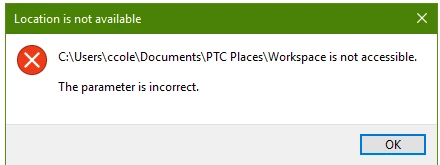
errors 1.PNG


Thanks

2 replies

13-Aquamarine
March 20, 2020

It may be a Windows UAC thing?  I don't know.  

I moved my WFS to the root of the c-drive.  No issues with SW2017 on WWGM 11.0 M030

jbailey
18-Opal
April 1, 2020

We decided to move all of our config locations to a standard area where we know the user has full control, and it isn't disturbed by system changes / windows user profile changes etc.


We start off by copying standards / locations in the registry to ensure al lthe template information is correct at each launch... then we robocopy the appreg location if it doesn't exist in our standard location, then set the environment variables in the "Session" as shown below.  This was after a few weeks of testing so we could easily deploy WGM to every user with minimal manual configuration


jbailey_0-1585742551558.png