
21-Topaz I
December 15, 2020
Solved

Report - Link Workflow Process to Task

  • December 15, 2020
  • 4 replies
  • 4279 views

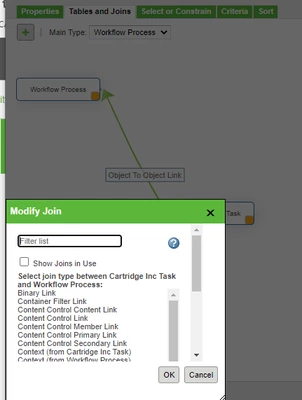
I am trying to link a "Workflow Process" to its Change Task.  I can't get it to show the Task information.


This is what I have so far.
STEVEG_0-1608067637699.png

Do I need to have an intermediate link to something else?


I am trying to link the Task to the Workflow Process.  The reason I need the Workflow Process is some of our workflows were not fully completed.  It's due to someone not taking something into account when creating the workflow.  I have a situation where the ECN shows Resolved, the Task shows as Resolved but the status of the Workflow Process still shows as Running in the Routing/Process History table.

I am trying to create a report with a criteria that says the Status of the process is Running but the ECN Task is Resolved.


I can get the report to show the Workflow Process but I can't get it to show the ECN Task.  The columns are blank for the Task Name and Number.
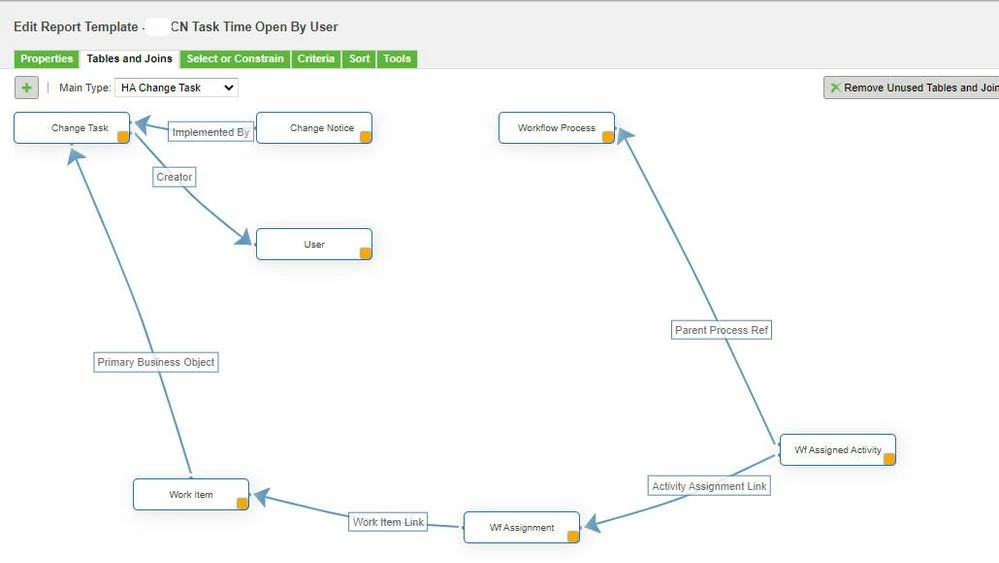
Best answer by BrianToussaint

Hello Steve,

Here is what I have for something similar.  It gives me the task, CN information, user, etc.  Don't know if this is what you are looking for.


report.jpg

4 replies

MarcoTosin
21-Topaz I
21-Topaz I
December 16, 2020

Hi Steve,

have you already read this article https://www.ptc.com/en/support/article/CS63595 ?


It doesn't talk about workflow process but it may help you to understand links between the various change objects and point you in the right direction.


Marco
19-Tanzanite
December 16, 2020

Hello Steve,

Here is what I have for something similar.  It gives me the task, CN information, user, etc.  Don't know if this is what you are looking for.


report.jpg

13-Aquamarine
December 16, 2020

Hi Steve,

you can try to specify a criteria instead of using OOTB joins... take a look at this, it is an example for joining WFProcess with WTDocument:


imendiola_0-1608128526359.png


Regards

STEVEG21-Topaz IAuthor
21-Topaz I
December 17, 2020

@Marco_Tosin  I have not seen that before but it should help going forward.  Thank you.


@BrianToussaint That worked Brian.  However, I am getting multiple entries of the same ECN #.  How can I remove the duplicates?  On the Properties page the Distinct and Group By boxes are grayed out.  Just for the heck of it I added Latest Iteration set to 1 on the Criteria page but that didn't work.


@imendiola Iker, that is a little too complicated for me.  I'm no expert.  I know enough to get by on the easier reports.

19-Tanzanite
December 17, 2020

@STEVEG - I only have the distinct checked.  It has been a while, but I know that sometimes it is difficult to get that checked. I also have Expose report checked.  I do have the following criteria also set up, and I do not know if that will help or not.


criteria.jpg

MarcoTosin
21-Topaz I
21-Topaz I
December 17, 2020

This is the most complicated report that we use.


It links ECR (Change Request), ECN (Change Notice) ECT (Implementation Task) and also Workflow Process.


All the green join are Outer Join, to give a result also if one of the objects is empty (for example one ECN without an ECR)


QML file (11.1 version) attached but I don't know if it will load in every system.

Some of the attribute names are written in Italian


Marco_Tosin_0-1608223295734.png


Marco