17-Peridot
September 15, 2023
Solved

WT Part Structure

  • September 15, 2023
  • 1 reply
  • 2828 views

Hi Everyone,

Can't see the WT Parts Structure

Image 1: I have a 3 model, 1-ASM & 2-Component. (Structure: PO_A.ASM/P1_P.prt/P2.P.prt )

Image 2: I only select the main assembly & the 2nd component (P2_P.prt) to auto-associate with WT parts.

Image 3: I check the data into Windchill. (CAD+WT)

Image 4: Then after opening the 1st Component P1_P.prt auto-associate check in the wt part only in windchill.

In Images 5 & 6: 5 image I only see the one WT part main assembly, but in 6 image I can see the part with CAD data.


How we can resolve this,

Thanks in Advance,

Amiro
 

Best answer by HelesicPetr

hi @Amirtharaj_K 

The build action is in the right click on a CAD in a workspace

HelesicPetr_0-1695102259602.png

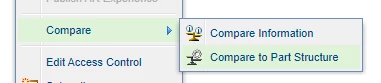
For some additional information compare the CAD Structure to WTPart, it can help you to identify the reason. 


HelesicPetr_1-1695102321792.png


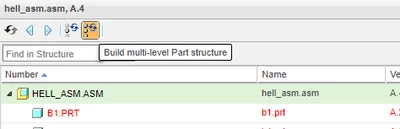
btw from the Compare to Part Structure you can build multilevel structure

HelesicPetr_3-1695102405204.png


PetrH


1 reply

HelesicPetr
22-Sapphire II
22-Sapphire II
September 15, 2023

Hi @Amirtharaj_K 

If you just check-in WTPart duting association. then there is no propagation info from CAD to WTpart,

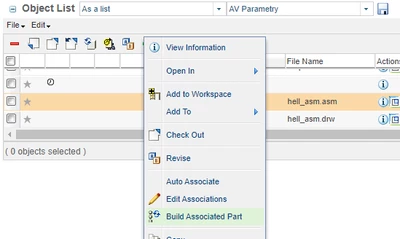
You need to use Build Associated Part function from workspace to correct the propagation. 

HelesicPetr_0-1694772313740.png

Function is available in a right click menu on the CAD Part from workspace or from detail page action menu

CAD Part can not be check-outed


PetrH

17-Peridot
September 15, 2023

Hi Mr. Petr, Thanks for your replied.

You mean when we check in the data, enable 'Auto Associate Parts to CAD Documents' in the workspace, because I can't see it in the right click menu in WT. Please give me more details.


Regards,

Amir


HelesicPetr
22-Sapphire II
22-Sapphire II
September 18, 2023

Hello @Amirtharaj_K 

You need to click on the CAD Document the 3D model. 


If 3D Model is check-in and WTPart does not exist then the WTPart is automatically created and the build is done during an auto-association and the behavior depends on a preference configuration. 


if 3D model has been already checked in and WTPart does not exists, then the "manual" auto-association creates a wtpart with a link to 3Dmodel , but it does not build the attributes, visualization and structure. 

In this case you need to use the build association part


PetrH