
17-Peridot
October 9, 2019
Solved

Where to write the code?

  • October 9, 2019
  • 1 reply
  • 9629 views

Tell me please where to write the code https://www.ptc.com/en/support/article?n=CS150777 , tried many options, but failed nothing. Here is the code to add a table to the page

Description

How to add Promotion Objects to the Instructions field on the task's details page

User should see all the objects being promoted on the same page to avoid multiple clicks for navigating to the Promotion Objects page

How to add Promotion Target Objects in workflow Email Notification


Resolution

  1. Create global variable (say var of type String)
  2. Before activity add expression robot
  3. Append string to have all the promotion objects' numbers/names
  4. In activity create local variable
  5. Use that local variable in instructions
  • Following code can be used to get the promotion target objects

​wt.maturity.PromotionNotice notice = (wt.maturity.PromotionNotice)primaryBusinessObject;
                 wt.fc.QueryResult results = wt.maturity.MaturityHelper.service.getPromotionTargets(notice);
                 while (results.hasMoreElements())
                  {
                          obj = results.nextElement();
                          if (obj instanceof wt.doc.WTDocument)
                          {                                 
         var += obj.getName ()+“,”;         // var  is a global variable
                          }
                     }


Best answer by yadavankur

2019-10-10 11_18_59-00 Process.png


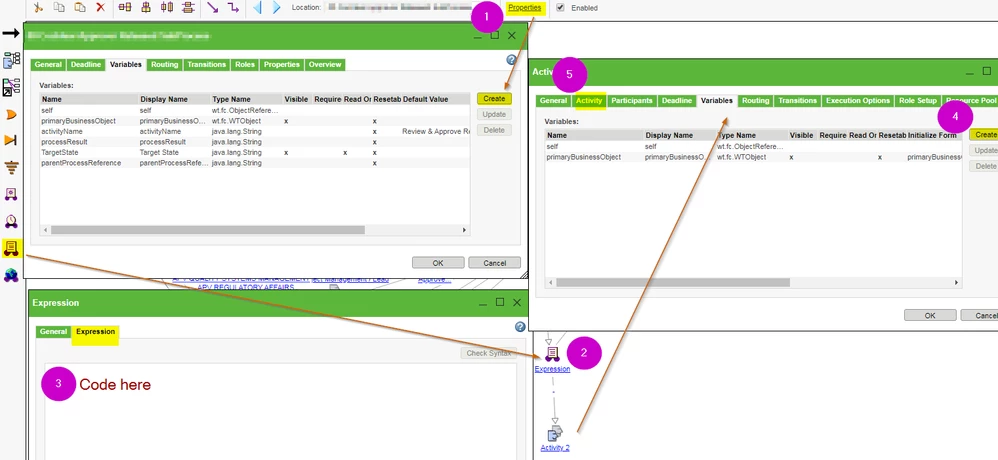
Hope this helps. The local variable should be initialized from the global variable. Local variables are only needed for activities, not for robots (like expression or email robot).

1 reply

12-Amethyst
October 10, 2019

2019-10-10 11_18_59-00 Process.png


Hope this helps. The local variable should be initialized from the global variable. Local variables are only needed for activities, not for robots (like expression or email robot).

VladiSlav17-PeridotAuthor
17-Peridot
October 10, 2019

yadavankur, thank you very much, tell me, is it in the template Promotion Request Review Process should be written or in another? And how to check that the attempt was successful?

12-Amethyst
October 10, 2019

Assuming your Windchill is completely out of the box, you will set up the code and the variable in the two Promotion processes that PTC provides. If you are not sure check promotion preference management under site>utilities and org>utilities If you want to use the variable in a workflow activity instruction you would use it like this {myLocalVariable} to check your attempt you will create a promotion and view the instructions on the task that you receive. Here are two example variable in use in a notification robot (not in activity).Variable.PNG