
13-Aquamarine
August 1, 2024
Solved

Ability to Zoom onto Line Chart Widget and Still See Limit Lines in Thingworx

  • August 1, 2024
  • 2 replies
  • 1969 views

Hi all,


I am trying to zoom into a line chart that has limit lines made:
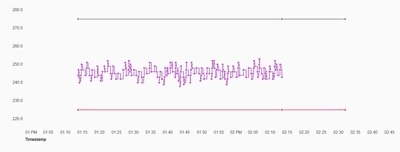
 

pre-zoomed chart.png

I want to be able to see these limit lines still if I zoom into the image, but they disappear even if I keep them in the zoom range:
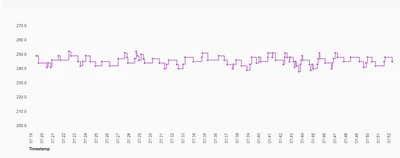
post-zoomed chart.png

Any tips on how to get this line to stay even after zooming?

2 replies

16-Pearl
August 2, 2024

Hi, @JK_10744682  Can you take a look at the below reference, and let us know your feedback?

https://community.ptc.com/t5/ThingWorx-Developers/Hide-Line-Chart-Zoom-Range/m-p/952831#M66732

13-Aquamarine
August 2, 2024

That post doesn't necessarily help answer this question. It is more so just being able to keep the lines visible even when I zoom in on the graph when my zoom doesn't include the limit line data points technically (still would like to show the lines)

Rocko
19-Tanzanite
August 2, 2024

Please always post which version you are using. It works for me on a 9.5.1, so I suggest you try to recreate this with in fresh mashup with an easier setup.

13-Aquamarine
August 2, 2024

Am on 9.3.13. It works to zoom if the data points are within the zoom range, just not if they are outside the zoom range, since the data isn't seen so the limit line can't be drawn. I found a work around where I can just plot a bunch of data points for the limits over various timestamps, but then I see a bunch of points which doesn't look great:

JK_10744682_0-1722603062225.png


13-Aquamarine
August 2, 2024

Do you know if there is a way to eliminate the data points dots? Or shrink them? I don't really want them there for the limit lines.