
5-Regular Member
July 8, 2022
Solved

Add user to usergroups

  • July 8, 2022
  • 1 reply
  • 1068 views

Hello everyone,

I working through my training manual ThingWorx Fundamental overview, using software version 9.3.2

Ref Page 59: Created new user XXXX password **** OK.

Now I want to add this user to administrators group, as per document search for administrators 

User Group: Administrators  Did not find any way to add newly created user to this user group.

Also tried Browse user Groups cannot see any group listed here strange?


Might be something simple I am missing.
 

Best answer by VladimirRosu_116627

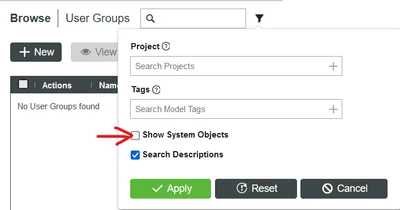
I do not have access to that manual, but you need to be aware that any system entity (this includes the Administrators User Group) is not displayed in Composer by default.

To do that, you need to enable the "Show System Objects" checkbox in the filter section.

VladimirRosu_0-1657447505808.png


1 reply

19-Tanzanite
July 10, 2022

I do not have access to that manual, but you need to be aware that any system entity (this includes the Administrators User Group) is not displayed in Composer by default.

To do that, you need to enable the "Show System Objects" checkbox in the filter section.

VladimirRosu_0-1657447505808.png


5-Regular Member
July 11, 2022

Hi Vladimir,

Thanks, it works. it unchecks itself again after I have added user. But doesn't matter! I know know now.

PTC documents are not beginner friendly.