

1-Visitor
December 29, 2016
Solved

AddRow won't work if field is added runtime

  • December 29, 2016
  • 3 replies
  • 2083 views

I have a datashape with some fields in it, then I have a "if" condition where I add two more fields to my table but when I add the values using AddRow to those two fields, they won't work.

Here's the code for more details:

var template = Things[entityName].thingTemplate;

var params = {

    infoTableName : "InfoTable",

    dataShapeName : "GeneralPropertiesTableShape"

};

var propertiesTable = Resources["InfoTableFunctions"].CreateInfoTableFromDataShape(params);

propertiesTable.AddRow({

    label: Things[entityName].label,

    strain: Things[entityName].strain,

    tiltX: Things[entityName].tiltX,

    tiltY: Things[entityName].tiltY,

    tiltZ: Things[entityName].tiltZ,

    temperature: Things[entityName].temperature,

    seismic: Things[entityName].seismic

});

switch(template){

    case('PointThingTemplate'):

        propertiesTable.AddField({name:"substrate", baseType:"STRING"});

        propertiesTable.AddRow({substrate: Things[entityName].substrate});

        break;

}

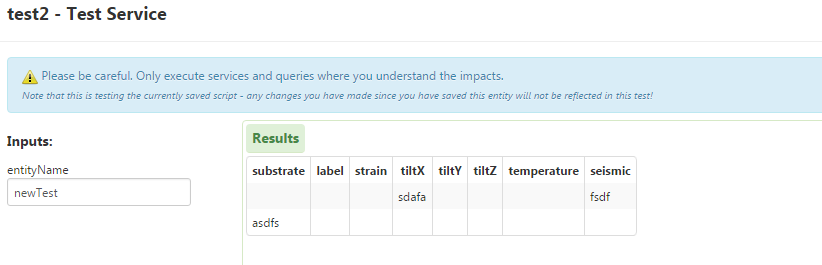
my result is I can see the new field "substrate" but I see it empty
Best answer by jamesm1

Hey Fabio,

Which version of TWX is this on? I ran your sample snippet and got the expected results:

If you want them to be on the same row, you would have to modify your code slightly to create a row object, add the additional field in the if statement, and add the row at the bottom. Note that this field wont be visible in the mashup builder because it has no way to know that this field is there in design time.

Thanks,

-James

3 replies

jamesm15-Regular MemberAnswer
5-Regular Member
December 29, 2016

Hey Fabio,

Which version of TWX is this on? I ran your sample snippet and got the expected results:

If you want them to be on the same row, you would have to modify your code slightly to create a row object, add the additional field in the if statement, and add the row at the bottom. Note that this field wont be visible in the mashup builder because it has no way to know that this field is there in design time.

Thanks,

-James

fmanniti1-VisitorAuthor
1-Visitor
December 29, 2016

Ok, perfect.

I was only showing one row, that's why I saw it empty.

Problem solved.

Thank you

5-Regular Member
December 29, 2016

I modified your snippet slightly so that it will all be on one row:

var template = Things[entityName].thingTemplate; 

var params = { 

    infoTableName : "InfoTable", 

    dataShapeName : "GeneralPropertiesTableShape" 

}; 

var propertiesTable = Resources["InfoTableFunctions"].CreateInfoTableFromDataShape(params); 

var row = { 

    label: Things[entityName].label,  

    strain: Things[entityName].strain, 

    tiltX: Things[entityName].tiltX, 

    tiltY: Things[entityName].tiltY, 

    tiltZ: Things[entityName].tiltZ, 

    temperature: Things[entityName].temperature, 

    seismic: Things[entityName].seismic 

}

switch(template){ 

    case('PointThingTemplate'): 

        propertiesTable.AddField({name:"substrate", baseType:"STRING"}); 

        row.substrate = Things[entityName].substrate; 

        break; 

}


propertiesTable.AddRow(row); 

result = propertiesTable