

15-Moonstone
January 22, 2020
Question

Advanced Grid cannot configure columns.

  • January 22, 2020
  • 5 replies
  • 2235 views

Hi,


I cannot configure the Grid Columns. I have a service that receives an infotable and a data shape as inputs, and creates an empty infotable with the specific data shape. Then, the infotable given as input is cloned into the empty infotable that I just created, and is given as service output.


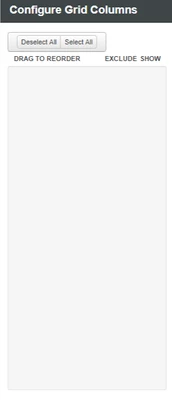
I'm binding this service output to the grid, but I cannot configure the Grid Columns. They show empty, just like in the photo. I understand that is the behaviour for when you're passing infotables without data shapes. But the service that I created, even though it doesn't have the Data Shape specifically defined in the Output section, it is still defined inside the code (see the code snippet for the BufferInfotable function attached below)


Am I doing something wrong? Thank you.


Code snippet below. "datash" is the data shape given as input, and "info" is the infotable with the data, given as input.


var params = {
	infoTableName: "InfoTable" /* STRING */,
	dataShapeName: datash /* DATASHAPENAME */
};

// result: INFOTABLE
var emptyInfo = Resources["InfoTableFunctions"].CreateInfoTableFromDataShape(params);

var params2 = {
	t1: emptyInfo /* INFOTABLE */,
	t2: info /* INFOTABLE */
};

// result: INFOTABLE
var result = Resources["InfoTableFunctions"].Union(params2);


Radu_0-1579687938427.png 


5 replies

16-Pearl
January 22, 2020
Hi radu,
I am not sure if you are able to see data in grid as above explained but try binding All data from service to grid. Like when you add your service to data part expand the service you can see all data, then drag all data to grid and bind as data.
Then you can see data in grid.

Thanks
Radu15-MoonstoneAuthor
15-Moonstone
January 23, 2020

Hi,


Thank you for your response. It is my bad, because I have been misunderstood. By "binding the service output" I actually mean what you're suggesting, dropping the "All Data" of the service to the grid.


The problem is not seeing the data in the grid, because it is displayed. The problem is that in the Grid Properties, when clicking the cog/wheel, I cannot see the grid columns. This happens because the output of my service doesn't have a data shape assigned, just like in the picture below. Problem is that inside the service I already defined the data shape, but dynamically.


Radu_0-1579768012939.png


16-Pearl
January 23, 2020

does your service snippets return the infotable result when you execute that service without mentioning the datashape in output.

for data to be visible i think you need to mention the datashape for output with infotable as well. datashapes as such i believe would be same for both infotables and once data is returned from service then only you will be able to configure columns on grid as those columns would only be visible which are mentioned in output datashape.

1-Visitor
February 17, 2020

They had to select the record in the grid to open a form, edit the data, and then save, which required multiple steps. With editable grids, users can do rich in-line editing directly from grids and subgrids whether they’re using a web app, tablet, or phone.