
1-Visitor
April 22, 2021
Solved

'All Data' and 'selectedrow' not available for infotables returned by GetProperties service

  • April 22, 2021
  • 1 reply
  • 2691 views

My usecase is the following:

I have a mashup centered around a dynamic thing.
The mashup shows the properties for this thing using the 'GetProperties' service.
The service is configured to use the 'automatic update' feature using websocket connection.

This automatic update works well for properties of the datatype string/integer/...

For properties that are infotables this feature does not work as expected, or it is missing some functionality.

Most services that return one or more infotables give the option to bind ALL the data and/or use the selectedrows.
The 'GetProperties' service does not provide this option.


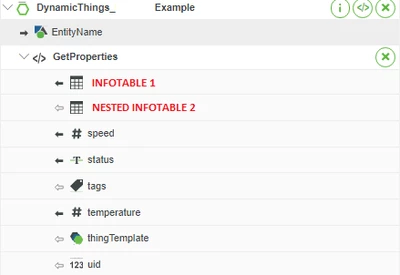
In the example below a thing has a few properties like speed/temperature.

It also contains 2 infotables.
- Infotable 1 has 1 level and contains 4 fields.
- Infotable 2 has some level 1 fields, but it also contains 2 other infotables that each contain some fields.

The 'GetProperties' service does not provide a method to expand these infotables to use the individual fields in the infotable or use the 'selectedrow'.
JanLaurens_2-1619080883625.png


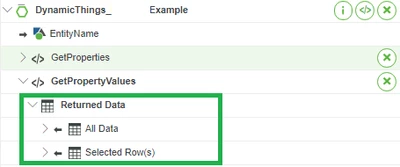
When compared to the 'GetPropertyValues' service:
JanLaurens_1-1619080649458.png

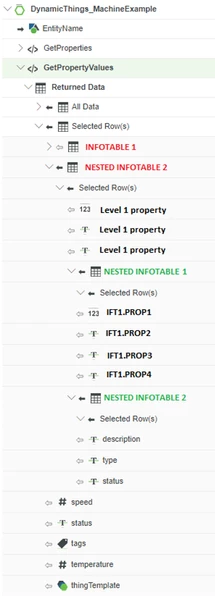
This service returns 'all data' and 'selectedrows'.
In the 'selectedrows' node, it even allows to use individual fields of the infotables.
JanLaurens_4-1619081333374.png


Currently i'm using the 'serviceinvokecompleted' function from the 'getproperties' service to trigger the getpropertyvalues service, but this is a bad workaround since it triggers whenever any of the properties refresh.


So my question is, why is the 'returned data/all data/selectedrows' not available for the getproperties service?
What is the best way to automatically update a level 2 nested field of an infotable in a mashup without using an autorefresh widget.
 

Best answer by JanLaurens

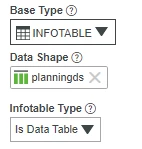
EDIT: I retested it, it seems that it DOES work correctly, but only if you choose 'is datatable' for every infotable used in the properties and datashapes.
So the data shifts only when you select 'just infotable'.

JanLaurens_0-1619167284202.png


1 reply

22-Sapphire I
April 22, 2021

I believe that is a feature that may not be available in GetProperties I don't remember.

A way to work around it would be to use the GetProperties, take a property that changes on a pushed update, tie that to a mashup parameter, and use Mashup Parameter Value changed, to then retrieve the changed InfoTables with a Service.

1-Visitor
April 22, 2021

Hello,
I like the idea of putting a infotable property from 'getproperties' in something that has a 'value changed' event.
I tried to use it, but for some reason the 'changed' event only fires when the number of rows in the top level infotable changes. When one of the fields in the nested infotable changes, the event is not triggered...

So I put the output of the infotable from the 'getproperties' service directly in a grid advanced and to my surprise I noticed that not all the fields in the datashape are filled in correctly, the getproperties service maps the fields to the wrong fields! It stored the infotable in one of the textfields...
It seems this only happens if not all the fields in the infotable are populated.

I assume this is a bug...

22-Sapphire I
April 22, 2021

That's correct, i am recommending not triggering off an infotable datachange, use a different property within the GetProperties that also changes at the same time as the infotable property then use that datachange event to retrieve the infotable information.